NAACCR-Compliant Cancer Registry Automation
Automated cancer registry abstraction — from cohort definition through NAACCR submission — using oncology-specific AI and certified tumor registrar validation. Patient Journey Intelligence reduces per-case abstraction time from ~2 hours to 10–20 minutes while delivering complete, audit-ready NAACCR data.
The Cancer Registry module automates the full abstraction lifecycle — from cohort definition and continuous case finding through NAACCR-compliant submission — using oncology-specific Medical Language Models and a structured human-in-the-loop validation workflow. Certified tumor registrars shift from manual chart review to focused exception-based validation, reviewing AI-extracted NAACCR data with supporting evidence already assembled.
Automated Case Finding
Multi-source detection: ICD-O-3 codes, pathology reports, radiology findings, treatment orders, death certificates
AJCC TNM Staging
Automated staging (AJCC 8th Edition), histology/grade extraction, biomarkers (ER, PR, HER2, PD-L1), lymph nodes, metastasis
Treatment Tracking
Surgical procedures, chemotherapy regimens, radiation therapy, immunotherapy, targeted therapy, clinical trials
Longitudinal Outcomes
Continuous monitoring: disease progression, recurrence, metastasis, survival status, quality of life indicators
Registrar Review Workflows
Evidence-based review interface, side-by-side source documents, confidence scoring, one-click corrections, audit trails
NAACCR Compliance
NAACCR v25 export, state registry submissions, SEER reporting, CoC accreditation, automated edit checks
Step 1 — Define the Patient Cohort
Before any abstraction begins, you define which patients belong in the registry. The cohort definition is the scope of the project - it determines which cases are pulled in, monitored continuously, and routed for abstraction. Getting it right upfront matters: the cohort definition cannot be changed retroactively without re-running extraction.
There are three ways to define the cohort for a cancer registry, depending on how precisely your inclusion criteria are known:
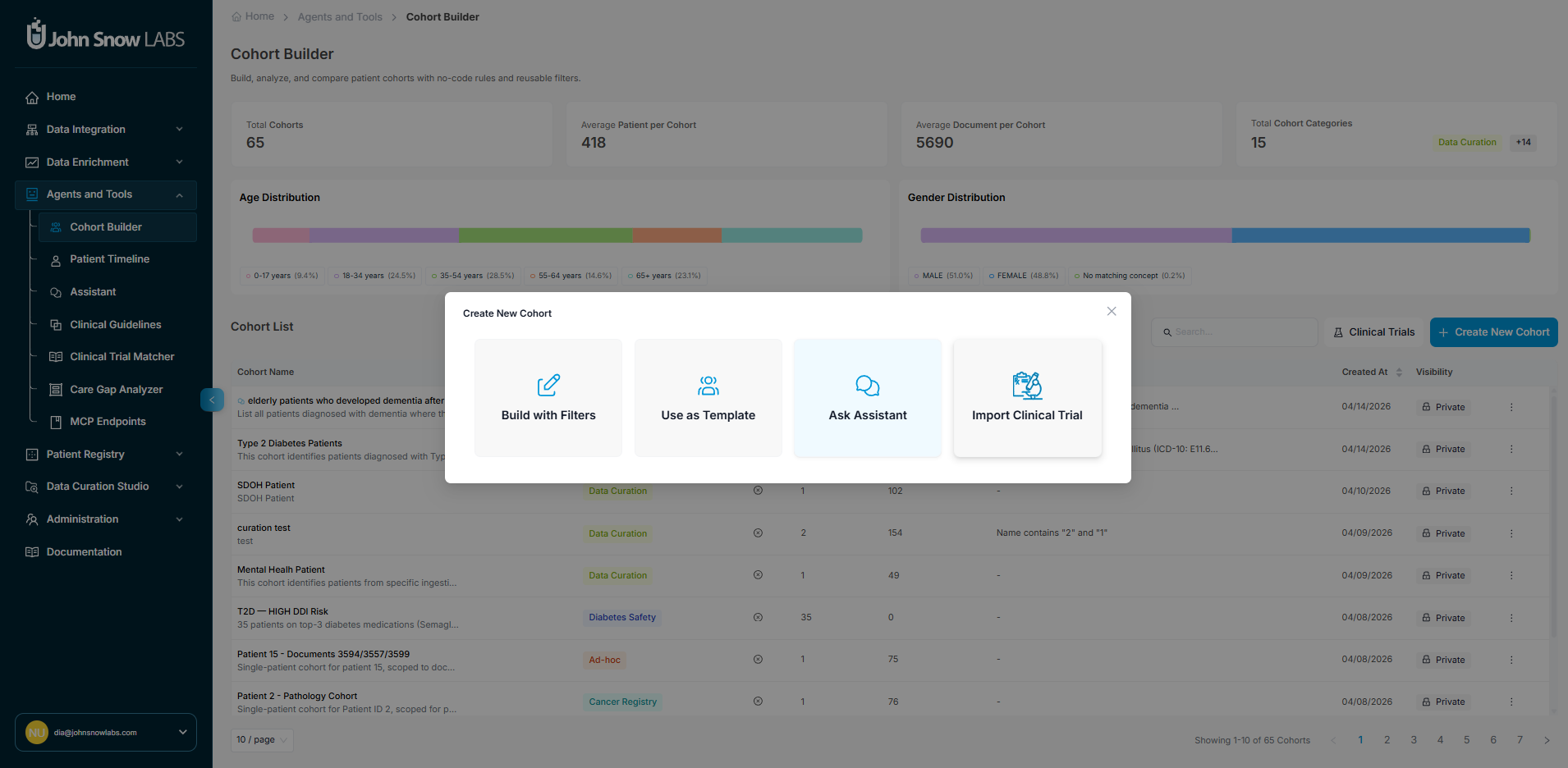
Option A - OMOP Filter Builder
For precise, rule-based definitions, use the visual filter builder to construct cohort criteria directly against OMOP CDM v5.4 fields. Filters can be applied across any OMOP domain:
| OMOP Domain | Example filters |
|---|---|
| Condition Occurrence | ICD-O-3 topography codes, ICD-10-CM diagnosis codes, concept sets by cancer site |
| Observation | Pathology findings, biomarker results (ER/PR/HER2), genomic test results |
| Measurement | Lab values, tumor marker levels, Ki-67 percentage |
| Drug Exposure | Chemotherapy agents, targeted therapy drugs, immunotherapy |
| Procedure Occurrence | Surgical procedures, radiation therapy, biopsy types |
| Visit Occurrence | Facility, visit type, date range |
| Person | Age at diagnosis, sex, race, ethnicity |
Criteria are combined with AND/OR logic. The builder shows a live patient count as you add criteria so you can verify the scope before launching.
Review the count before saving
Check the estimated patient count after building your cohort definition. A count that is much larger or smaller than expected usually indicates a criteria error - a missing behavior code filter, an overly broad concept set, or a date range issue - that is cheaper to fix now than after extraction has run.
Option B - Start from a Template or Existing Cohort
The fastest starting point is a pre-built template or an existing cohort from a previous project. Both give you a fully defined set of criteria that you can use as-is or adjust before launching.
Pre-built templates encode standard reportable populations:
NPCR / SEER Reportable Cancers
All malignant ICD-O-3 behavior codes (behavior /3) across all primary sites, scoped to your facility and diagnosis year range. Matches standard state cancer registry reporting requirements.
CoC Accreditation Registry
Commission on Cancer analytic case definition: first primary cancers diagnosed and/or treated at your facility, excluding cases diagnosed only at autopsy or death certificate.
Site-Specific Registry
Single cancer site registries (e.g., Breast, Lung, Colorectal, Prostate) pre-configured with the correct ICD-O-3 topography ranges, histology behavior codes, and site-specific data item requirements for that cancer type.
Existing cohorts from any previous project can be duplicated and used as the starting point for a new one - useful when running a new reporting period, narrowing a broad registry to a sub-site study, or creating a research cohort derived from your operational registry.
Once you have loaded a template or existing cohort, all its criteria are editable before saving:
- Adjust filters: change the diagnosis date range, facility scope, ICD-O-3 topography or histology ranges, or behavior code restrictions
- Add inclusion criteria: layer in additional OMOP domain filters (e.g., restrict to patients with a specific biomarker result or treatment exposure)
- Add exclusion criteria: remove cases that meet certain conditions (e.g., exclude cases diagnosed only at autopsy, exclude patients under 18, exclude cases with no treatment documented at your facility)
The live patient count updates as you modify criteria, so you can see the impact of each change before committing.
Option C - Define Target Population in Conversational Style
Describe the cohort in plain language and the system translates it into OMOP filter criteria automatically. This is the fastest path when starting from a clinical question rather than a code list.
Examples of natural-language cohort prompts:
- "Female patients age 18 and older diagnosed with breast cancer between 2020 and 2024 at our main campus"
- "All lung cancer cases with EGFR mutation testing documented, excluding stage IV at diagnosis"
- "Colorectal cancer patients who received neoadjuvant chemotherapy before surgery"
The AI generates the corresponding OMOP criteria, shows you the patient count, and lets you review and refine the definition before committing. Each generated criterion is displayed alongside the OMOP concept it maps to so you can verify correctness before launching.
Step 2 - Create a Registry Project
Once the cohort is defined, create the project that wraps it. The project sets submission targets, assigns the registrar team, and configures how validation will be managed.
- Navigate to Patient Registries → Cancer Registry → New Project.
- Select or confirm the cohort definition from Step 1.
- Choose the NAACCR version and target state registry for submission formatting.
- Assign registrars: designate certified tumor registrars by cancer site expertise, facility, or workload.
- Click Launch - automated case finding and abstraction begin immediately against the defined cohort.
Step 3 — Automated Case Finding
Once a project is active, the system continuously monitors your EHR for new cases matching the cohort definition across five parallel detection pathways. Cases are created automatically - no manual triggering required.
Structured Code Monitoring
Automatically detects new ICD-O-3 diagnosis codes, ICD-10-CM cancer diagnoses, and oncology-related procedure codes the moment they appear in your EHR.
Unstructured Clinical Note Screening
Medical Language Models analyze clinical notes, pathology reports, and consultation documentation to identify cancer mentions before formal diagnosis coding occurs, often detecting cases weeks earlier than code-based methods alone.
Pathology Report Parsing
Every pathology report is automatically screened for cancer diagnoses, malignancy classifications, and suspicious findings, triggering case creation for biopsy-confirmed malignancies.
Radiology Findings Analysis
Imaging reports (CT, MRI, PET scans) are analyzed for primary tumor identification, staging information, and metastasis detection, linking radiologic findings to existing cases or creating new ones.
Treatment Indication Detection
Oncology treatment orders (chemotherapy, radiation therapy, immunotherapy) are monitored to identify cases where cancer treatment was initiated before formal registry abstraction, preventing gaps in case capture.
New cases appear in the registrar dashboard as they are detected. Each case shows the detection source, patient demographics, and abstraction status so registrars can monitor the queue in real time.
Step 4 - AI-Powered NAACCR Data Extraction
For every detected case, the platform automatically reads all relevant clinical documentation and extracts the full set of NAACCR-required data elements. Extraction runs without manual intervention - registrars open a case to find it already populated.
700+ Automatically Extracted NAACCR Data Items
The Cancer Registry extracts, codes, and validates all required NAACCR data items from your clinical documentation, covering patient identification, cancer characteristics, staging, treatment, and outcomes.
Patient Demographics & Identification
Name, date of birth, sex, race, ethnicity, address, Social Security number, insurance status, and occupation drawn from structured EHR fields and supplemented by unstructured documentation when necessary.
Primary Site and Histology
ICD-O-3 topography and morphology codes extracted from pathology reports, with laterality, behavior codes, and grade determination.
AJCC TNM Staging
Clinical and pathologic T, N, M categories extracted from pathology reports, imaging studies, and clinical documentation, with automatic stage group calculation following AJCC 8th Edition guidelines.
Tumor Characteristics
Grade, differentiation, tumor size, extension, lymph node involvement, and site-specific data items (SSDIs) extracted from pathology and surgical reports.
Biomarker Status
Estrogen receptor (ER), progesterone receptor (PR), HER2, Ki-67, PD-L1, and other prognostic markers extracted from immunohistochemistry and molecular testing reports.
Treatment Details
Surgical procedures with margins and scope, chemotherapy regimens with cycles and doses, radiation therapy with modality and anatomic sites, immunotherapy and targeted therapy agents — all extracted from operative notes, chemotherapy orders, and radiation planning documentation.
Longitudinal Outcomes
Disease progression, recurrence detection, metastasis identification, survival status, and cause of death tracked continuously as new clinical documentation arrives, keeping registry data current without manual follow-up searches.
Every extracted value carries full provenance: source document, specific supporting text, AI confidence score, and extraction timestamp. This creates a complete audit trail from clinical documentation to registry field — required for regulatory review.
Supported NAACCR Record Layout Categories
The platform extracts data across all major sections of the NAACCR record layout specification.
Record ID
Demographic
Cancer Identification
Hospital-Specific
Stage/Prognostic Factors
Treatment-1st Course
Treatment-Subsequent & Other
Follow-up/Recurrence/Death
Edit Overrides/Conversion History
Patient Confidential
Hospital-Confidential
Other-Confidential
Text-Diagnosis
Text-Treatment
Text-Miscellaneous
Special Use
Pathology
Extraction Examples
Pathology Report
Input: Free-text surgical pathology report
DIAGNOSIS: LEFT BREAST, LUMPECTOMY:
- Invasive ductal carcinoma, Grade 2
- Tumor size: 1.8 cm in greatest dimension
- Margins: All margins negative, closest margin 0.3 cm
- Lymphovascular invasion: Present
- ER: Positive (90%, strong)
- PR: Positive (70%, moderate)
- HER2: Negative (IHC 1+)
- Ki-67: 25%
Extracted NAACCR fields:
- Primary Site: C50.9 (Breast, NOS)
- Histology: 8500/3 (Infiltrating duct carcinoma)
- Grade: 2 (Moderately differentiated)
- Tumor Size: 18 mm
- ER Status: Positive
- PR Status: Positive
- HER2 Status: Negative
- CS Extension: 310 (Confined to breast)
Radiology Report
Input: PET/CT report
IMPRESSION:
1. Hypermetabolic right upper lobe mass (SUV 8.2), suspicious for primary lung malignancy
2. FDG-avid right hilar and mediastinal lymph nodes (SUV 4.5-6.1)
3. No evidence of distant metastatic disease
Extracted NAACCR fields:
- Primary Site Confirmed: C34.1 (Upper lobe, lung)
- Regional Lymph Nodes: Positive (hilar + mediastinal)
- Distant Metastasis: M0 (No distant mets)
- Clinical Stage: At least Stage IIIA
Supported Cancer Sites
Medical Language Models are trained per cancer type, ensuring accurate extraction of histology, grade, biomarkers, and staging variables specific to each anatomic site.
Breast
Thorax (Lung)
Lower GI Tract (Colon, Rectum)
Male Genital (Prostate)
Head and Neck
Urinary Tract (Bladder, Kidney)
Upper GI Tract (Esophagus, Stomach)
Female Reproductive (Ovary, Cervix, Uterus)
Hematologic (Leukemia, Lymphoma, Myeloma)
Central Nervous System
Hepatobiliary (Liver, Pancreas)
Skin (Melanoma)
Endocrine (Thyroid)
Soft Tissue Sarcoma
Bone
Neuroendocrine Tumors
Ophthalmic Sites
Step 5 - Registrar Validation (HITL Review)
When AI abstraction is complete for a case, it enters the registrar's validation queue. The registrar opens the case and reviews a pre-populated NAACCR abstraction form - no chart hunting required.
The Validation Interface
Each NAACCR field in the form shows three things side by side:
- Extracted value - the AI-coded result (e.g.,
pT2for pathologic T stage) - Confidence score - color-coded by the model's certainty: fields highlighted in red require review and must be corrected or confirmed before the case can be approved; fields highlighted in green have high confidence and can be bypassed without opening the source document
- Source evidence - both supporting and contradictory evidence are extracted for each field. Relevant passages are highlighted directly in the source documents, alongside an explanation of the AI model's reasoning - why it chose the extracted value and what evidence it weighed against
Clicking any field expands the source document inline. For staging fields, the system displays all contributing evidence — the pathology report establishing T category, the imaging establishing N category, and any clinical notes affecting M category — assembled and cross-referenced without the registrar opening the EHR.
Manual Extraction Utility
Registrars can edit any field value directly and manually add evidence the model missed. A purpose-built extraction utility accelerates this: the registrar selects a paragraph from any source document and runs the extraction rules against it, which automatically populates both the field value and the supporting evidence. This avoids manual transcription and keeps the evidence trail intact even for manually corrected fields.
Validation Actions
For each field, the registrar chooses one of three actions:
| Action | When to use |
|---|---|
| Accept | AI extraction is correct - nothing to do |
| Edit | AI extraction is wrong, incomplete, or manually sourced - type the correct value or use the extraction utility to re-run rules on a selected passage; the system logs the original AI value, the correction, who made it, and when |
Quality Assurance
Before a case can be submitted, the following checks run automatically:
- NAACCR edit checks - flags impossible or internally inconsistent value combinations (e.g., prostate primary site coded for a female patient, diagnosis date after last contact date)
- Completeness check - verifies all required fields for the target state registry are populated
- Inter-rater review - if the project is configured for dual abstraction, the case is routed to a second registrar; the system tracks agreement rates and surfaces discrepancies for resolution
The project dashboard tracks validation progress per registrar and per case, showing the percentage complete, so supervisors can manage workload and deadlines efficiently.
Audit Trail
Every action is permanently logged:
- AI extractions: timestamp, confidence score, source document reference
- Registrar edits: original value, corrected value, registrar identity, timestamp, optional note
- Validation approvals: who approved which cases and when
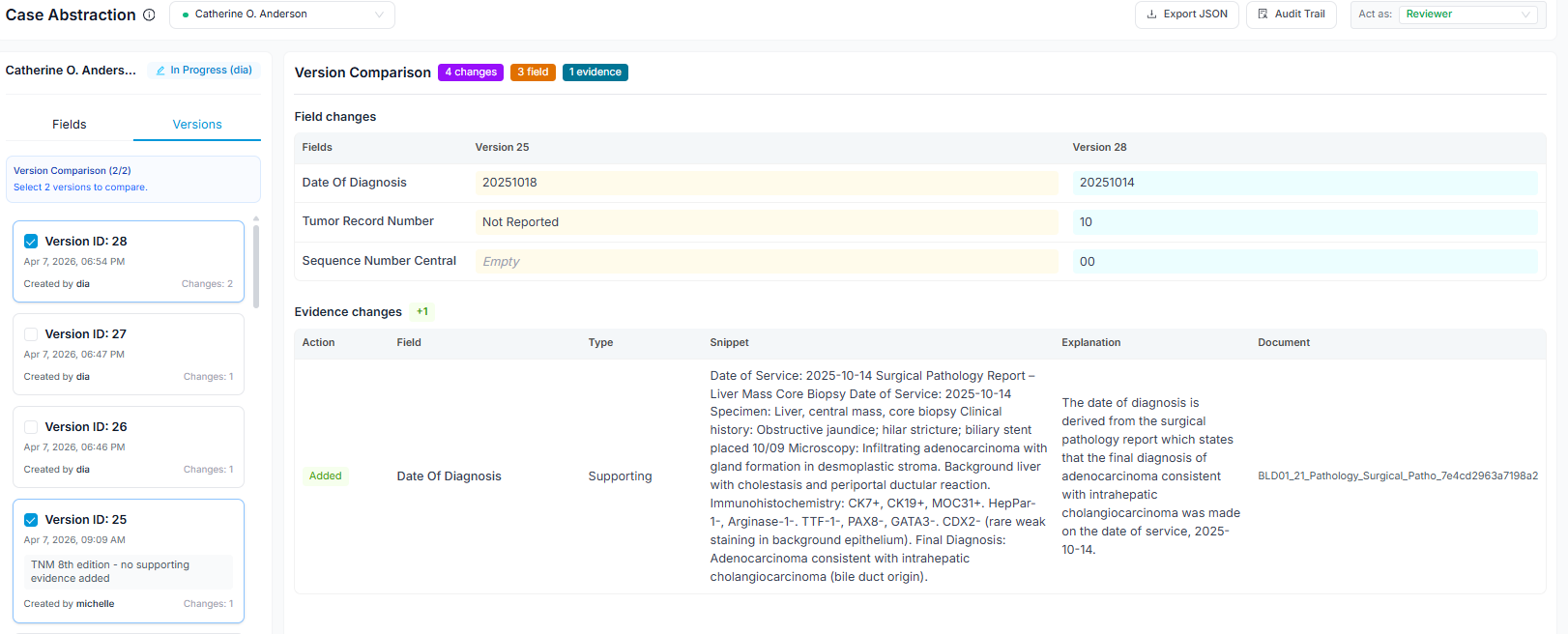
Any two versions of a case can be compared side by side - for example, the original AI extraction against the final validated abstraction, or one registrar's abstraction against another's in a dual-abstraction workflow. This diff view makes it straightforward to identify where the model is systematically underperforming (e.g., consistently miscoding a staging variable for a specific cancer site) and where registrar interpretations diverge from each other, surfacing training needs or guideline ambiguities worth resolving at the team level.
This audit trail satisfies CoC, state registry, and SEER audit requirements without any additional documentation effort.
Step 6 - NAACCR Export and Submission
When cases in the project are validated and approved, export the registry file for submission. Abstracted cases can be exported as NAACCR XML or JSON, both fully compliant with NAACCR v25 specifications. No manual file formatting or edit-check scripting is required.
Exporting the full project: Go to Project → Export to generate a submission file containing all validated cases in the registry. The system applies the correct field mapping for your target registry (state cancer registry, SEER program, or CoC accreditation body) automatically before export.
Exporting individual cases: Individual cases can be exported directly from the abstraction menu — useful for submitting a single case amendment or sharing a specific abstraction for review outside the system.