Multimodal clinical data integration: from raw EHR data to AI-ready OMOP datasets
Clinical data lives in the wrong places. A patient's diagnosis is in a free-text ED note. Their medication history is split between a pharmacy system and an EHR medication list that don't always agree. Their imaging is in a DICOM archive. Their lab results are in a separate LIS. Their social history is in a scanned intake form.
No individual system has the full picture - and no analytics platform, AI agent, or research cohort can work effectively from this fragmented reality. This is the clinical data accuracy gap: the structural disconnect between what healthcare systems capture in coded fields and what actually exists in the full clinical record. Research consistently shows that 40–87% of clinically significant information - staging details, adverse events, social history, nuanced diagnoses - exists only in unstructured notes, never surfacing in the structured data most analytics platforms rely on.
Data integration is where that changes. It is the foundational layer of Patient Journey Intelligence: the module that connects to every clinical source in your organization, extracts clinical facts from every format, resolves the inconsistencies that accumulate across systems, and delivers a single, continuously updated OMOP CDM dataset that every downstream capability - AI agents, cohort queries, registries, de-identified research exports - runs against.
The goal is not to move data. It is to transform it: from raw, fragmented, format-specific clinical records into a structured, standardized, audit-ready representation of each patient's clinical history.
What the pipeline does, end to end
The platform follows a deterministic sequence. Every source, every document type, and every clinical entity passes through the same pipeline - so the output is consistent regardless of where the data came from or how it was originally documented.
Connect to your systems
Configure secure connections to EHRs, FHIR endpoints, imaging archives, labs, document stores, and file repositories. Connections are reusable across all ingestion jobs.
Ingest clinical data
Pull documents, structured records, and images on a schedule or on demand. The pipeline handles file discovery, format detection, validation, and routing automatically.
Extract clinical facts
Healthcare NLP reads unstructured notes and extracts diagnoses, medications, procedures, lab results, findings, and relationships that exist only in free text - not in coded fields.
Normalize to standard vocabularies
Map every extracted and structured concept to SNOMED CT, RxNorm, LOINC, ICD-10-CM, CPT, and 40+ additional vocabularies. Local codes, abbreviations, and institution-specific terms all resolve to standard concept IDs.
Reason, deduplicate, and build timelines
Medical reasoning resolves conflicts between sources, merges duplicate entities, sequences events correctly, and scores confidence - producing a single, auditable patient timeline in OMOP CDM v5.4.
Steps 2 and 3 above - ingesting clinical data and extracting facts from it - are handled by the content extraction pipeline, whose architecture is shown below. The pipeline accepts any input types from local or cloud storage: PDFs, scanned documents, medical images (DICOM), structured exports (HL7/FHIR), office documents, csv, json, EMR/EHR exports. From there, six processing stages run in sequence: file discovery validates and batches incoming files; document type detection routes each file to the appropriate extraction path; content extraction pulls text, tables, sections, and metadata; multimodal processing applies OCR, layout analysis, and vision-language models for scanned or image-based content; content normalization cleans and reconstructs document structure; and raw extraction storage writes the results to Elastic Search. The normalized output is then consumed by five downstream systems - the NLP and information extraction pipeline, clinical NER models, concept resolution and enrichment, OMOP modeling workflows, and patient-level evidence systems - which correspond to the remaining steps in the pipeline described above.
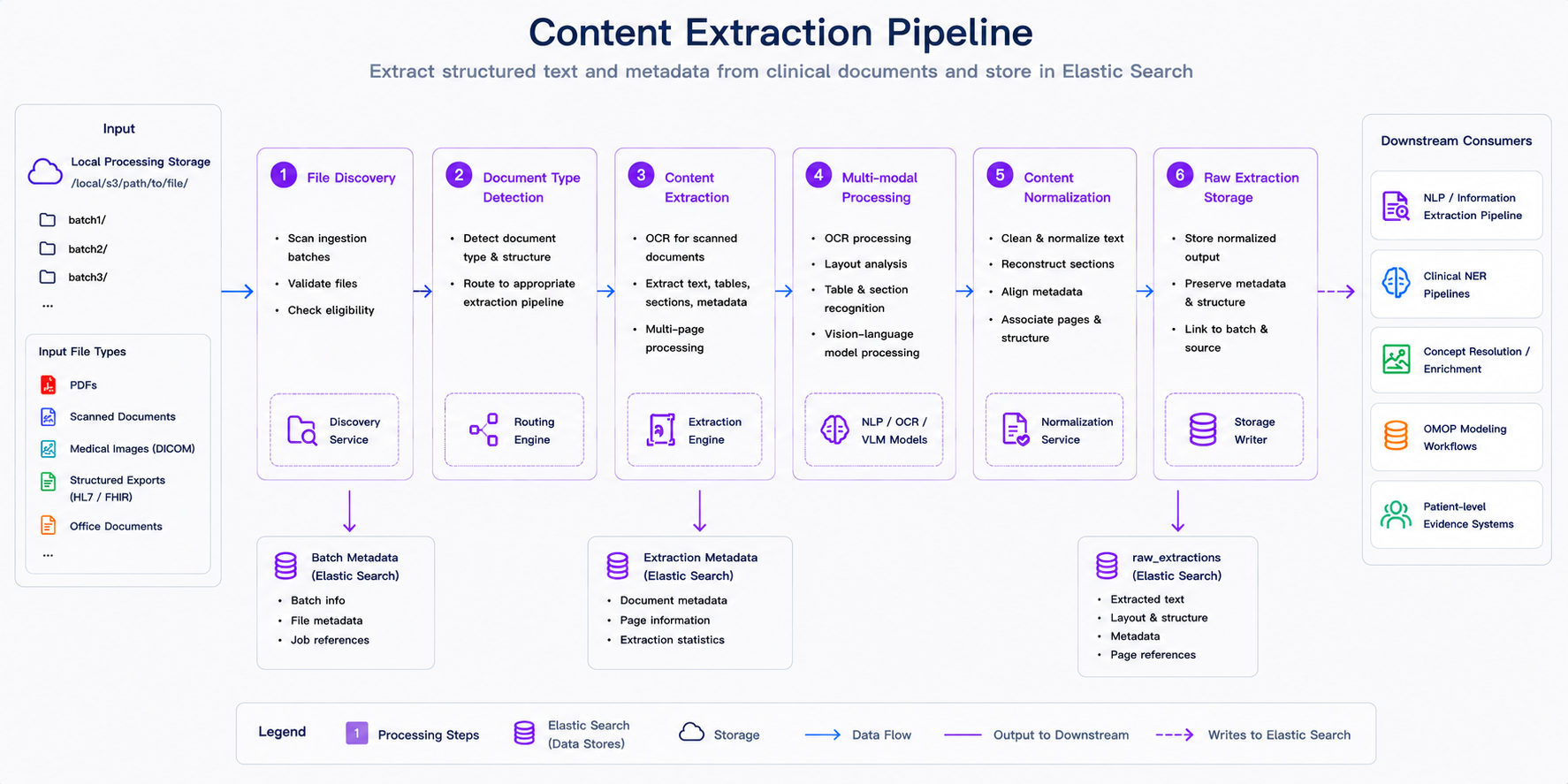
Content extraction in the ingestion pipeline. After files are discovered and validated, the platform detects document type, extracts text and metadata, applies OCR or multimodal processing when needed, normalizes structure, and stores extraction results for downstream NLP, terminology mapping, OMOP modeling, and patient-level analytics.
Why this approach matters
Traditional clinical data engineering requires weeks of manual ETL development, custom parsers, and one-off scripts for every new source system. A new EHR integration means a new project. A new document type means a new parser. Every institution builds the same infrastructure independently, and it breaks every time a source system upgrades.
Patient Journey Intelligence automates the full pipeline. You configure a connection, define what you need, and the platform continuously maintains your OMOP dataset - handling format detection, NLP extraction, vocabulary mapping, deduplication, and de-identification without custom engineering for each source.
Three outcomes follow from this architecture:
Complete clinical context. Research consistently shows that 40–87% of clinically significant information exists only in free-text notes, not in coded fields. Healthcare NLP captures what structured data alone misses - the staging detail in a pathology report, the social history in a clinical note, the adverse event documented in a discharge summary.
One standard, infinite reuse. Standardizing to OMOP CDM v5.4 means you build your data foundation once. The same dataset feeds cancer registries, quality measure reporting, research cohort queries, and AI agent prompts - without rebuilding pipelines for each use case.
Compliance built in. De-identification, provenance tracking, and audit trails are part of the pipeline, not an afterthought. PHI removal runs automatically at ingestion. Every clinical fact carries its source provenance. HIPAA, 21 CFR Part 11, and IRB requirements are satisfied by the dataset structure itself.
The modules that make it work
Data integration is not a single step - it is a coordinated set of modules, each responsible for a specific transformation in the pipeline. Here is what each one does and how they connect.
Data Sources
Before any data can flow, the platform needs to know where it lives. The Data Sources module is where you configure connections to every clinical system in your organization: EHRs, FHIR R4 and STU3 endpoints, HL7 v2 feeds, DICOM archives, S3 buckets, SFTP servers, JDBC/ODBC databases, and direct file uploads. Each configured source becomes a reusable connector for all ingestion jobs - you set it up once and reference it as many times as you need.
Start here if you are setting up the platform for the first time. No data can be ingested until at least one source is configured.
Data Ingestion
With sources configured, Data Ingestion is where you define and run ingestion jobs. You can pull from any configured source on a schedule (daily, weekly, custom intervals) or trigger on-demand imports. The dashboard shows the full pipeline in real time: documents discovered, processed, de-identified, and transformed into OMOP format - with per-document status and error reporting.
Use this to start your first import, monitor active jobs, and validate that documents are flowing through the pipeline correctly.
Information Extraction
Structured EHR fields capture only a fraction of clinically relevant information. The Information Extraction module uses healthcare-specific NLP models to read every clinical note, discharge summary, pathology report, and radiology finding - extracting diagnoses, medications, lab results, procedures, anatomy, and relationships with entity-level assertion status (present, absent, historical, hypothetical).
This runs automatically during ingestion. You can also configure specialized extraction pipelines for oncology, mental health, social determinants, genomics, and other clinical domains.
Learn About Information Extraction →
Medical Terminology
Every clinical concept extracted from text or read from a structured field passes through the Medical Terminology Server, which resolves it to a standard vocabulary code: SNOMED CT, RxNorm, LOINC, ICD-10-CM, CPT, or one of 40+ additional vocabularies. Local institutional codes and abbreviations are mapped automatically.
The result: "MI", "AMI", "heart attack", and "myocardial infarction" all resolve to the same SNOMED concept. A cohort query works once and captures everything.
Learn About Medical Terminology →
Medical Reasoning
Once entities are extracted and normalized, Medical Reasoning resolves the data quality problems that are unavoidable in real healthcare data: duplicate records across systems, conflicting values for the same clinical fact, and temporal inconsistencies that make patient timelines unreliable. The reasoning engine applies a four-tier conflict resolution hierarchy - source priority, recency, confidence score, clinical logic - and records every decision with full provenance.
This runs automatically. Understanding it helps you interpret confidence scores and provenance metadata in your OMOP dataset.
Learn About Medical Reasoning →
De-identification
The De-Identification module removes protected health information from clinical text, PDF documents, DICOM files, and images using HIPAA Safe Harbor and Expert Determination methods. Patient Journey Intelligence maintains a continuously synchronized de-identified OMOP dataset alongside the identified one - so every research pipeline and AI agent can operate on privacy-protected data by default, with no separate de-identification step required at query time.
Learn About De-Identification →
Clinical Measures
After data reaches the OMOP CDM, Clinical Measures enables you to define and compute clinical quality metrics, registry measures, and custom analytics directly on your standardized dataset. Cancer staging completeness, diabetes control rates, treatment response metrics, and registry-specific measures can all be defined once and computed continuously as new data arrives.
Learn About Clinical Measures →
Database Explorer
The Database Explorer provides a SQL query interface directly against your OMOP CDM. Use it to validate data quality after ingestion, run ad-hoc cohort queries, check terminology mapping coverage, and export datasets for use in R, Python, or external analytics platforms.
How to get started
The recommended path is to start small, validate end to end, and then scale:
Configure a single data source
Connect to one EHR system or document repository. Test with one source before scaling to your full environment.
Run a pilot ingestion
Import a sample dataset of 100–1,000 documents to validate the pipeline end to end: extraction quality, terminology mapping coverage, and OMOP output structure.
Validate data quality
Use Database Explorer to check completeness, review extraction results, confirm terminology mappings, and verify that patient timelines look correct before scaling up.
Scale and automate
Add remaining sources, configure scheduled ingestion, set up specialized NLP pipelines for specific clinical domains, and enable de-identification for research exports.
Most organizations connect their first source and complete a pilot ingestion within one to two days. Full enterprise deployment - all sources, all document types, scheduled ingestion - typically takes 8–12 weeks.
The platform ingests FHIR R4 and STU3, HL7 v2, CSV, JSON, XML, PDF documents, plain-text and RTF clinical notes, scanned documents (with OCR), DICOM metadata, and direct database connections via JDBC/ODBC. On the structured data side, it connects to Epic, Cerner, Allscripts, and most major EHR systems through standard interfaces.
Both. Structured fields are read directly and normalized to standard vocabularies. Unstructured clinical notes, discharge summaries, pathology reports, and radiology findings are processed by the healthcare NLP pipeline to extract clinical entities, relationships, and assertion status that exist only in free text. The two streams are merged in the OMOP CDM output.
The Medical Reasoning module addresses this automatically at ingestion. It detects and merges duplicate entities across sources, resolves conflicts using a four-tier hierarchy (source priority, recency, confidence score, clinical logic), and records every decision with full provenance. Irresolvable conflicts are flagged rather than silently resolved, giving you visibility into data quality edge cases.
Continuous. You can configure scheduled ingestion (daily, weekly, or custom intervals) on any source, and the platform will maintain up-to-date patient timelines automatically. New documents are processed through the full pipeline and merged into the existing OMOP dataset with provenance tracking. The de-identified dataset is kept synchronized with the identified one in real time.
De-identification runs automatically during ingestion using HIPAA Safe Harbor and Expert Determination methods. It operates across text, PDF, DICOM, and images. The platform maintains two synchronized OMOP datasets - identified and de-identified - so research pipelines and AI agents always have access to privacy-protected data without a separate processing step.
The platform outputs OMOP CDM v5.4, the current standard maintained by OHDSI. This is directly compatible with ATLAS, ACHILLES, and other OHDSI tools, as well as multi-institutional research networks like PCORnet and TriNetX. No custom transformation is required to use OHDSI tooling against your dataset.
Related tutorials
The Patient Journey Intelligence cookbook documents these workflows end to end, across modules. The pages in this section are the module reference; the cookbook is where the tasks live.