Clinical de-identification: PHI removal across every modality
Patient Journey Intelligence maintains two synchronized versions of your clinical data from the moment ingestion begins: an identified OMOP CDM dataset and a continuously updated, de-identified OMOP CDM dataset. Research pipelines, AI agents, cohort queries, and registry workflows route to the de-identified dataset by default. No separate de-identification step, no manual export, no lag between when data is ingested and when it's available for research use.
De-identification UI showing original and de-identified versions of DICOM, PDF, and plain-text clinical documents side by side, with associated PHI detection statistics.
Why a live de-identified dataset matters for researchers
Most healthcare organizations treat de-identification as a project-level task: when a researcher needs data, someone runs a de-identification job, waits days for review, and delivers a frozen extract. That extract is already stale. If the patient has a new encounter, a new lab result, or a new note that changes their clinical picture, none of it is in the extract the researcher is working from.
Patient Journey Intelligence takes a different architectural approach. De-identification runs as an integrated step of the ingestion pipeline - the same pipeline that builds your OMOP CDM. The result is that the de-identified dataset is a live, continuously maintained mirror of the identified one, updated on every ingestion cycle. Research agents and AI pipelines querying the de-identified dataset are always working with current data, not a months-old snapshot.
This matters practically. A clinical trial matching agent needs to know whether a patient still meets eligibility criteria today, not whether they met them when someone last ran an export. A pharmacovigilance pipeline monitoring post-market safety signals can't afford to work from stale cohorts. A quality improvement workflow that runs monthly on frozen extracts misses patients who deteriorated between runs.
The de-identified dataset also removes a category of access control decisions. Instead of governing which researchers can access PHI-containing data and tracking every query against an audit trail of PHI exposure, the default is privacy: secondary-use queries go to the de-identified dataset, and access to the identified dataset requires explicit elevated permission with a documented purpose.
Performance at production scale
The clinical de-identification problem is harder than it looks. A general-purpose model that identifies names and dates in news text performs poorly on clinical notes, where PHI appears in non-standard formats: pager numbers embedded in free-text instructions, age references that exceed the HIPAA 89-year threshold buried in social histories, facility names that appear as abbreviations in one note and spelled out in another.
A peer-reviewed evaluation published at the Text2Story Workshop (ECIR 2025) measured PHI detection accuracy across healthcare-specific and general-purpose models. Healthcare-specific small language models reached 96% F1 on PHI detection. GPT-4o reached 79%. AWS Comprehend Medical reached 83%. Azure reached 91%. The healthcare-specific models also ran at over 80% lower cost per document - the margin that makes processing at population scale economically viable.
The production validation behind these numbers is concrete. Providence, one of the largest health systems in the United States, de-identified 2 billion patient notes using John Snow Labs' Healthcare NLP, with zero re-identifications confirmed in a peer-reviewed evaluation. That scale and that outcome define what production-grade de-identification means.
De-identification architecture: how the pipeline works
The de-identification service processes every document type through a purpose-built path. Routing happens automatically based on content type - you configure a profile, and the pipeline handles the rest.
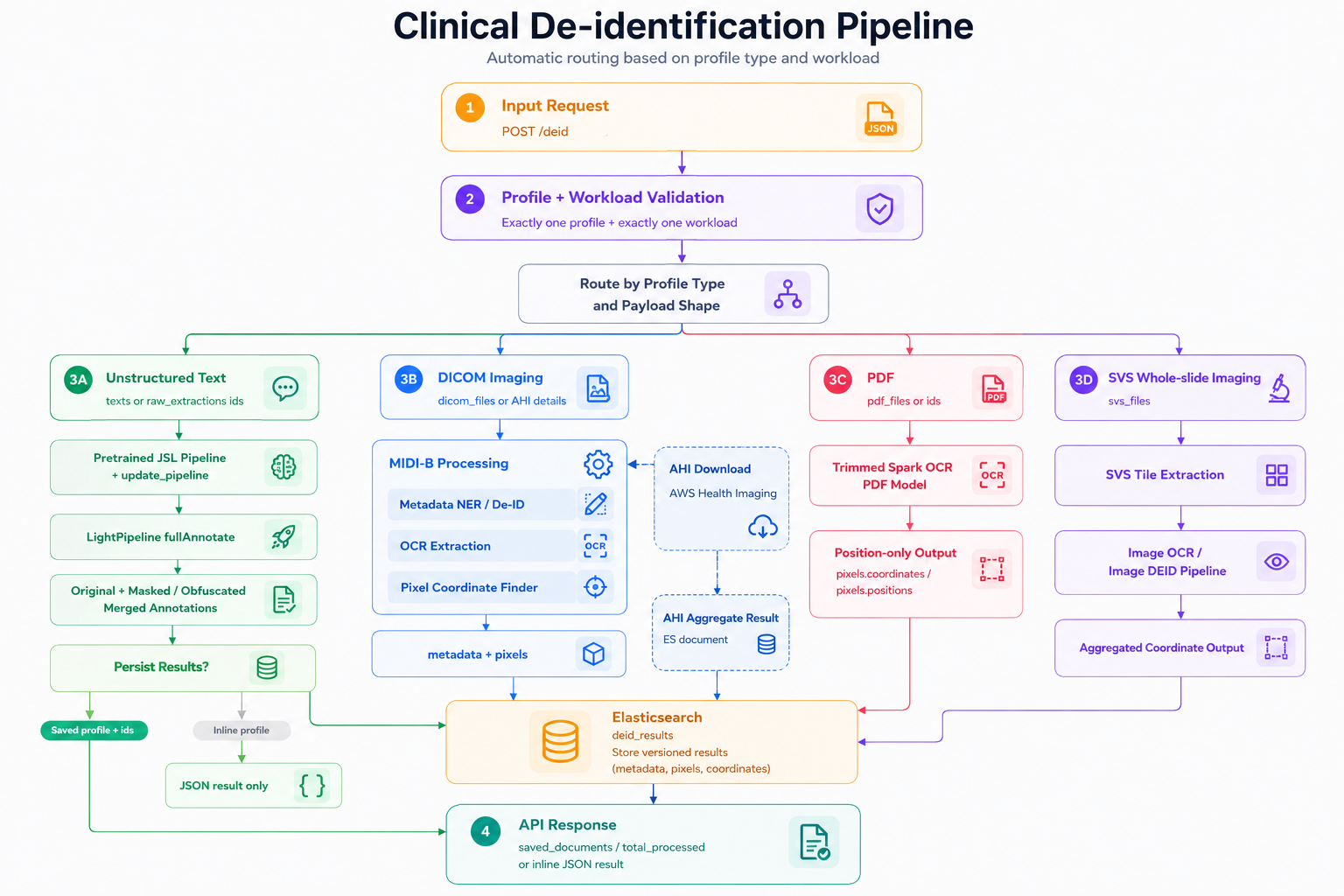
Profile-based de-identification workflow. The service validates incoming requests, routes workloads by profile and payload type, and processes unstructured text, DICOM imaging, PDFs, and whole-slide images through the appropriate de-identification path before returning inline JSON results or storing versioned outputs for downstream use.
Unstructured text - clinical notes, discharge summaries, radiology reports, pathology narratives - goes through healthcare-specific NLP models that detect all 18 HIPAA Safe Harbor identifier categories. PHI spans are replaced, suppressed, or pseudonymized according to the active profile.
PDFs receive combined text-layer and OCR coverage. The pipeline handles both digital PDFs with embedded text and scanned PDFs where text was never selectable, including multi-column layouts and degraded scan quality common in legacy document archives.
DICOM studies require two separate passes. Header-level de-identification removes or replaces PHI in DICOM metadata tags: patient name, date of birth, MRN, referring physician, institution, acquisition timestamps. Pixel-level de-identification uses a vision-language model to detect identifiers burned into image pixels - patient demographics and facility names overlaid on the image by the acquisition device, which header-only de-identification cannot reach.
Whole-slide images (histopathology, cytology) receive the same pixel-level treatment, with spatial detection tuned for the label regions and annotation overlays that typically carry identifying information.
Across all modalities, consistent pseudonymization links a patient's records across documents and time. The pseudonymized identifier is stable within a dataset - a patient's notes, labs, imaging, and claims all resolve to the same pseudonym - so longitudinal analytics on the de-identified dataset remain coherent. Date shifting applies a patient-specific offset that preserves intra-patient temporal relationships (the gap between a diagnosis and the first treatment visit stays accurate) while preventing date-correlation attacks across patients.
Key capabilities
PHI detection in clinical text
All 18 HIPAA Safe Harbor identifier categories detected in free-text notes, reports, and narratives using healthcare-specific NLP models. 99% accuracy, validated at 2 billion notes.
PHI detection in PDFs
Combined text-layer and OCR coverage for digital and scanned PDFs. Handles multi-column layouts, degraded scan quality, and historical document formats.
DICOM header de-identification
Tag-level PHI removal across all standard DICOM SOP classes, including burned-in annotation text in structured report objects.
DICOM pixel de-identification
Vision-language model detection and removal of identifiers burned into image pixels - the modality where header-only de-identification fails.
Whole-slide image de-identification
Pixel-level PHI detection in histopathology and cytology slides, tuned for label regions and annotation overlays.
Cross-document pseudonymization
Patient pseudonyms consistent across all documents and modalities, preserving longitudinal linkage through the de-identified dataset.
Patient-specific date shifting
Dates shifted by a patient-specific offset preserving intra-patient temporal relationships while preventing date-correlation re-identification.
Configurable de-identification profiles
HIPAA Safe Harbor, HIPAA Expert Determination, and GDPR pseudonymization. Profile selection is configurable per project without pipeline changes.
The de-identification dashboard
While de-identification runs automatically during ingestion to maintain the live de-identified OMOP dataset, you can also run custom de-identification jobs on specific datasets or documents - on demand and in parallel to the ingestion pipeline. The dashboard gives you real-time visibility into all de-identification activity across the platform, whether automated or manually triggered.
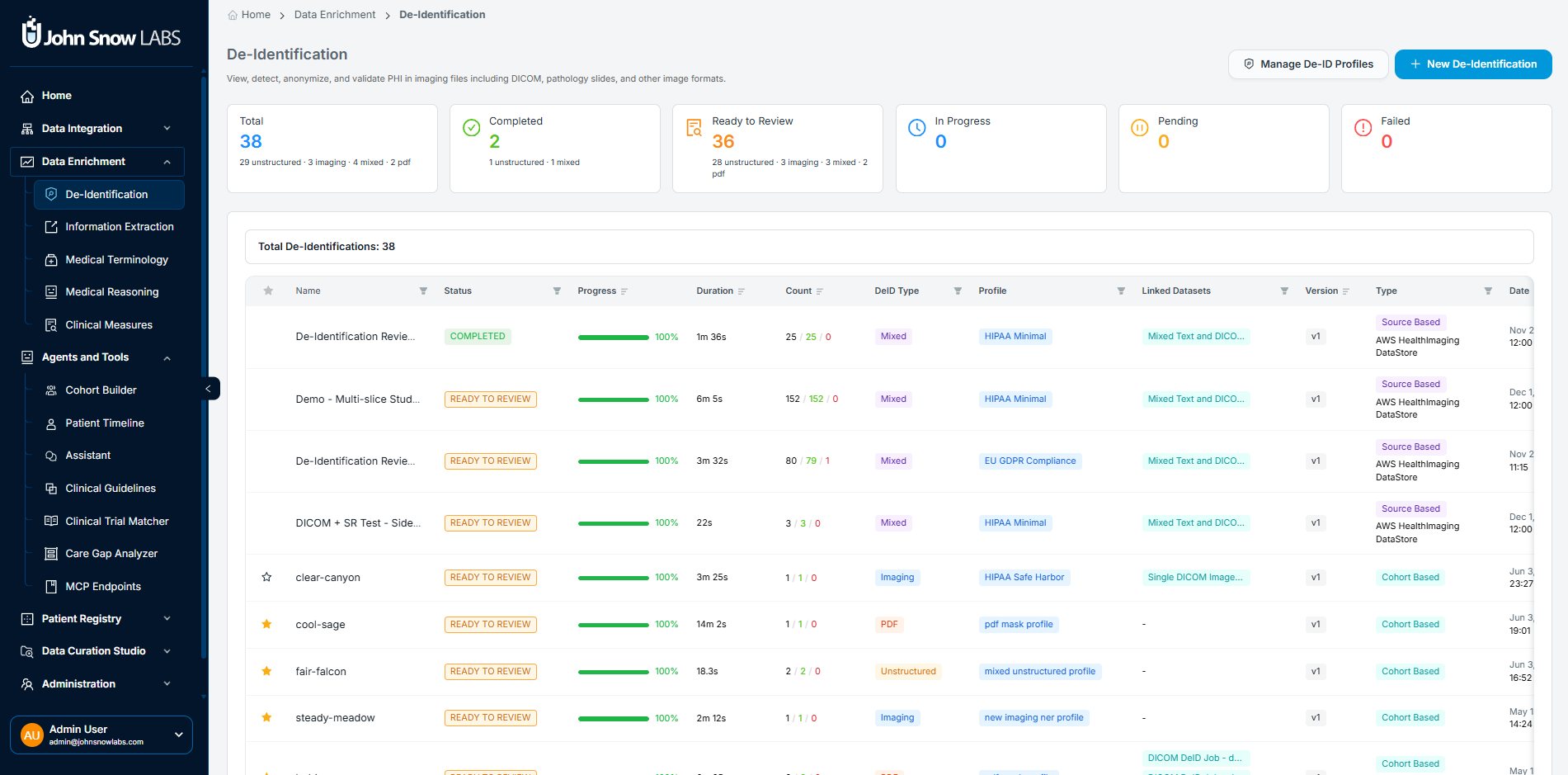
De-Identification Dashboard showing system-wide job status indicators, PHI detection metrics, and the full job table with profile, workflow type, and per-job actions.
Six system-wide indicators track status at a glance:
- Total: Cumulative jobs executed, broken down by content type (unstructured, imaging, mixed, PDF)
- Completed: Successfully finalized workflows
- Ready to Review: Jobs where processing is complete and results are awaiting manual validation before promotion
- In Progress: Active anonymization processes currently running
- Pending: Jobs queued but not yet started
- Failed: Jobs with processing or rule application errors requiring attention
The job table below the indicators shows every active and historical job with the profile applied, workflow type (cohort-based or source-based), PHI detection metrics, processing timestamps, and direct links to view details, export results, or edit the profile for reuse.
Running a de-identification job
To start a new job, click New De-Identification and follow three steps.
Choose your data source. You can scope the job to a defined cohort - a patient-level collection already built in the platform - or to a source, such as an external PACS or cloud imaging store. Cohort-based jobs are the right choice when you want to de-identify a specific patient population. Source-based jobs are better for processing incoming data streams continuously.
Select an anonymization profile. The profile determines which PHI categories are removed, how each is handled (drop, replace, hash, or shift), and which regulatory standard the output satisfies. Standard profiles cover HIPAA Minimal Safe Harbor, GDPR-compliant pseudonymization, and clinical trial redaction policies. Custom profiles can be created and cloned for organization-specific or study-specific requirements.
Confirm and run. The pipeline scans every document in scope for PHI in both metadata and content, applies the profile rules, and generates a per-document outcome record. For DICOM studies, every slice is scanned independently.
Reviewing results: the job detail interface
Selecting a completed job opens a multi-panel interface for review, validation, and export.
Patient panel
A filterable sidebar lists every patient in the job with age, sex, total documents, and number of imaging studies. Selecting a patient updates the main viewing area with that patient's documents and de-identification statistics.
Split view: side-by-side quality assurance
The dual-pane viewer is the primary tool for verifying de-identification quality across all content types - unstructured text, PDFs, DICOM studies, and whole-slide images. The original document appears on the left; the de-identified version on the right. For DICOM studies, both panes support slice navigation, zoom and pan, window/level controls, and synchronized scroll. PHI regions detected in the original are highlighted, and metadata tag overlays are available for imaging modalities.
This side-by-side layout lets you confirm that names, dates, and identifiers present in the original have been removed or replaced in the output - across every format the pipeline processes.
DICOM Metadata inspector
The metadata inspector displays the original and de-identified DICOM headers side by side, with a change summary showing which tags were modified, masked, or removed. Categories reviewed include patient identifiers, study and series descriptors, institutional metadata, and timestamps and acquisition details.
De-identification statistics panel
Every job produces a structured summary of anonymization performance per study:
General metrics: total slices processed, slices with detected PHI, and overall detection rate.
Pixel-based PHI breakdown: detected instances, cleared (anonymized), rejected, and pending manual review.
Entity breakdown: PHI detected by category - name, MRN, institution, dates, and other structured identifiers - so you can see where your data carries the most PHI and whether any category shows unexpectedly low detection rates.
Metadata PHI: field-level enumeration of PHI tags with anonymization status for each DICOM tag.
Outcome summary: successful (all PHI addressed per profile), failed, or requires review.
Pipeline metadata: the profile used, execution time, processor ID if applicable, and final status - the fields you need for reproducibility and audit documentation.
Export and data persistence
Once you've reviewed results and are satisfied with quality, anonymized data can be:
- Exported locally for research or regulatory submission
- Saved to internal Patient Journey Intelligence storage for downstream platform use
- Linked to OMOP CDM to enable imaging analytics alongside the structured clinical dataset
A confirmation banner summarizes the number of exported studies, series, and slices.
Managing de-identification profiles
Profiles are the governance layer that converts your regulatory requirements into pipeline behavior. Each profile defines tag-level rules (drop, replace, or hash per field), pixel-level detection thresholds, pattern recognition settings, and the regulatory compliance target.
Administrators can create custom profiles, clone existing ones for study-specific variations, preview rule effects on sample data before applying at scale, and temporarily disable profiles without deleting them. The standard profile set covers:
- HIPAA Minimal Safe Harbor - removes all 18 Safe Harbor categories
- HIPAA Expert Determination - retains more granular data (5-digit ZIP codes, month-level dates, ages over 89) when a qualified statistician certifies re-identification risk is very small
- GDPR-compliant pseudonymization - structured for Article 89 research exemption requirements
- Clinical trial redaction policy - tuned for ICH GCP and sponsor-specific requirements
- Institutional custom profiles - organization-specific rules layered on any base profile
Best practices for production de-identification
Getting de-identification right at scale requires more than selecting a profile and running a job. The practices below are the difference between a de-identification workflow that holds up in an audit and one that generates re-review requests, compliance gaps, or research delays.
Validate profiles on pilot datasets before production-scale use. Before applying a profile to millions of documents, run it against a representative sample that includes edge cases: scanned PDFs with degraded quality, DICOM studies with burned-in annotations, notes with non-standard abbreviations. A pilot run surfaces detection gaps while the correction cost is low, not after you've processed a full patient cohort and need to rerun.
Use the split view to verify pixel-level anonymization, not just metadata. The metadata inspector confirms that DICOM header tags were modified. The split viewer confirms that text burned into image pixels was actually removed from the image itself. These are two different checks, and both matter. For imaging modalities, make pixel verification a required step before results are promoted - it's the validation the metadata inspector alone cannot provide.
Review DICOM headers for residual identifiers after each new source is onboarded. Different imaging devices and PACS systems write PHI into different tag sets. A profile tuned for one manufacturer's scanner may miss proprietary tags written by another. The first time you ingest from a new source, open the metadata inspector and scan the change summary for any tags that were not addressed by the active profile. Update the profile before scaling ingestion from that source.
Align de-identification rules with study-specific requirements before a project starts. HIPAA Safe Harbor, Expert Determination, GDPR Article 89, and clinical trial redaction policies each impose different constraints, and the right choice depends on the downstream use. A retrospective cohort study may require only Safe Harbor. A clinical trial regulated under ICH GCP needs sponsor-specific redaction rules. Selecting the profile after data has already been de-identified means re-processing; selecting it upfront is a configuration step.
Document the profile used for each project, and keep that record with the data. When a researcher submits findings to a journal, or a sponsor asks for de-identification methodology during an audit, the answer needs to be specific: which profile, which version, which pipeline run, and what the outcome statistics were. The per-job audit record in Patient Journey Intelligence captures all of this automatically, but only if you preserve the association between the job and the downstream dataset or publication it produced.
Patient Journey Intelligence's De-Identification module automatically removes Protected Health Information from clinical notes, PDFs, DICOM studies, and whole-slide images, then maintains a continuously synchronized de-identified OMOP CDM dataset alongside the identified one. Research pipelines and AI agents query the de-identified dataset by default - it is updated on every ingestion cycle, not just on demand.
Healthcare-specific NLP models in Patient Journey Intelligence reach 96% F1 on PHI detection in clinical text, compared to 79% for GPT-4o, 83% for AWS Comprehend Medical, and 91% for Azure - in a peer-reviewed evaluation published at the Text2Story Workshop (ECIR 2025). At Providence, the platform de-identified 2 billion patient notes with zero re-identifications, confirmed in a peer-reviewed study.
The platform de-identifies structured data (csv, json, FHIR), unstructured clinical text (notes, reports, summaries), scanned and digital PDFs, DICOM imaging studies at both the header and pixel level, and whole-slide images. Each modality has a purpose-built processing path - DICOM pixel de-identification, for example, uses a vision-language model to detect identifiers burned into image pixels, which header-only processing cannot reach.
Each patient is assigned a stable pseudonym at the start of ingestion. That pseudonym is used consistently across all documents, modalities, and time periods in the de-identified dataset - notes, labs, imaging studies, and claims all link to the same pseudonym - so longitudinal analytics remain coherent without exposing the identified patient record.
Standard profiles include HIPAA Minimal Safe Harbor (all 18 categories removed), HIPAA Expert Determination (more granular data retained with statistical certification), GDPR pseudonymization for Article 89 research, and clinical trial redaction for ICH GCP compliance. Custom profiles can be created, cloned, and previewed on sample data before production deployment.
Dates are shifted by a patient-specific offset - the same offset applies to all dates for a given patient. This preserves the temporal relationships between events within a patient's record: the gap between a diagnosis date and first treatment date stays accurate. It prevents date-correlation re-identification across patients because each patient's offset is different.
De-identification runs as an integrated step of the standard ingestion pipeline - not as a separate, on-demand export. Every ingestion cycle updates both the identified and de-identified datasets in parallel. Research pipelines and agents querying the de-identified dataset see current data, not a historical snapshot.
Each job generates a per-document outcome record: profile used, PHI entities detected by category, pixel-level results per slice, execution time, and final status. This documentation supports HIPAA compliance documentation, IRB reporting, and regulatory submissions that require evidence of de-identification methodology and outcome.