Patient Journey Intelligence 2.1.0: distributed processing, FHIR R4 export, and expanded de-identification coverage
Patient Journey Intelligence 2.1.0 extends the platform across the clinical data lifecycle, from ingesting source documents to releasing de-identified data outside your organization. Large ingestion workloads run on multi-node Apache Spark clusters in Databricks. OMOP data exports as FHIR R4. De-identification covers FHIR, CDA, whole-slide images, and DICOM Structured Reports. Raw Store keeps uploaded files exactly as received, so downstream work never modifies the source document.
If you process large document volumes, build patient cohorts, review de-identified records, or run the platform in production, this release changes how each of those jobs behaves.
Clinical scenarios in this page are illustrative. Any patient data shown is synthetically generated.
Databricks distributed processing
Ingestion and processing run on multi-node Apache Spark clusters in Databricks instead of local infrastructure.
FHIR R4 export
Export patients, cohorts, or your full population from the OMOP model as standard FHIR R4 packages.
Expanded de-identification
FHIR, CDA, SVS whole-slide images, DICOM Structured Reports, and mixed text and imaging datasets.
Raw Store ingestion
Uploaded files are preserved exactly as received, so the original source document stays available as the record.
Highlights
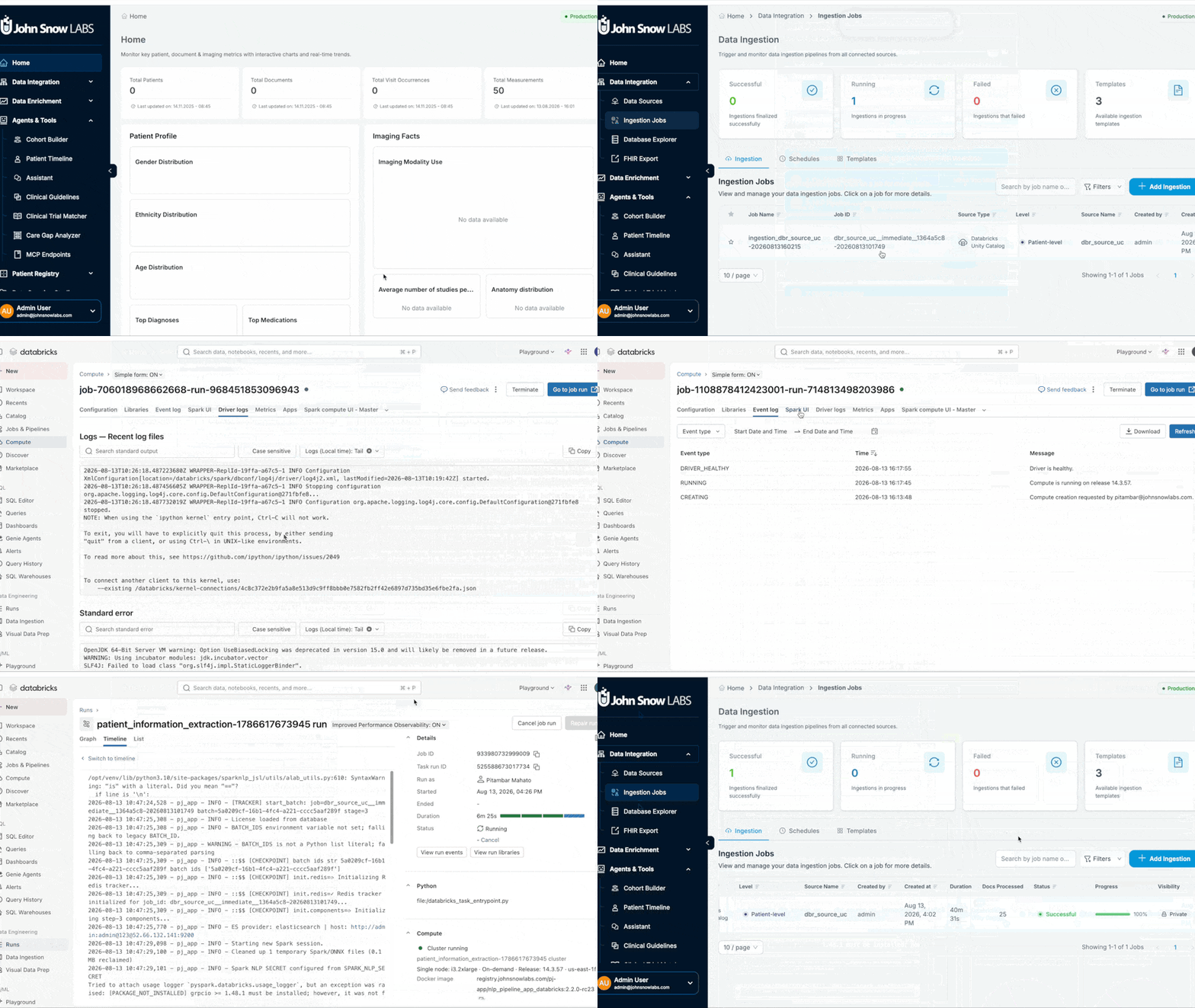
Databricks-powered distributed processing
Ingestion and processing workloads in Patient Journey Intelligence 2.1.0 can run on multi-node Apache Spark clusters in Databricks rather than on local infrastructure. The core processing pipeline has been optimized for distributed Spark execution, and a dedicated Databricks ingestion connector moves data into the platform directly.
Document volume is where clinical data programs stall. A single service reading a decade of scanned pathology reports, operative notes, and outside records is limited by one machine, and the backlog grows faster than it clears. Distributing that work across a Spark cluster turns the constraint into a sizing decision rather than a queue you wait out.
Processing runs on your existing Databricks infrastructure, so the platform sits alongside the compute and storage your data platform team already operates.
Where this matters. A cancer center onboarding twelve years of archived pathology PDFs ahead of a registry backlog project can size a cluster for the initial load, then scale it down for the weekly incremental. The same pipeline handles both.
FHIR R4 export from the OMOP model
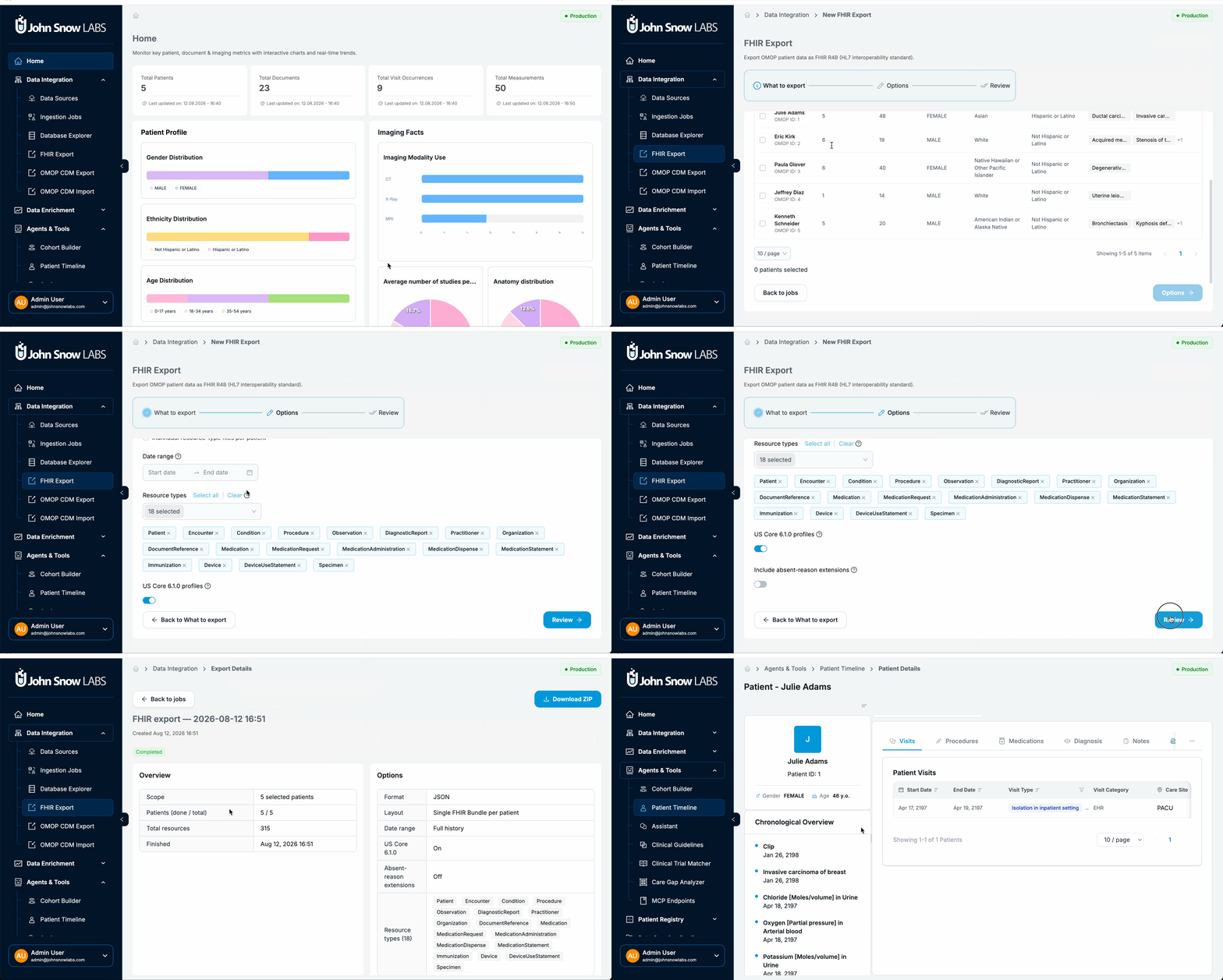
Patient Journey Intelligence can now export clinical data held in the OMOP Common Data Model as FHIR R4 resources. Export an individual patient, one or more cohorts, or your entire patient population, choose which resource types to include, monitor export progress, and download the result as a standard FHIR package.
OMOP and FHIR answer different questions. OMOP is the analytics model: it is what cohort definitions, care gap analyses, and observational studies run against. FHIR is the exchange model: it is what another system, a sponsor, or an application expects to receive. Holding data in OMOP and having no path to FHIR means every handoff becomes a bespoke extract.
Where this matters. A research coordinator answers a sponsor's feasibility question by building a cohort in the platform, then exports that same cohort as a FHIR package for the sponsor's system. The population in the feasibility answer and the population in the delivered package are defined by one cohort, not reconciled by hand at each step.
See OMOP to FHIR.
De-identification for FHIR, CDA, whole-slide images, and DICOM Structured Reports
De-identification in 2.1.0 covers a much broader range of clinical content, including FHIR, CDA, SVS whole-slide images, DICOM Structured Reports, and mixed text and imaging datasets.
PHI does not stay in the places a text-only pipeline reads. A C-CDA carries names and addresses in structured XML elements and again in its narrative sections. A whole-slide image carries the patient name and medical record number in the label photograph attached to the slide file. A DICOM Structured Report carries the findings as coded content rather than pixels. Each of these is a release blocker for a data-sharing agreement, and each needs handling specific to its format.
Profile validation now identifies fields that may remain unprotected before a job starts, so a gap is corrected while it is a configuration problem rather than discovered after a corpus has been processed.
Where this matters. A research data office preparing a pathology corpus for an external collaborator runs profile validation and finds that the private DICOM tags written by one of its scanners are not covered by the active profile. They extend the profile, then run the job. Without the check, those tags travel with the release.
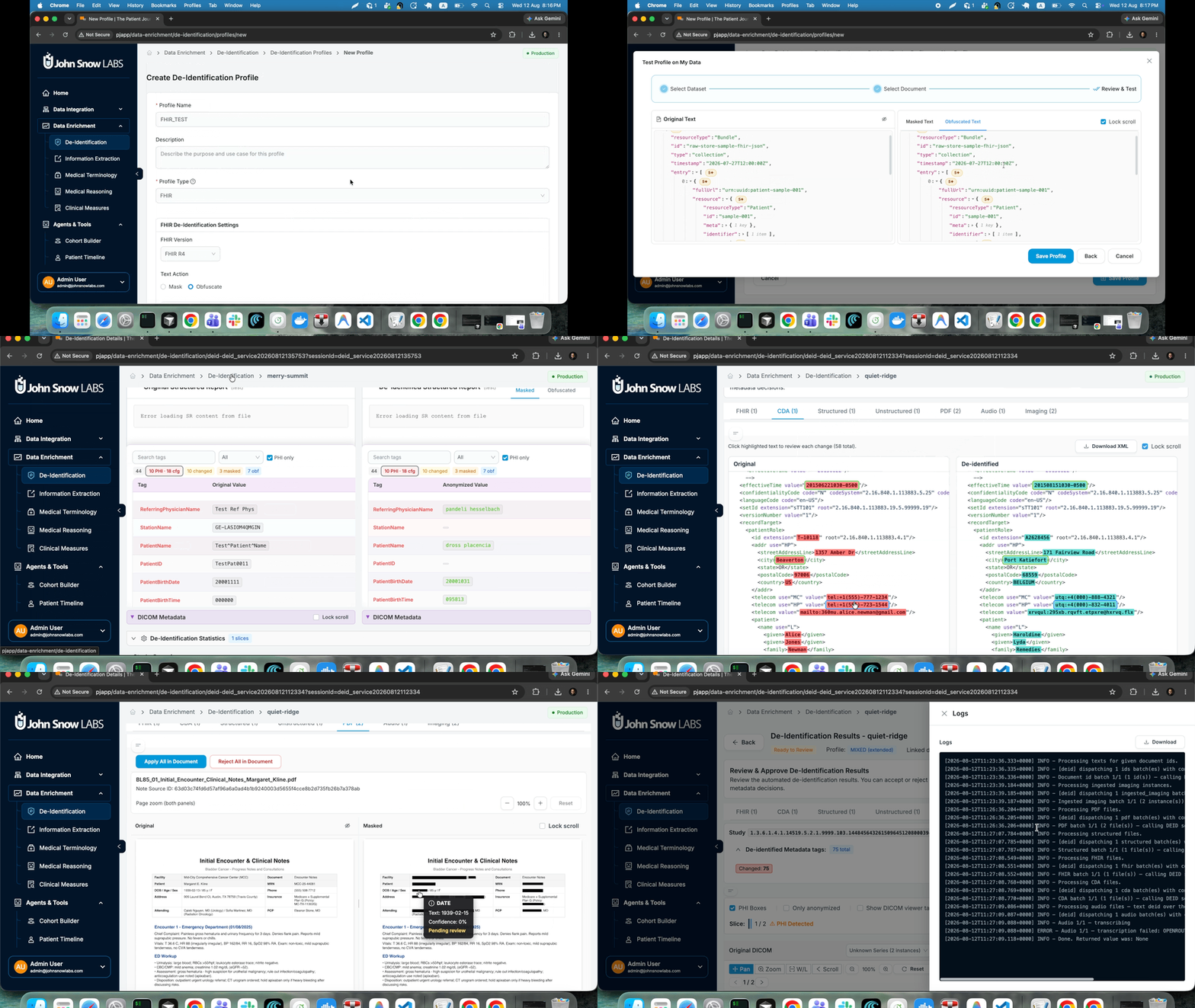
Review is more transparent as well:
- Live session logs while a job runs
- Improved review highlighting
- Better handling of complex imaging studies
- Metadata-only fallback for pixel-less DICOM files
Raw Store ingestion
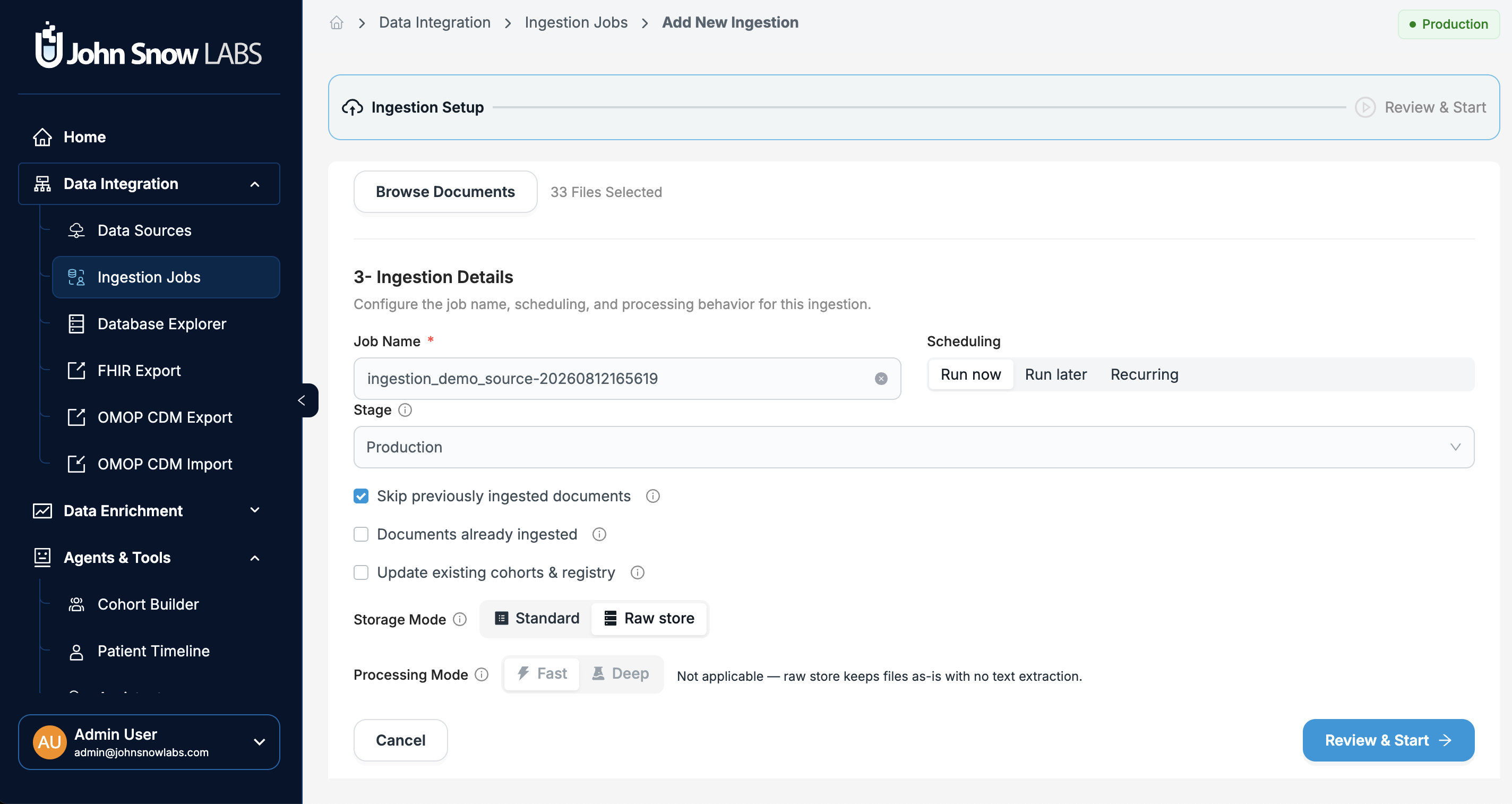
Raw Store preserves uploaded files exactly as received. Documents are stored in their original format, and datasets and downstream processing are built against them without modifying the source.
Two things follow. Datasets and downstream processing are built against the file as it arrived, and the source document is never modified along the way. And where an extracted value is later challenged, by a registry auditor, an IRB, or a clinician, the answer points back to the document as it was received.
Where this matters. A health system's outside-records feed arrives as a mix of faxed reports, scanned discharge summaries, and a delimited extract from a partner lab. Ingested through Raw Store, every file is retained in its original form and available for downstream processing, with the source document preserved as the record of what was received.
New features
Large-scale data ingestion
-
Databricks-based distributed processing runs the pipeline on Spark clusters, as described above.
-
Direct ingestion from existing OMOP databases connects to a repository you already maintain. Teams that spent years building an OMOP CDM, reviewing vocabulary mappings and publishing cohort definitions against it, do not have to export files and re-ingest them to work in the platform. The mapping decisions and the analyst SQL written against them survive.
-
External PACS support over DICOMweb pulls imaging studies from a third-party archive, so imaging joins the patient record through the same ingestion path as documents rather than a side channel.
-
Faster document validation during uploads shortens the gap between selecting files and knowing whether they were accepted.
Reusable dataset builder
-
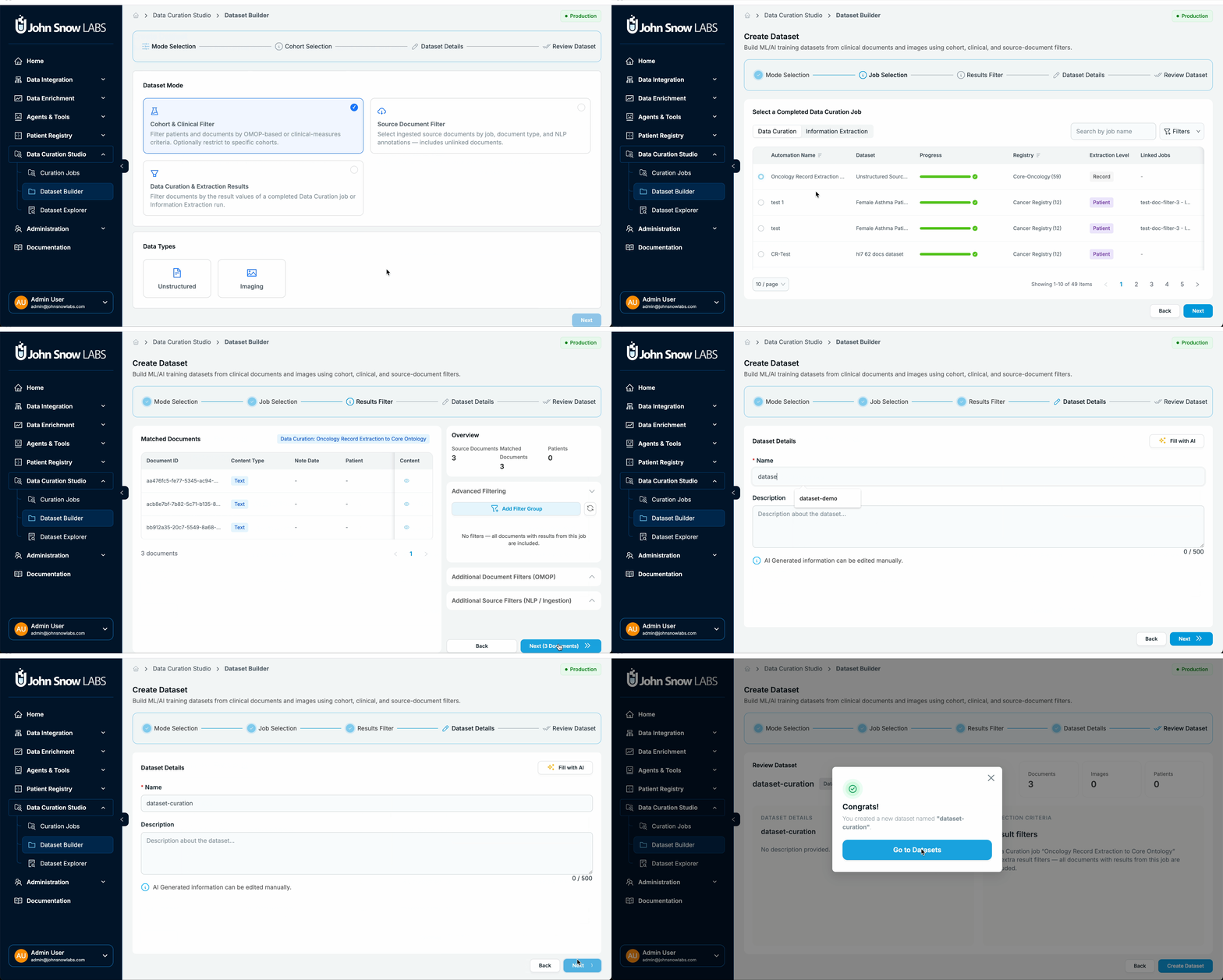
Build datasets from completed Information Extraction or Data Curation jobs. A finished job already identifies the documents that contain what you were looking for. Turning that result into a dataset means the next job runs against the documents that matter instead of the full corpus.
-
Link previously unmatched documents to patients. Documents that arrive without a patient match are common in outside records, where the identifiers in a faxed report do not resolve against the local record. Those documents can now be attached to the right patient by hand rather than left orphaned.
-
Include files that were skipped as duplicates. A file that ingestion skipped because it already existed in the system can now be included in a dataset, so a dataset is not silently missing content the platform already holds.
-
Where this matters. An oncology outcomes team runs curation for recurrence across a breast cancer cohort, then builds a dataset from the documents where a recurrence event was found. Chart review starts on that dataset rather than on every note in the cohort.
See cohort builder and data curation.
De-Identification Studio
Reviewing a de-identification job is more transparent, and the workflows it supports are broader.
- Live Airflow session logs show what a job is doing while it runs
- Downloadable grouped logs give a privacy officer something to attach to a sign-off record
- Mixed text and imaging workflows cover datasets holding both, in one job
- Custom de-identification pipelines can be used in place of the built-in pipelines
- Coverage analysis before execution reports what a profile would leave unprotected
Coverage analysis is the item worth acting on. A de-identification job that completes successfully and a de-identification job that removed everything it should are not the same result, and the difference is visible before the run rather than after.
Information extraction and data curation
Healthcare NLP can pre-filter documents before extraction. Running extraction across every document in a large corpus spends compute on registration forms and billing sheets, and it hands reviewers a result set where most rows are empty. Pre-filtering narrows the corpus first, so extraction runs on the documents likely to carry the target facts.
Where this matters. A rare disease research team holds tens of thousands of notes for a candidate cohort and needs the small number that document a specific finding. Pre-filtering narrows the corpus, then curation runs against a collection where most documents are relevant. Reviewers see a denser result set and stay accurate through it.
Also in this area:
- Dedicated pipeline management
- Better patient filtering
- Support for curating documents that are not yet linked to patients
Improvements
Cohort Builder
Cohort definitions are the denominator behind every number the platform reports, so the changes here are about a definition meaning what its author intended.
- Linked cohorts open in a new browser tab, so the page you came from stays open
- Creating a cohort from a template clearly warns when manually excluded patients will not be copied
- Age filtering is more accurate
- Patient and document count filters behave consistently
- Category filtering is improved
- Templates remain usable after their originating chat has been deleted
The template warning matters more than its size suggests. A cohort reused as a template silently loses its exclusions, and the count moves without anyone deciding it should.
Assistant
The Assistant produces more reliable results, with:
- Improved query generation
- Better handling of age-based calculations
- More consistent patient-level statistics
- Support for supported non-OMOP databases
- Better follow-up suggestions
- Improved error recovery
Consistency between what a table shows and what a summary reports is the point. An analyst who finds two different patient counts for one question stops trusting both.
Clinical Guidelines
- Clearer, user-friendly error messages
- Improved text formatting
- Consistent terminology across the application
These are presentation and wording changes. The underlying guideline behavior is unchanged.
Information Extraction
Pipeline names are presented consistently across the application, without exposing internal implementation details. A pipeline you selected in one module is recognizable by the same name in the next.
Care Gap Analyzer
Care gap analysis is more reliable, with improved concept normalization and more accurate evidence display.
Normalization is what decides whether a gap is real. The same lab result arrives coded several ways across source systems, and a gap list that treats those as different tests flags patients who were in fact tested. A care manager who calls three patients who already had the test stops working the list.
See agents and tools.
Bug fixes
Assistant
- Patient age calculation queries that previously returned no results now work
- Inconsistencies between patient counts shown in tables and in summary statistics are resolved
Cohort Builder
- Age filters could include patients outside the selected range. Corrected.
De-identification
- Highlighting is correct when identical PHI values appear more than once in a document
- Metadata-only fallback added for pixel-less DICOM files
- Failed job visibility improved
- Entity editing issues fixed
- DICOM and SVS mask rendering corrected
- Jobs that occasionally remained In Progress after completing now report their final state
- Structured CSV result handling improved
Clinical Trial Matcher
- Execution when running a single pending criterion is fixed
- The Patients Found tab loads correctly
- Overall job reliability improved
Data Ingestion
- Stop and restart behavior improved
- Resumable upload failures fixed
- Browsing external imaging sources improved
- Duplicate document filtering issues resolved
Platform, security, and operations
Deployment
Running the platform is easier to operate, with:
- Improved Kubernetes naming conventions
- Better service discovery
- Faster document validation
- Enhanced maintenance tooling
Build and security
- Hermetic builds
- Security vulnerabilities addressed as required for AWS Marketplace deployments
- Strengthened monitoring, auditing, and operational tooling across the platform
See AWS deployment and on-premises deployment.
Patient Journey Intelligence 2.1.0 adds distributed ingestion and processing on multi-node Apache Spark clusters in Databricks, FHIR R4 export from the OMOP Common Data Model, de-identification for FHIR, CDA, SVS whole-slide images, DICOM Structured Reports and mixed text and imaging datasets, and Raw Store ingestion that preserves uploaded files exactly as received. It also adds direct ingestion from existing OMOP databases, external PACS ingestion over DICOMweb, and datasets built from completed Information Extraction or Data Curation jobs.
Yes. From 2.1.0, large ingestion and processing workloads run on multi-node Apache Spark clusters in Databricks instead of local infrastructure, and a dedicated Databricks ingestion connector moves data into the platform directly. The core processing pipeline is optimized for distributed Spark execution and runs on your existing Databricks infrastructure.
Yes. Patient Journey Intelligence 2.1.0 exports clinical data from the OMOP Common Data Model as FHIR R4 resources. You can export an individual patient, one or more cohorts, or the entire patient population, select which resource types to include, monitor export progress, and download the result as a standard FHIR package.
De-identification in 2.1.0 covers a much broader range of clinical content, including FHIR, CDA, SVS whole-slide images, DICOM Structured Reports, and mixed text and imaging datasets. Profile validation identifies fields that may remain unprotected before a job starts.
Raw Store preserves uploaded files exactly as received, with no modification to the source document, and datasets and downstream processing are built against them. Use it when the original document has to remain available, unchanged, as the record of what was received.
Yes. Patient Journey Intelligence 2.1.0 supports ingestion from an external PACS over DICOMweb, so imaging studies enter the patient record through the same ingestion path as clinical documents.
Coverage analysis reports which fields the selected de-identification profile may leave unprotected, before the job starts. It gives administrators the chance to extend the profile while the correction is a configuration change rather than a reprocessing exercise.
Yes. Dataset Builder in 2.1.0 creates a dataset from a completed Information Extraction or Data Curation job, so the next step runs only on the documents that job identified. You can also link previously unmatched documents to a patient, and include files that ingestion skipped because they already existed in the system.