Patient Journey Intelligence 2.2.0: Databricks for every source and Agentic Search
Patient Journey Intelligence 2.2.0 runs de-identification and NLP extraction on Databricks for every ingestion source, replaces the per-run file ceiling with a dataset-first de-identification workflow, and processes text and imaging together in one job. Agentic Search queries a clinical document corpus in plain language before anything is ingested. NAACCR schema detection now runs on SEER's published rule set of 237 rules across 121 schemas.
Two constraints are gone. Databricks compute was previously reserved for Unity Catalog sources, so a team ingesting from S3 or SFTP had no way to scale a large de-identification run. De-identification was also capped per run, which turned a 40,000-document backfill into a sequence of hand-managed batches. Both limits are replaced by explicit, per-job choices.
If you run large document volumes, prepare corpora for external release, or maintain a cancer registry, this release changes how each of those jobs behaves.
Clinical scenarios in this page are illustrative. Any patient data shown is synthetically generated.
Databricks for any source
De-identification and NLP extraction run on Databricks for uploaded files, S3, SFTP, and Snowflake sources, not only Unity Catalog. Compute is chosen per job.
Dataset-first de-identification
De-identification starts from a dataset. Ingest once, build a dataset, and run against it as often as you need with no per-run file ceiling.
Agentic Search
Describe a clinical question in plain language and search a registered corpus. Review matched patients with evidence before ingesting anything.
SEER schema engine
NAACCR schema detection runs on SEER's own published rule set of 237 rules across 121 schemas, replacing the prior hand-built approximation.
Highlights
Databricks compute for uploads, S3, SFTP, and Snowflake
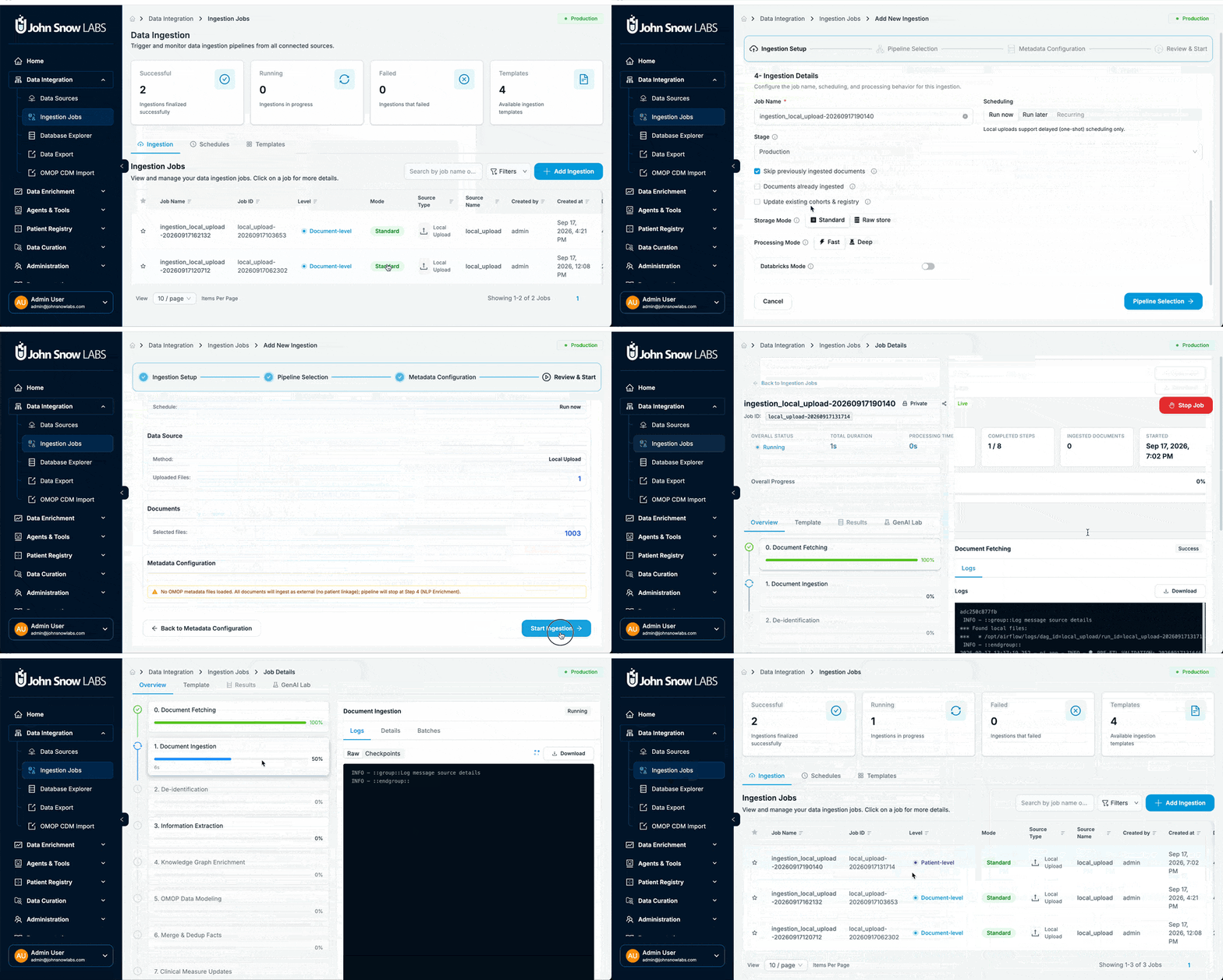
Databricks compute for de-identification and NLP extraction is no longer restricted to Unity Catalog sources. From 2.2.0, any ingestion source, including uploaded files, S3, SFTP, and Snowflake, can route these two pipeline steps to a Databricks cluster. Unity Catalog sources no longer use Databricks automatically, so the compute choice is explicit on every job.
Processing runs on your existing Databricks workspace, which keeps clinical documents inside the environment your data platform team already operates and governs.
Sizing a cluster per job
Worker-node count is configurable per job. Save a Databricks credential once under Settings → Cloud Credentials, then pick a worker count between 0 and 32 each time you configure a job. A small overnight batch and a bulk historical load each get the cluster size they need, with no change to any global configuration.
Example: one S3 source, two compute profiles
An oncology data team ingests roughly 3,000 new documents a week from an S3 bucket and is also loading eight years of archived pathology reports. They run the weekly job on local compute with 0 workers and configure the backfill with 16 workers on Databricks. Both jobs read the same S3 source and use the same de-identification profile, so no second pipeline or connector configuration is needed.
Dataset-first and mixed modality de-identification
De-identification starts from a dataset
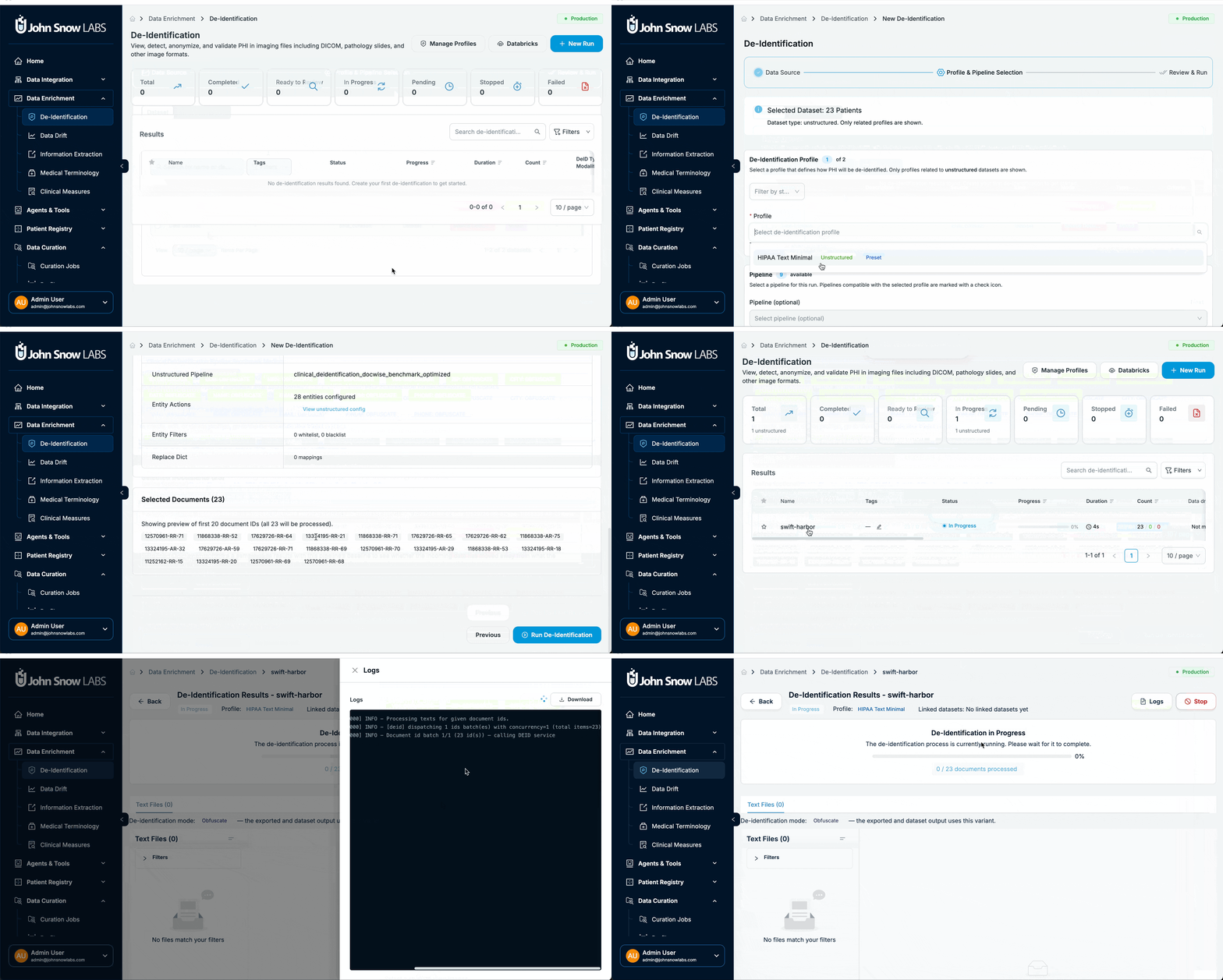
De-identification now always starts from a dataset. Ingest once, build a dataset, then run de-identification against it as many times as needed. The previous per-run file-count ceiling is removed, so a corpus of any size is one job rather than a series of manually split batches.
Re-running matters as much as scale. When a profile is extended to cover an identifier format the first pass missed, the second run goes against the same dataset, and the two outcomes are comparable because the input is identical.
One job covers text, PDF, and imaging
A single workflow covers mixed modalities together. Text documents, PDFs, and imaging studies belonging to the same patients are processed in one run instead of one job per format.
AWS HealthImaging studies stay in your datastore
Imaging studies held in AWS HealthImaging are ingested without being copied. Studies stay in your datastore and are fetched when a user views them. De-identification of these studies is not yet supported, and a job that attempts it now reports the specific cause instead of a blank error.
Example: preparing a mixed pathology corpus
A research data office assembles a dataset of 12,000 pathology reports, the scanned PDFs attached to them, and the matching whole-slide images. In 2.1.0 that meant separate runs per format and a manual reconciliation of which patients had completed in which run. In 2.2.0 it is one dataset and one job, and a profile change is re-run against the same dataset the following day.
Review fixes for CSV and imaging
Structured CSV and imaging review received a focused round of fixes. PHI bounding boxes no longer appear on the wrong image slice, and a failed CSV surfaces its error message instead of showing an empty, miscounted list.
Agentic Search over a registered corpus
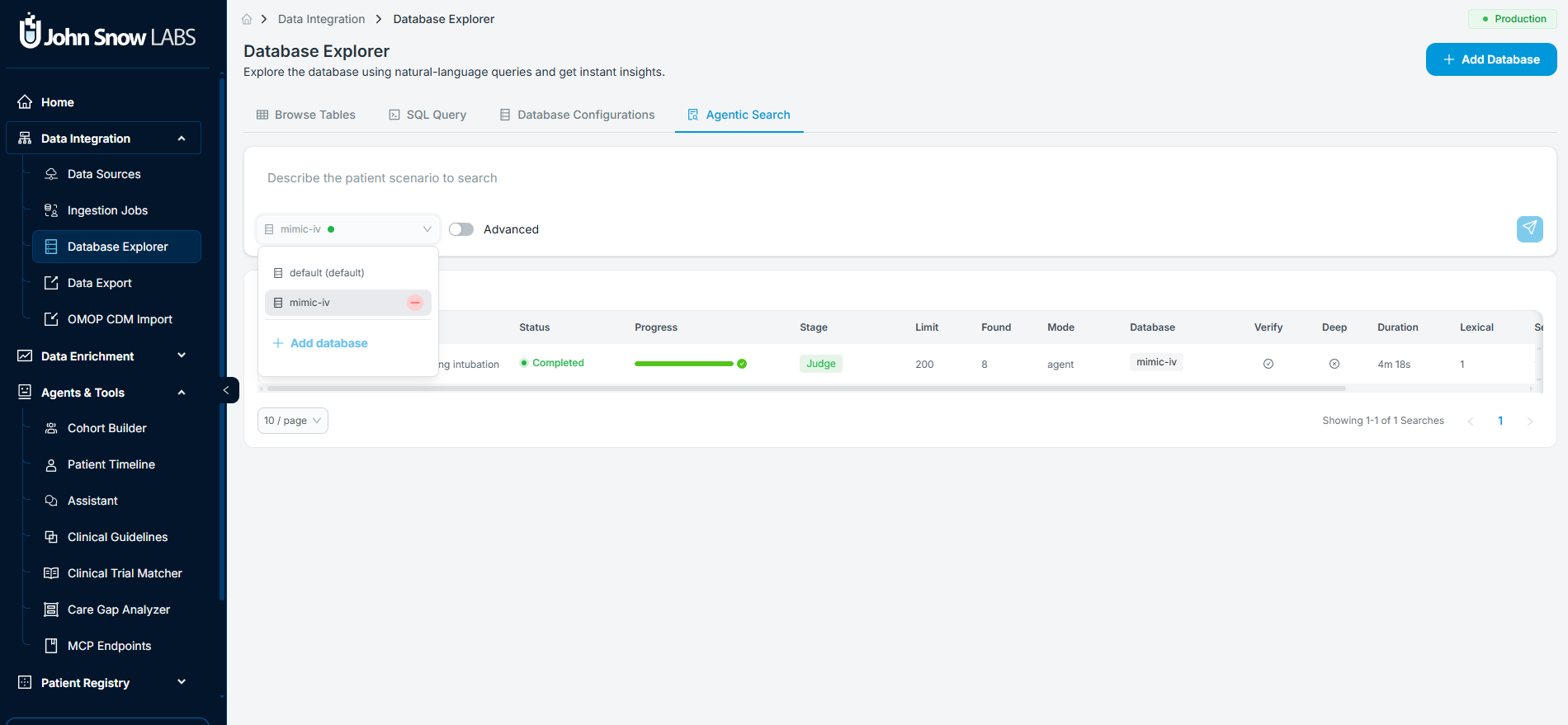
Agentic Search lets you describe a clinical question in plain language, for example patients with septic shock on norepinephrine requiring ventilation, and search a registered database corpus before any documents are ingested.
Every completed search returns matched records with a rationale and an evidence passage for each match, so relevance is visible before you commit to ingestion. A Preview documents step then scopes which patients and document types to fetch. Searches are organized with favorites and sharing controls, so a search that produced a usable cohort can be handed to a colleague rather than rebuilt.
Example: finding a rare presentation in 80,000 notes
A research coordinator with access to an 80,000-note corpus searches for patients with biopsy-confirmed cardiac amyloidosis. The search returns 11 patients with the sentence from each pathology report that triggered the match. Ingestion runs against those 11 patients instead of the full corpus, and the reviewers open a result set where most documents are relevant.
See Agentic Search for the full workflow, supported database types, and preview filters.
SEER schema rules in the cancer registry
237 SEER rules across 121 schemas
NAACCR schema detection runs on SEER's own published rule set, 237 rules across 121 schemas, replacing the hand-built approximation the platform used before. Schema assignment is more accurate across the histology and site combinations the prior logic handled inconsistently, which is where abstractors previously had to correct the assignment by hand.
Confirmed reportable cases assign correctly
Confirmed, reportable cancer cases no longer land under Not Reportable when their codes do not match a schema directly.
Bulk curation start
Start curation for every case in a tab at once instead of confirming one dialog per case. A registrar opening a tab of 60 newly ingested cases starts all of them with a single action.
New features
Infrastructure and reliability
Ingestion no longer freezes the API server
The API server stays responsive during ingestion jobs. Recovering from the previous behavior required a manual restart.
TLS certificates renew without a restart
Renewed TLS certificates are picked up by nginx without a manual container restart.
Idle sessions survive a failed token refresh
Idle users are no longer redirected to the login screen when a silent token refresh fails in the background.
External Apps
System Administrators can register other web applications to render inside Patient Journey Intelligence. Source code is pulled directly from a GitHub repository and branch, and a complete audit trail records app usage and configuration changes. A team that maintains its own tumor board dashboard can surface it next to the registry workflows that feed it, with usage recorded in the same audit log as the rest of the platform.
Information extraction and datasets
Retry failed extractions from the jobs table
Failed information extraction jobs can be retried directly from the jobs table, with no need to open the job detail first.
Search and filter panels on datasets and cohorts
Dataset and document tables now carry Search and Filters panels. Cohorts can no longer be saved with zero patients once exclusions are applied.
Ingestion job details open immediately
Ingestion job detail pages open immediately. Loading previously took up to a minute.
Bug fixes
Assistant
- Patient-level and cohort-level AI chat sessions no longer lose context.
- OMOP and specialized-table results appear as separate tabs when a question spans more than one context.
- Fill with AI works on the forms where it previously failed.
- Names and descriptions derive from real filter and job context instead of invented dates or labels.
Patient registry
- Confirmed, reportable cases no longer appear under Not Reportable when their codes do not map to a schema directly.
De-identification
- PHI bounding boxes render on the correct image slice.
- Failed CSV documents surface their error message instead of an empty, miscounted result list.
Patient Journey Intelligence 2.2.0 extends Databricks compute for de-identification and NLP extraction to every ingestion source, introduces a dataset-first de-identification workflow with no per-run file ceiling, covers mixed modalities in a single de-identification job, and adds the Agentic Search interface for plain-language corpus queries. NAACCR schema detection is rebuilt on SEER's published rule set of 237 rules across 121 schemas, and confirmed reportable cases now assign correctly.
Yes. From 2.2.0, de-identification and NLP extraction run on a Databricks cluster for any ingestion source, including uploaded files, S3, SFTP, and Snowflake. Unity Catalog sources no longer use Databricks automatically, so you choose compute explicitly per job. Worker-node count is configurable per job between 0 and 32, using a Databricks credential saved once under Settings → Cloud Credentials.
There is no per-run file-count ceiling. De-identification starts from a dataset, so a dataset of any size is de-identified in a single job, and the same dataset can be re-run whenever a profile changes. Before 2.2.0, large corpora had to be split into manually managed batches.
Yes. One workflow covers mixed modalities together, so text documents, PDFs, and imaging studies for the same patients are processed in a single run. Imaging studies held in AWS HealthImaging can be ingested without copying them, though de-identification of those studies is not yet supported and now reports a specific cause when it is attempted.
Agentic Search is an interface for describing a clinical question in plain language and searching a registered database corpus before ingesting any documents. Results show matched records with a rationale and an evidence passage for each match. A Preview documents step scopes which patients and document types to fetch, and searches can be saved as favorites and shared with colleagues.
NAACCR schema detection runs on SEER's own published rule set of 237 rules across 121 schemas, replacing the prior hand-built approximation, so schema assignment is more accurate across histology and site combinations. Confirmed, reportable cancer cases no longer appear under Not Reportable when their codes do not map directly to a schema, and bulk curation start launches curation for every case in a tab at once.