Patient Journey Intelligence 2.2.2: Databricks curation jobs and OMOP upload fixes
Patient Journey Intelligence 2.2.2 extends the Databricks integration introduced in 2.2.0 and closes two local upload failures. Data Curation jobs that include an Information Extraction step now run on a Databricks cluster, and the contents of a ZIP archive are visible inside the Databricks job that processed it.
On the local upload side, two failures that produced wrong or missing data without saying so are fixed. An upload spanning several patient folders now maps every patient, and a source value longer than its OMOP varchar column is trimmed or flagged instead of stopping the job in silence.
Clinical scenarios in this page are illustrative. Any patient data shown is synthetically generated.
Curation with IE on Databricks
Data Curation jobs that include an Information Extraction step run on a Databricks cluster, so the full curation workflow uses one compute environment.
ZIP contents in job detail
The files inside an uploaded archive are listed in the Databricks job that processed it, so you can confirm what was read without leaving the platform.
Features and enhancements
Databricks integration
ZIP archive contents are visible in the job
ZIP file contents are displayed directly within Databricks jobs. When a job processes an archive, the files inside it appear in the job detail, so you can confirm what was processed and diagnose a shortfall without leaving the platform.
A registry team uploading outside_records_2019.zip can see that the archive held 412 PDFs and 3 unreadable files, rather than inferring it from a document count that does not match the invoice.
Data Curation with Information Extraction runs on a cluster
Data Curation jobs that include an Information Extraction step can be configured to run on a Databricks cluster. When a cluster configuration is applied, Information Extraction runs strictly within the Databricks environment, so the full curation workflow uses one compute environment from extraction through to the curated output.
A cancer center curating 5,000 pathology reports for a registry backlog configures the curation job with a Databricks cluster once. Extraction and curation then run on the same cluster, and cluster sizing is the only knob that changes between a backlog run and a weekly incremental.
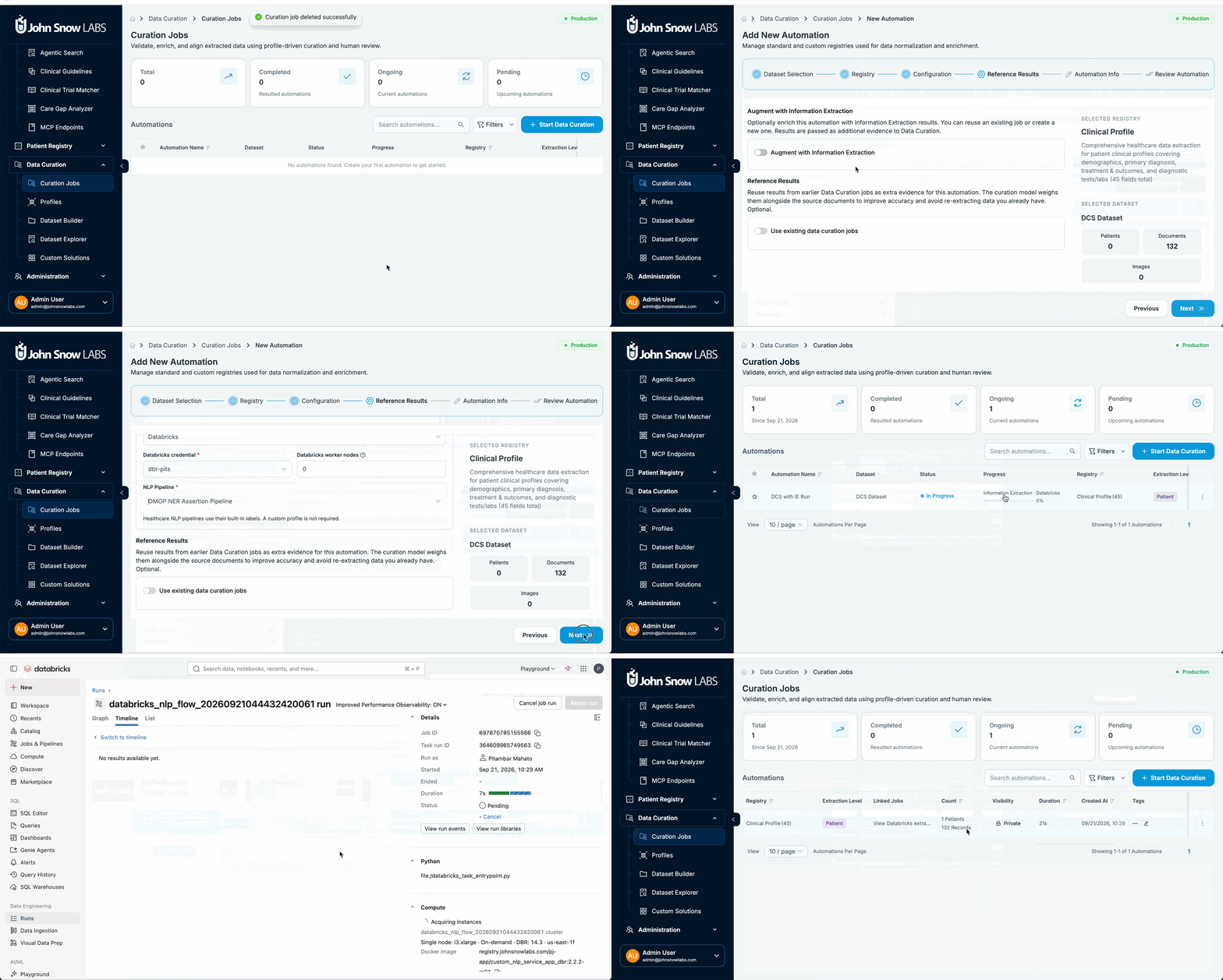
See curation jobs and data ingestion for how to configure compute on each step.
Bug fixes
Local upload
Every patient folder is mapped
When a local upload contained several folders, each holding its own patient metadata file, only one patient was mapped. Every patient in the upload is now mapped correctly. An upload of 25 patient folders produces 25 patients rather than 1.
OMOP source values longer than the column limit
Local uploads failed silently when an OMOP source value exceeded the varchar column limit in the database, which is a common outcome for a long procedure description or a concatenated source identifier. The platform now handles these values by auto-trimming them or surfacing a validation warning, so the job reports what happened instead of stopping without explanation.
Patient Journey Intelligence 2.2.2 shows ZIP archive contents inside Databricks jobs, lets Data Curation jobs that include an Information Extraction step run on a Databricks cluster, and fixes two local upload failures: uploads spanning multiple patient folders now map every patient, and OMOP source values that exceed varchar column limits are trimmed or flagged instead of failing silently.
Yes, from 2.2.2. Data Curation jobs that include an Information Extraction step can be configured with a Databricks cluster. When a cluster configuration is applied, Information Extraction runs strictly within the Databricks environment, so extraction and curation use the same compute.
Before 2.2.2, an upload containing multiple folders that each held an individual patient metadata file mapped only one of them. The fix in 2.2.2 maps every patient in the upload. Re-run the affected upload after upgrading to bring in the patients that were skipped.
From 2.2.2, the value is auto-trimmed or a validation warning is surfaced, and the job continues and reports what happened. Before 2.2.2, the upload failed silently with no explanation, which most often affected long procedure descriptions and concatenated source identifiers.