Patient Journey Intelligence 2.3.0: multi-modal de-identification, remote compute, and product selection
Patient Journey Intelligence 2.3.0 brings improvements to de-identification, remote compute, AI inference, data management, and the overall user experience. It also adds GPU configuration for selected processing steps and strengthens security and reliability.
Multi-modal de-identification
De-identify external database tables and apply consistent pseudonymization across text, CDA, FHIR, HL7, DICOM, and tabular data.
Databricks and remote compute
Run ingestion, de-identification, and Information Extraction on existing Databricks workspaces and remote Spark clusters.
LLM serving with LMCache
The local vLLM launcher offloads KV cache to CPU memory or SSD to speed up repeated-context inference.
GPU for ingestion steps
Configure GPU resources for De-identification and Information Extraction steps in templates.
Agentic Search
Preview results, connect Elasticsearch as a corpus, and send found documents to ingestion.
Choose your PJI products
Install Patient Registry, De-identification, Data Curation, Patient Journey, or a combination, and control access per user.
New features and enhancements
Multi-modal de-identification and review
De-identify external database tables
Connect to external relational databases through Spark JDBC and configure de-identification actions for individual columns, including date shifting, HIPAA masking, and age grouping. AI-assisted configuration generation is also supported.
Consistent pseudonymization across formats
Apply consistent, salt-based pseudonymization across clinical text, CDA, FHIR, HL7, DICOM, and tabular data to help maintain a unified patient timeline.
Simpler chained pipelines
Chained Airflow pipelines now pass document references and IDs instead of transferring full document payloads through DAG configuration and PostgreSQL.
Review more document types
Review decisions are saved for HL7 v2 messages, structured tables, and CDA documents. Reviewers can also redact PDFs using manual bounding boxes and propagate redactions across DICOM series slices.
Distinguish FHIR formats
FHIR XML and JSON documents now have different visual badges.
Improve failure diagnosis
Exception dialogs and original-text fallbacks make pipeline failures easier to investigate.
Share de-identification projects
De-identification projects now use the platform's standard Share dialog. Open it from a project's Share button or the share icon in the project list.
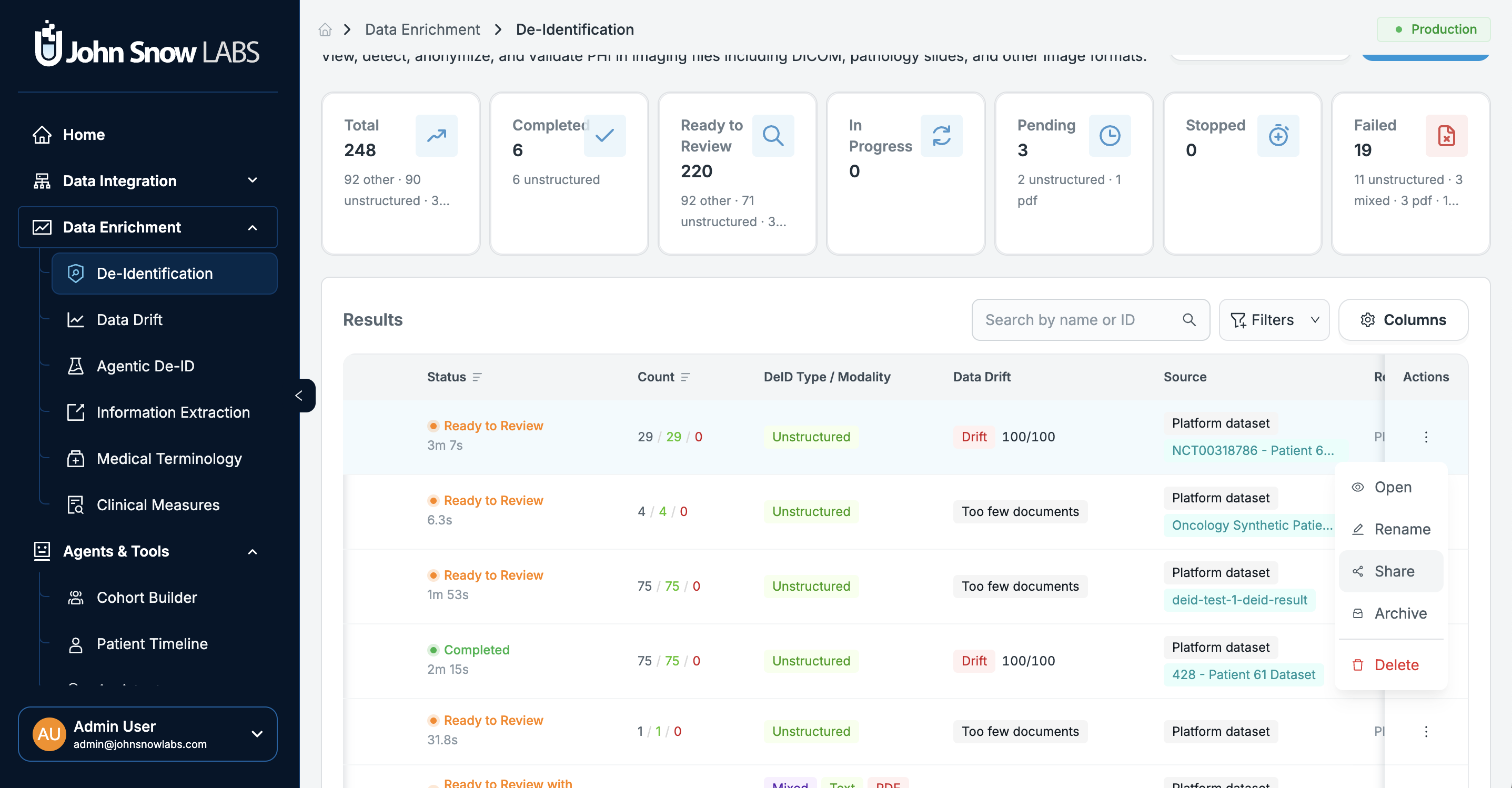
See de-identification for how projects and review work.
Databricks and remote compute
Run workloads on remote clusters
Run ingestion, de-identification, and Information Extraction (IE) workloads on existing Databricks workspaces and remote Spark clusters.
Control remote database access
Requests from Databricks and other approved remote servers are identified and authenticated before access is granted. Authorized requests receive access to PostgreSQL and Elasticsearch only as required for the supported operation. A proxy service is not a prerequisite for this access.
Use PJI datasets for de-identification and IE
De-identification and Information Extraction can now process data from PJI datasets.
Ingest Delta tables
Ingest unstructured documents directly from Delta tables.
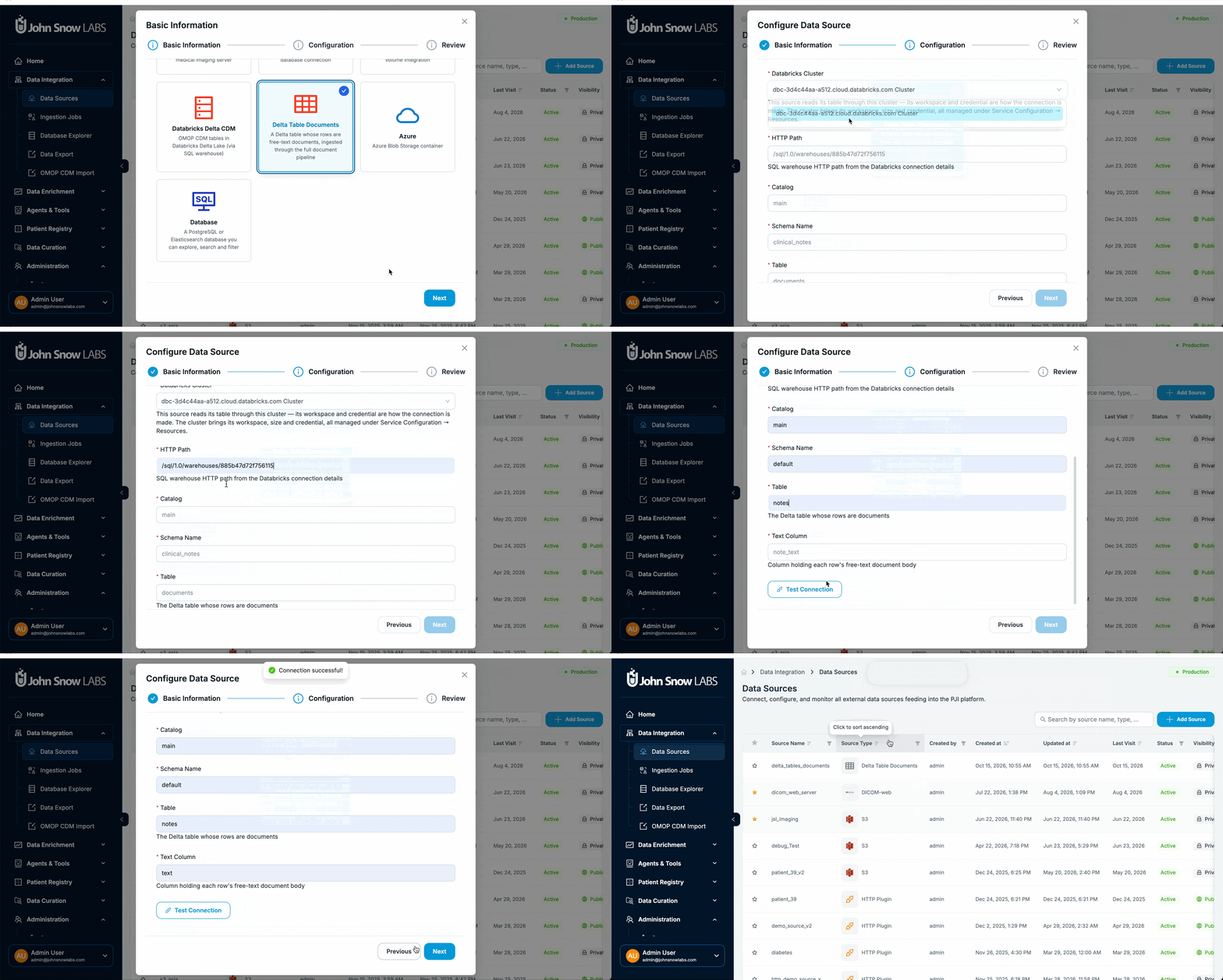
View cluster details
The application now displays Databricks cluster nodes, status, and execution configuration.
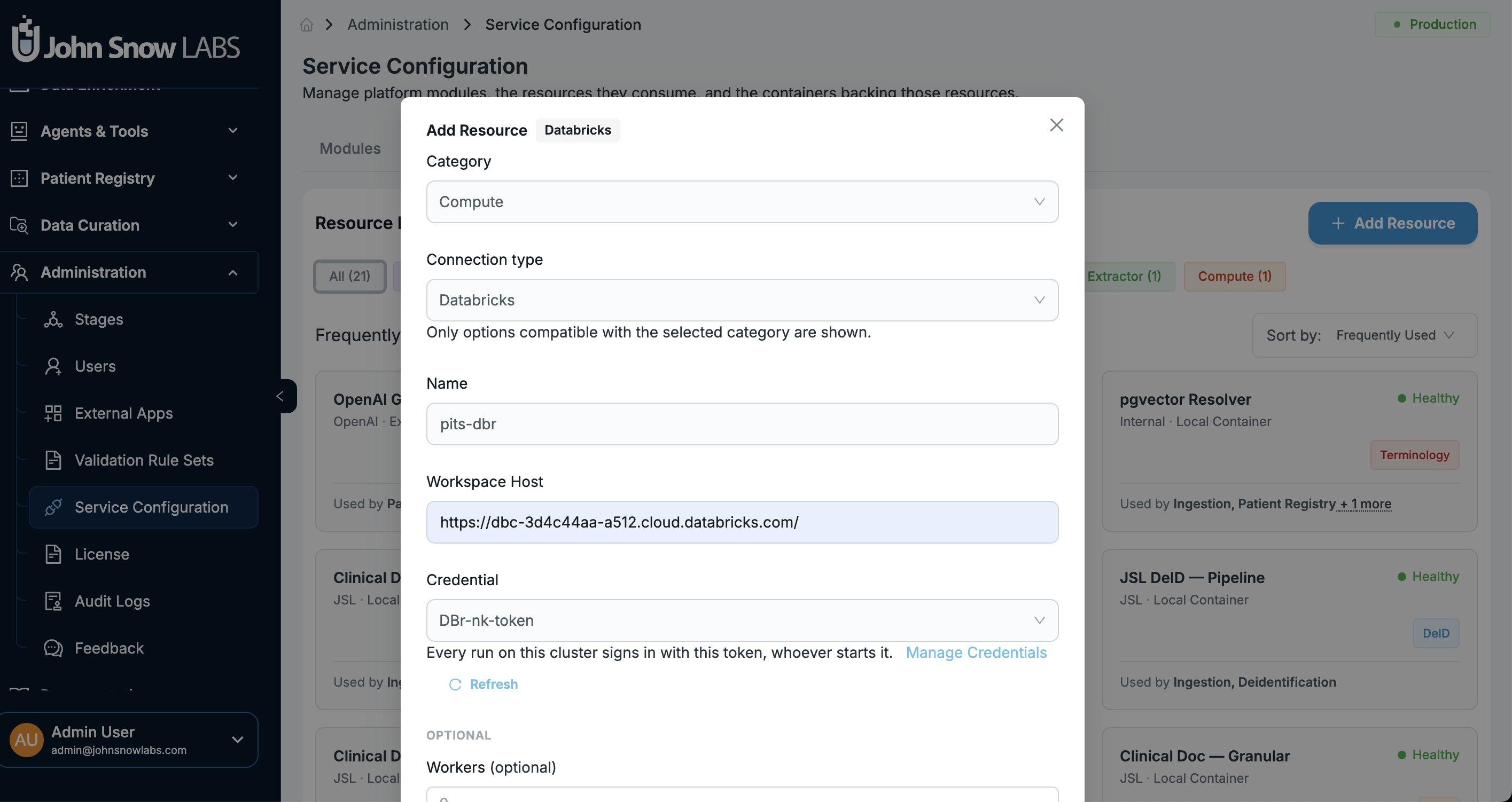
See Databricks deployment and data ingestion for configuration details.
LLM serving and inference caching
Improve repeated-context inference
The local vLLM launcher now integrates LMCache, which can offload KV cache to CPU memory or SSD. Project notes report 3-10x faster responses in repeated-context evaluations. Actual results depend on the workload and deployment.
Simplify local LLM setup
Local LLM setup and token generation are automated for models deployed within PJI instances.
Data management and enterprise deployments
Expand OMOP metadata mapping
Metadata mapping to OMOP Common Data Model (CDM) tables now includes non-DICOM formats such as NIFTI, SVS whole-slide pathology images, PNG/JPEG images, and MP4 video.
Clear ingestion data safely
Administrators can clear raw Elasticsearch index data and staging files while retaining job audit logs. Related dataset and cohort views display a clear Source removed indicator instead of failing with 404/403 errors.
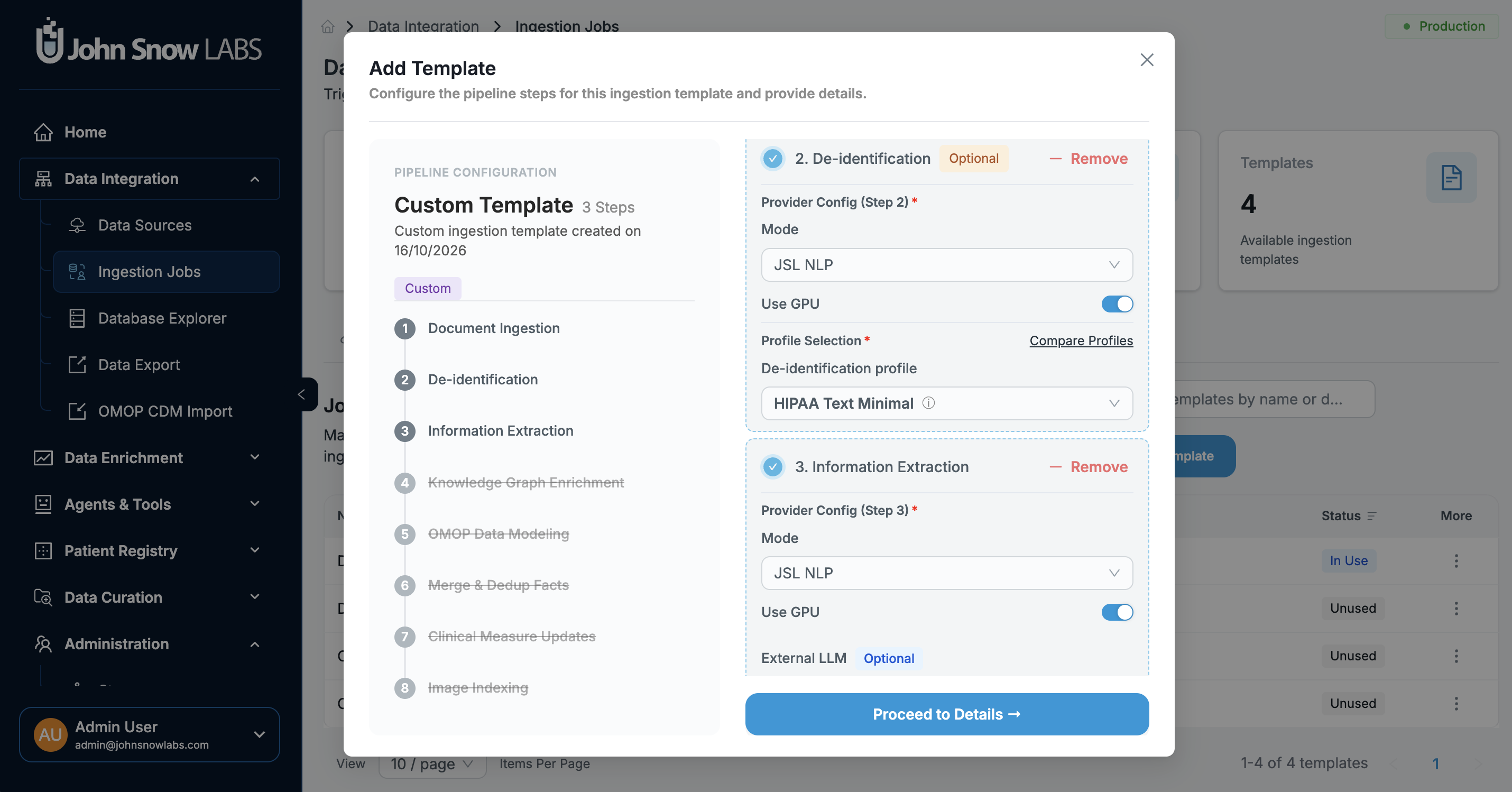
GPU support for ingestion workflows
GPU configuration is now available in templates for the De-identification and Information Extraction steps. Users can configure GPU resources for these steps so supported Spark-related jobs can use them.
Agentic Search improvements
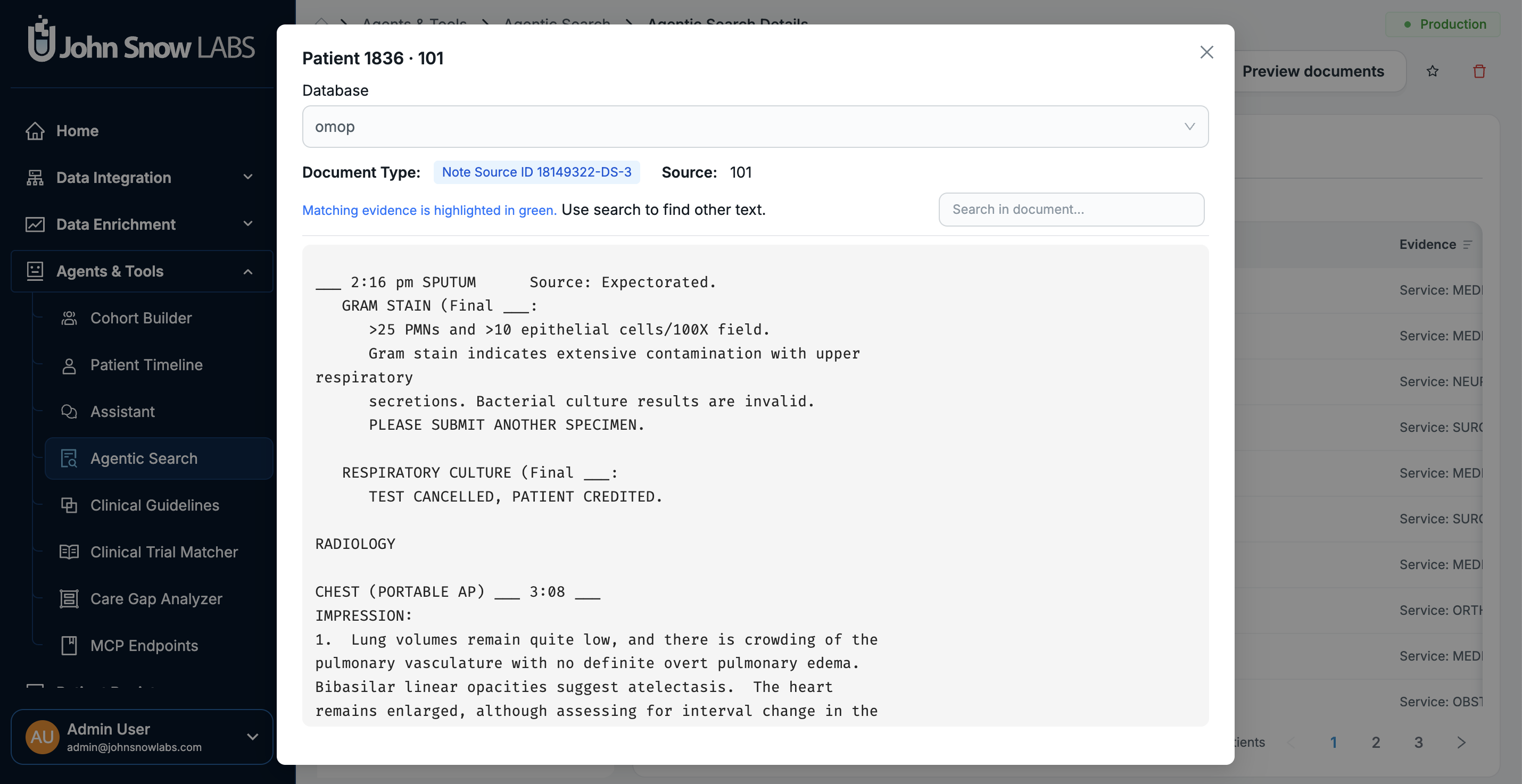
Preview search results
Completed Agentic Search runs now include a Preview documents option on the run page.
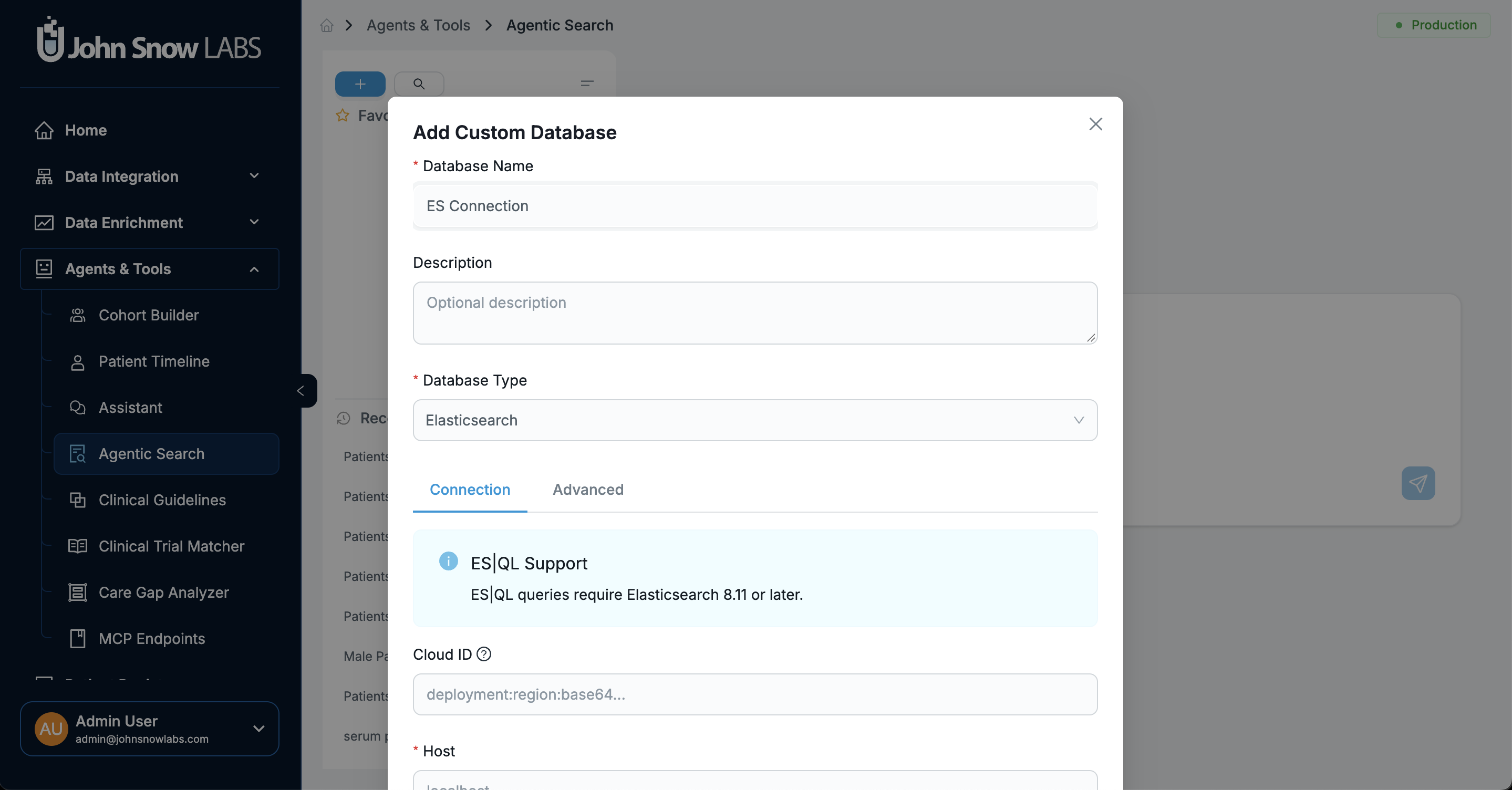
Connect Elasticsearch as a search corpus
Add Database and Agentic Search can now register Elasticsearch connections alongside PostgreSQL.
See Agentic Search for the full workflow.
Additional product improvements
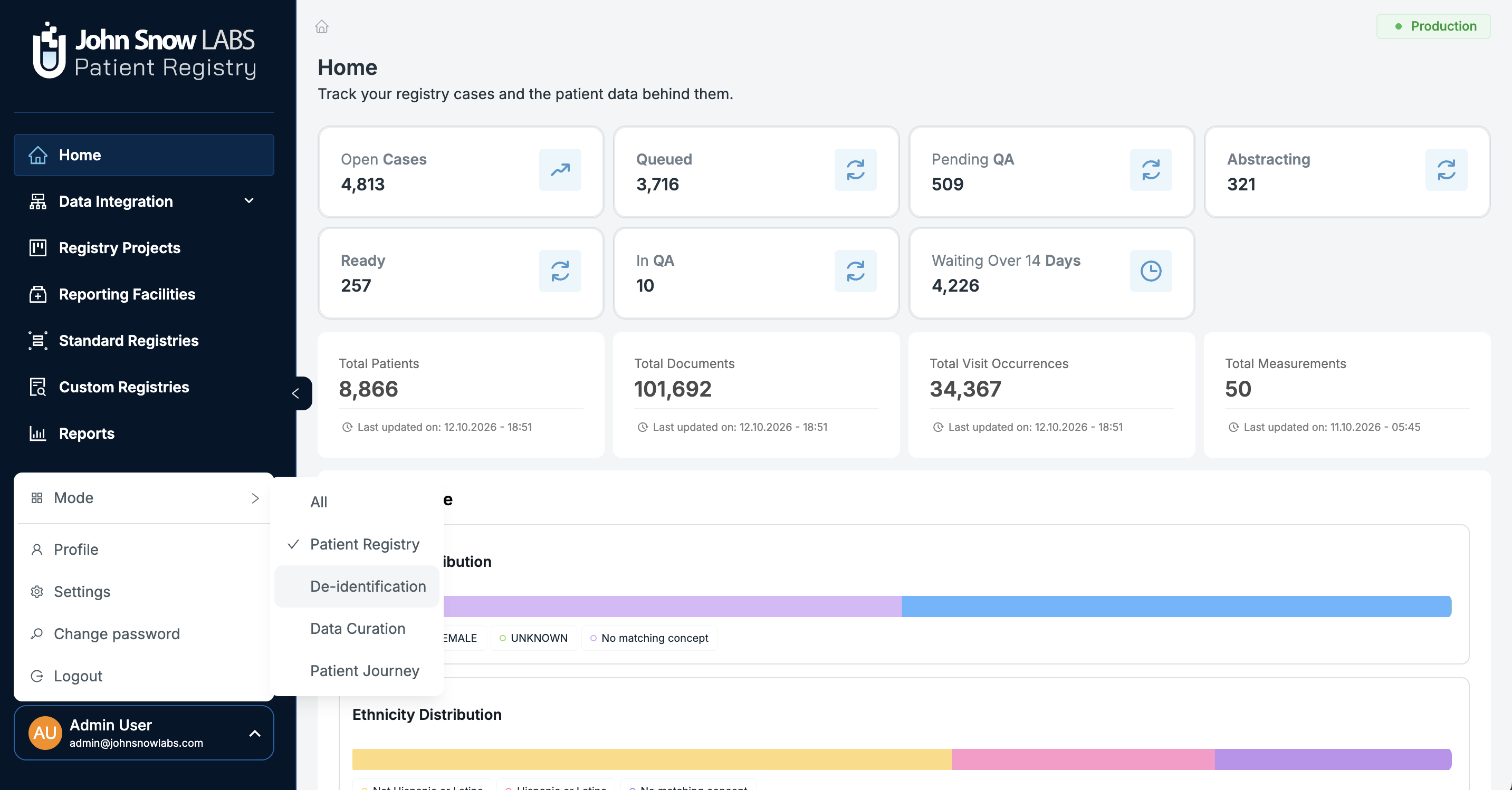
Choose which PJI products to install
Deploy Patient Registry, De-identification, Data Curation, Patient Journey, or a combination of these products. Administrators can control which products each user can access through the user form. The sidebar is grouped by product, and users with access to multiple products can switch modes from the user menu. The menu and logo adjust to the selected product.
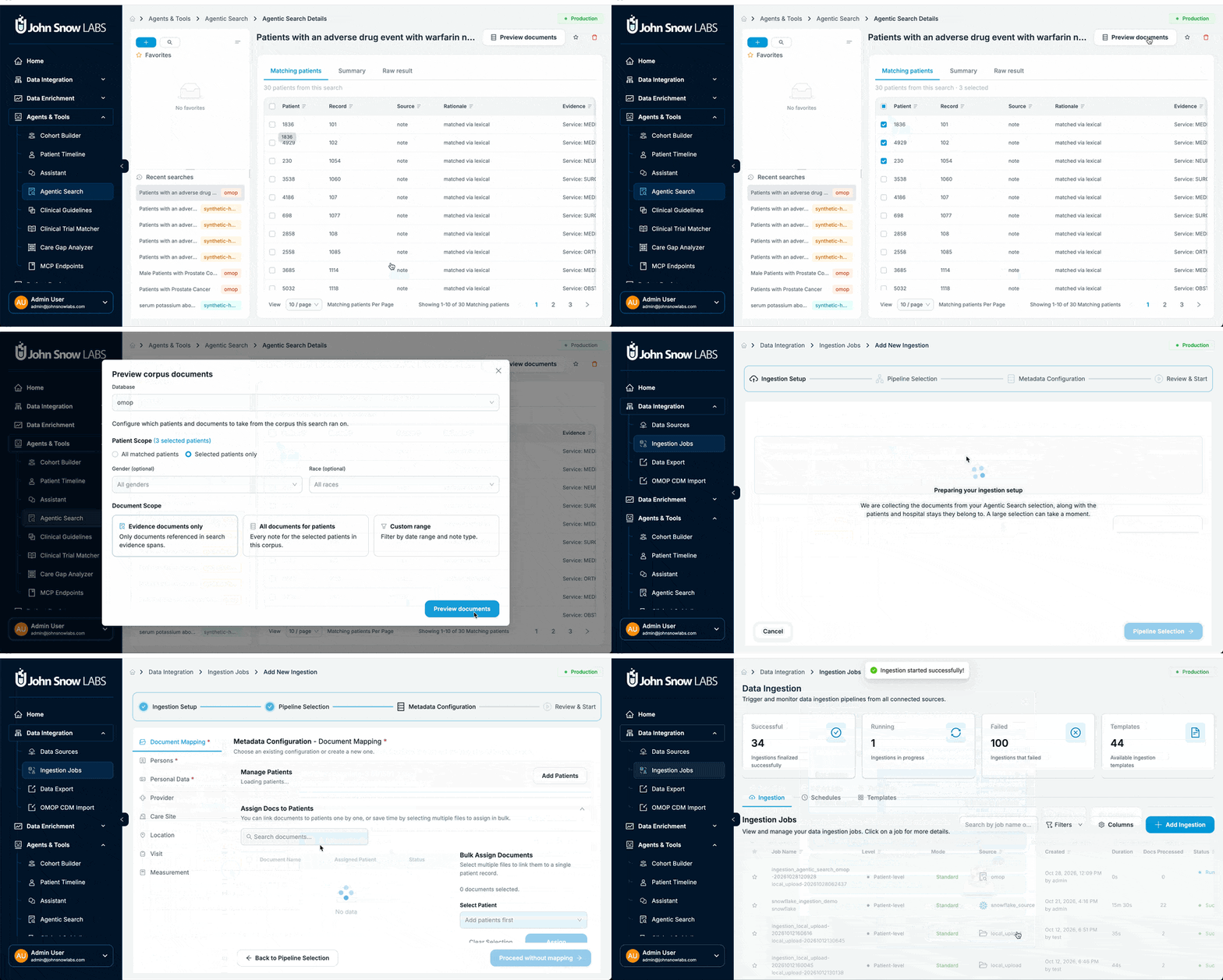
Send search results to ingestion
Documents found through Agentic Search can be sent directly to ingestion with their patient details.
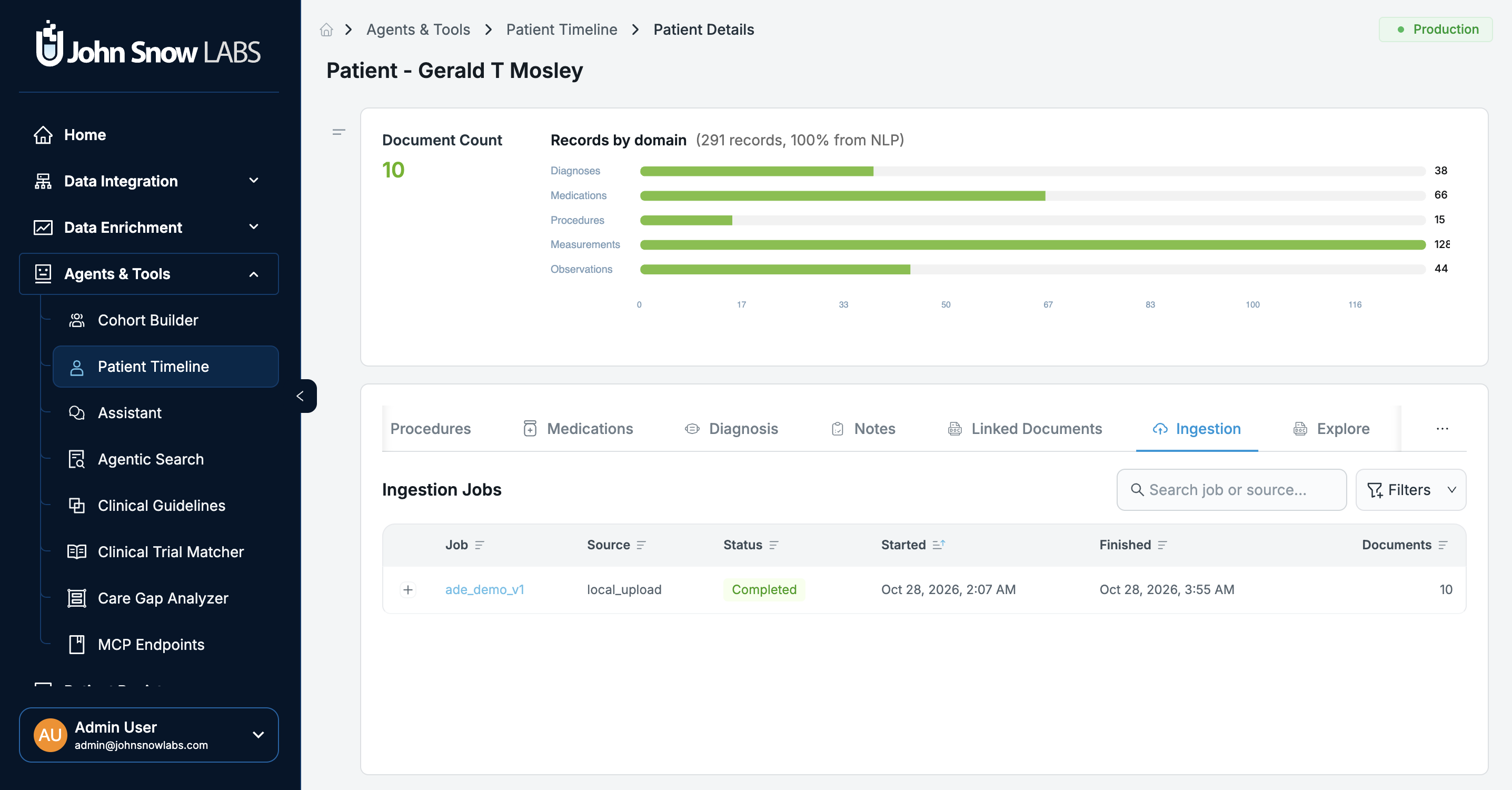
View ingestion history on patient pages
A new Ingestion tab lists the jobs that added documents for a patient and shows which documents each job contributed.
Security, performance, and bug fixes
Security
- Stronger access checks: Production and playground environments now require explicit team and user membership checks.
Cloud storage and Elasticsearch
- More reliable cloud storage access: Fixed credential decryption issues, AWS STS temporary-credential expiry problems during high-volume S3 listings, and connection-pool leaks.
- Improved Elasticsearch stability: Reduced the risk of JVM circuit-breaker trips caused by large payloads and addressed long-running timeouts during bulk status changes.
Frontend
- Smoother review interface: Fixed React 19 and Ant Design
Splitterre-render cycles and corrected scroll synchronization in dual-panel review. - More reliable document explorer: Fixed issues with pagination resets and the serving of raw files.
- More robust event streaming: Improved frontend Server-Sent Events (SSE) handling for malformed chunks.
Patient Journey Intelligence 2.3.0 adds de-identification of external database tables, consistent pseudonymization across text, CDA, FHIR, HL7, DICOM, and tabular data, and remote execution of ingestion, de-identification, and Information Extraction on Databricks and Spark clusters. It also adds LMCache to the local vLLM launcher, GPU configuration for De-identification and Information Extraction steps, Agentic Search preview and Elasticsearch corpora, and selectable PJI products.
Connect to the database through Spark JDBC and configure a de-identification action for each column, such as date shifting, HIPAA masking, or age grouping. AI-assisted configuration generation can propose the column actions for you.
No. Requests from Databricks and other approved remote servers are identified and authenticated, and authorized requests receive access to PostgreSQL and Elasticsearch only as required for the supported operation. A proxy service is not a prerequisite.
The local vLLM launcher now integrates LMCache, which can offload KV cache to CPU memory or SSD. Project notes report 3-10x faster responses in repeated-context evaluations, but actual results depend on the workload and deployment.
Yes. You can deploy Patient Registry, De-identification, Data Curation, Patient Journey, or a combination. Administrators control which products each user can access through the user form, and users with access to several products can switch modes from the user menu.
Administrators can clear raw Elasticsearch index data and staging files while retaining job audit logs. Related dataset and cohort views show a Source removed indicator instead of failing with 404 or 403 errors.