

 Demos
Demos































Visual de-identification is the process of detecting and masking protected health information (PHI) inside scanned medical documents, images, and PDFs.
PHI in visual documents can appear in printed headers, stamps, handwritten notes, tables, signatures, or other areas that standard text-processing workflows may not capture.
Generative AI Lab addresses this with a dedicated Visual NER De-Identification workflow that brings PHI detection, masking, human review, and controlled export into the same environment.
Why Do Scanned Medical Documents Need Visual De-Identification?
Healthcare organizations regularly work with scanned medical records, faxed referrals, intake forms, and image-based PDFs.
Unlike a standard text document, a scanned page is first treated as an image. Before sensitive information can be masked, the system needs to identify where that information appears on the page.
PHI may be embedded in locations such as:
- Printed headers
- Stamps
- Handwritten annotations
- Embedded tables
- Signature blocks
- Organization-specific identifiers
Manual redaction can work for small volumes, but it becomes difficult to maintain consistently as datasets grow. It also separates privacy review from the annotation workflow itself.
Generative AI Lab brings those steps together in one visual de-identification workflow.
How Does Visual De-Identification Work from Import to Export?
The Visual NER De-Identification project type applies de-identification throughout the document workflow and not as a separate final step.
When images or PDFs are imported, OCR preprocessing prepares the documents for analysis. During AI-assisted pre-annotation, sensitive entities such as names, dates, and identification numbers can be marked for masking.
Reviewers then work with the masked document directly inside the annotation interface. They can compare the original and de-identified views, correct missed or incorrectly masked information, and rerun de-identification to update the preview.
Once the review is complete, teams can use Export Only De-Identified to restrict the output to the masked version of the documents.
How Can PHI Detection Be Configured?
Different organizations handle different types of sensitive information, so Generative AI Lab supports two approaches to configuring visual de-identification.

Clinical De-Identification Pipeline
The clinical de-identification pipeline combines models and resources designed for common healthcare identifiers.
It provides out-of-the-box coverage for entities such as names, dates, addresses, and identification numbers and is intended for teams that want broad PHI detection with minimal configuration.
Custom Models and Rules
For projects that require more specialized control, teams can configure de-identification using individual NER models together with built-in or custom rule-based detectors.
This is useful for identifiers that follow organization-specific patterns, such as local encounter IDs, accession numbers, or other structured formats that may not be covered by a general clinical model.
These options allow teams to choose the configuration that best matches their document types and privacy requirements.
What Does Human Review Add to Visual De-Identification?
Automated detection is only one part of a reliable de-identification workflow. Scan quality, handwriting, document layout, and unusual identifier formats can all affect what an automated system detects. Human review therefore remains an important part of the process.
Generative AI Lab provides a live de-identification preview so reviewers can verify what the final masked document will look like before export.
If a reviewer notices that a sensitive element has been missed, they can adjust the annotation and rerun de-identification. The updated mask is then reflected in the preview.
This keeps correction and validation inside the same workflow without requiring a separate redaction tool.
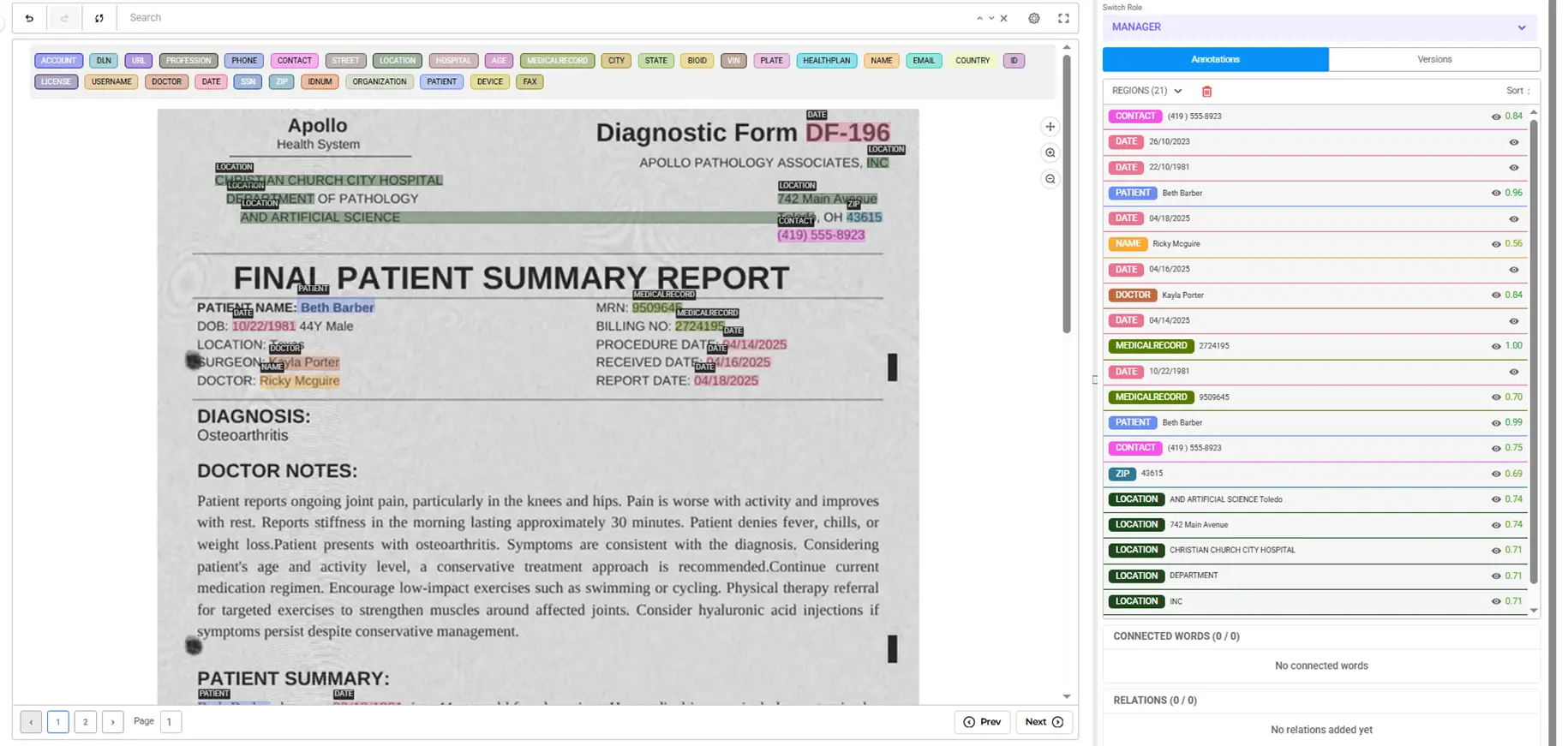
Example: Preparing Scanned Records for Research
Consider a research team preparing a large collection of scanned oncology records for secondary use.
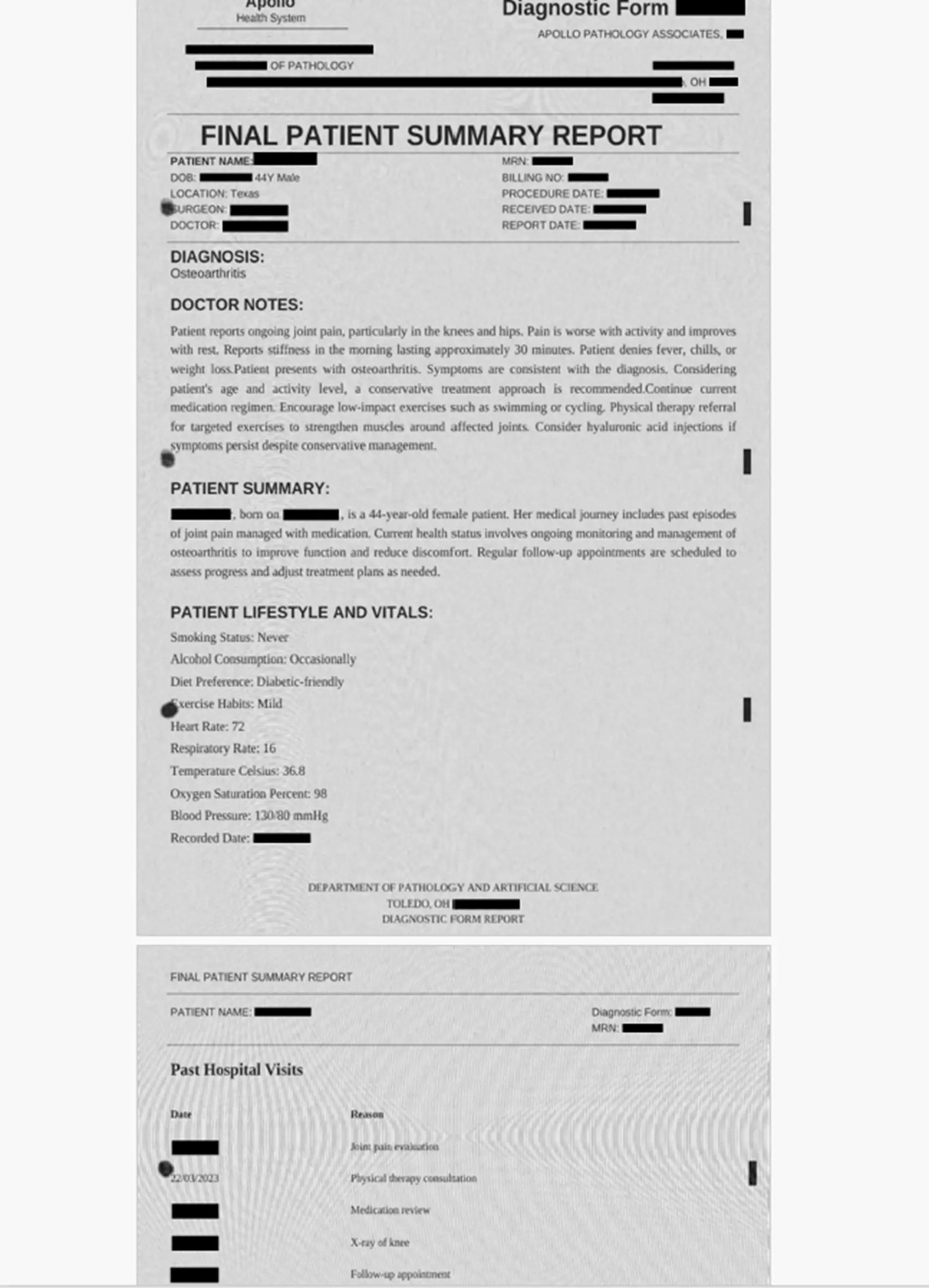
A synthetic document contains a patient name, medical record number, dates, address information, and an internal encounter identifier following a hospital-specific format.
The team can use the clinical de-identification pipeline for common PHI categories and configure a specialized rule-based workflow for identifiers that require organization-specific handling.
During human review, a reviewer notices a handwritten physician initial that was not automatically detected. They add the appropriate annotation, rerun de-identification, and verify the corrected mask in the live preview.
Once the review is complete, the team exports only the de-identified PDFs.
How Does Visual De-Identification Fit into a Broader Privacy Workflow?
Visual de-identification extends PHI detection to scanned and image-based content.
The same broader healthcare privacy workflow may also include structured clinical text, medical imaging, and other formats.
DICOM medical images, for example, require their own imaging-specific de-identification process because sensitive information may appear both in image pixels and in metadata.
It is also important to distinguish between detecting and masking identifiers and meeting a particular regulatory de-identification standard.
HIPAA Safe Harbor, Expert Determination, and GDPR each introduce different requirements. Identifier detection is an important part of those processes, but it does not by itself determine whether a dataset satisfies a specific regulatory standard.
Frequently asked questions
What is visual de-identification?
Visual de-identification is the process of detecting and masking sensitive information inside scanned medical documents, images, and PDFs.
How is visual de-identification different from text-based de-identification?
Text de-identification works directly on machine-readable text. Visual de-identification first needs to locate sensitive information inside an image or scanned page before that information can be labeled and masked.
How can PHI detection be configured?
Teams can use the clinical de-identification pipeline for common healthcare identifiers or configure individual NER models and rule-based detectors for more specialized requirements.
Can Generative AI Lab export only de-identified files?
Yes. The Export Only De-Identified option allows teams to restrict exported output to the masked versions of the documents.
What file types does visual de-identification support?
The workflow supports scanned images and PDFs, including multi-page documents. DICOM medical images are handled through a related imaging-specific workflow.
How does human review work before export?
Reviewers use the live preview to compare the original and masked document, correct missed or incorrectly detected PHI, and rerun de-identification before the final output is exported.
Does visual de-identification support HIPAA and GDPR workflows?
The workflow performs the detection, masking, review and export steps. HIPAA Safe Harbor requires removal of 18 identifier categories, and Expert Determination requires a documented risk assessment. GDPR treats pseudonymised data as personal data. Compliance depends on which standard the organization applies and how the output is used.
See it in action
Generative AI Lab brings visual de-identification into the same platform where annotation and review already happen.
Talk to us about a de-identification workflow