

























Join the Applied Healthcare AI Summit | Free online conference | April 14-15, 2026
was successfully added to your cart.

Terminology Server

Power your workflows with smarter, faster medical terminology matching, the fastest way to turn medical text into standardized codes - no matter the source.

Seamless
Accurate
Instant

Supported Standard Vocabularies

Comprehensive coverage of all major medical coding systems and terminologies
ATC
CPT4
CVX
HCPCS
HGNC
HPO
NDC
ICD-10-CM
ICD-10-PCS
ICD-9-CM
ICDO3
LOINC
MedDRA
MeSH
NCIT
NDC
NDC-PACKAGE
NDC-PRODUCT
RxNorm
SNOMED-CT
UMLS

From Raw Text To Accurate Medical Codes

Comprehensive medical terminology processing with intelligent features

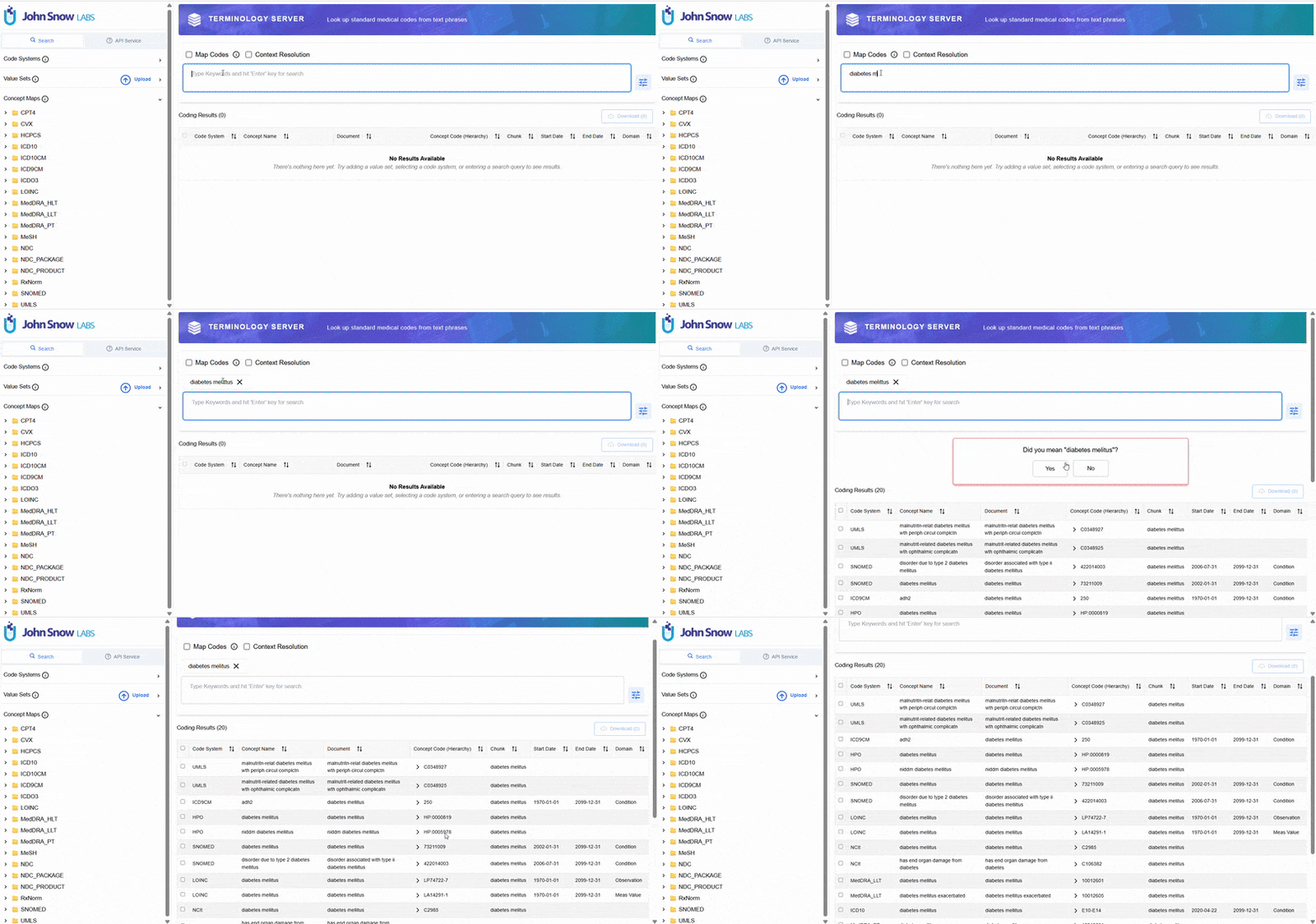
Smart Text-to-Code Conversion

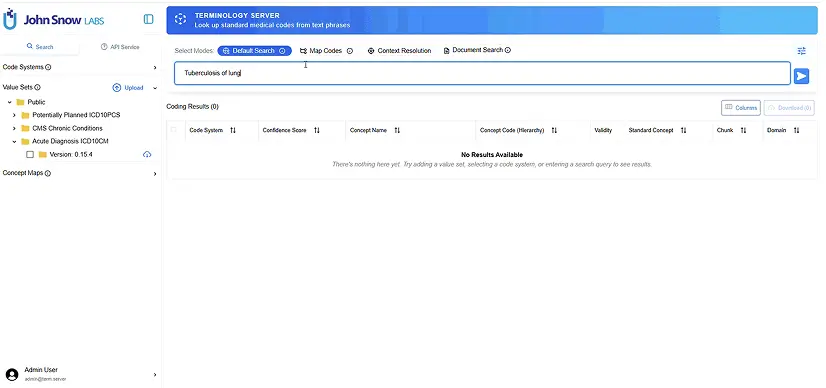
Input free medical text to get corresponding medical codes. Automatic detection of spelling errors or abbreviations in user queries with option to accept or ignore the suggestion/correction.

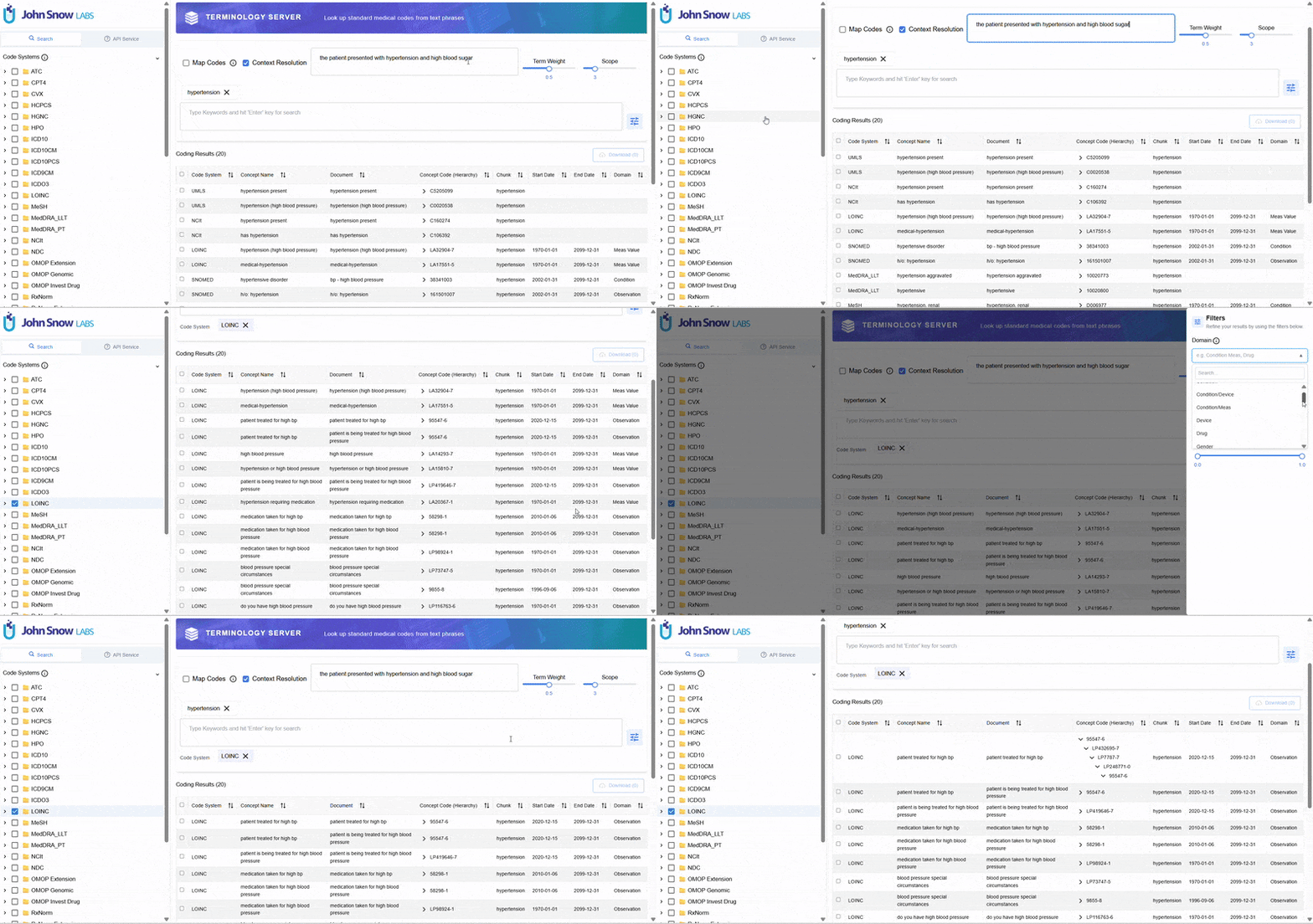
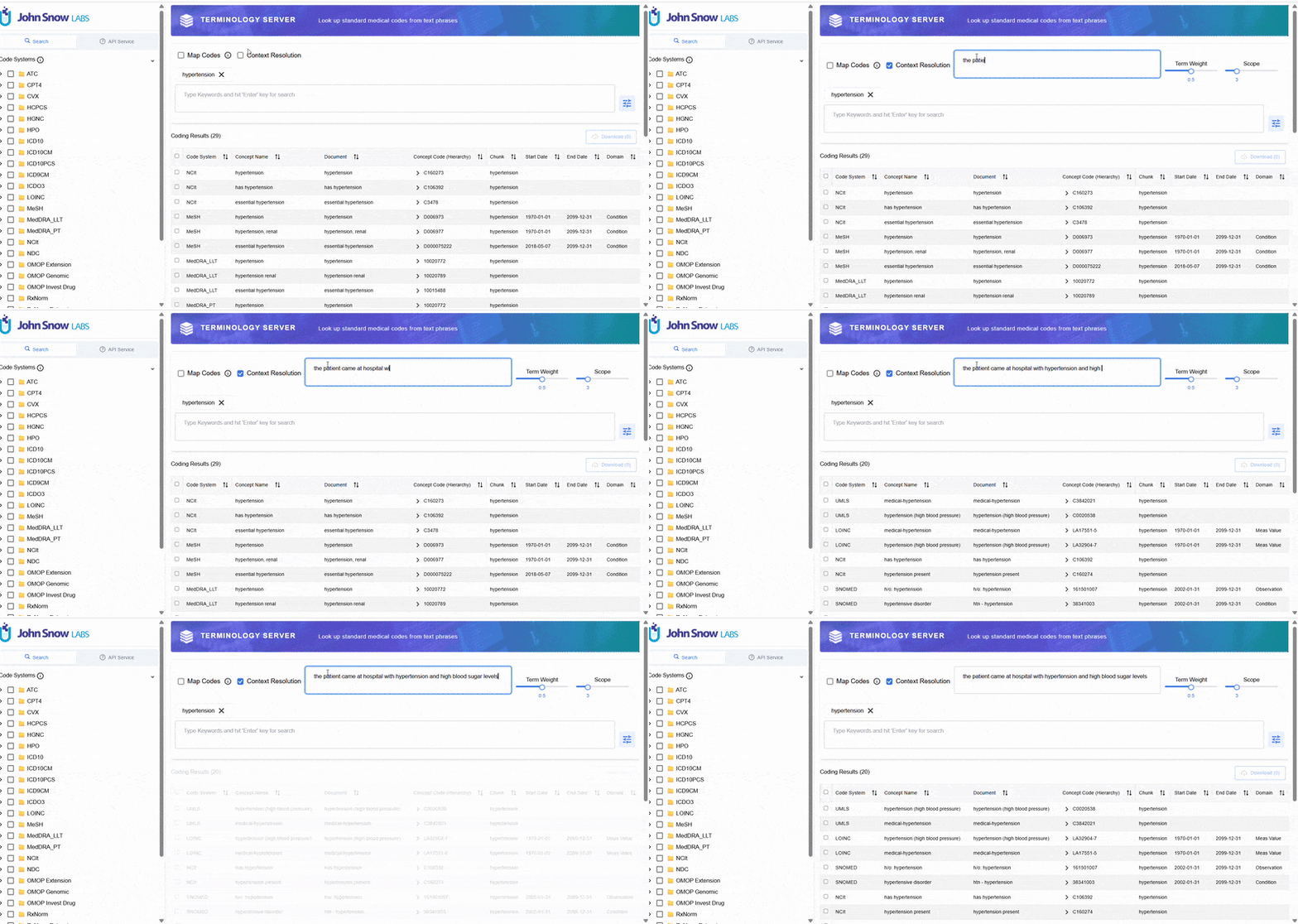
Context Resolution Search

Intelligently prioritize and rank results that are most relevant to the user’s specific intent. Reduce irrelevant results, improve precision for specialized domains, and streamline workflows by surfacing the most applicable codes faster.

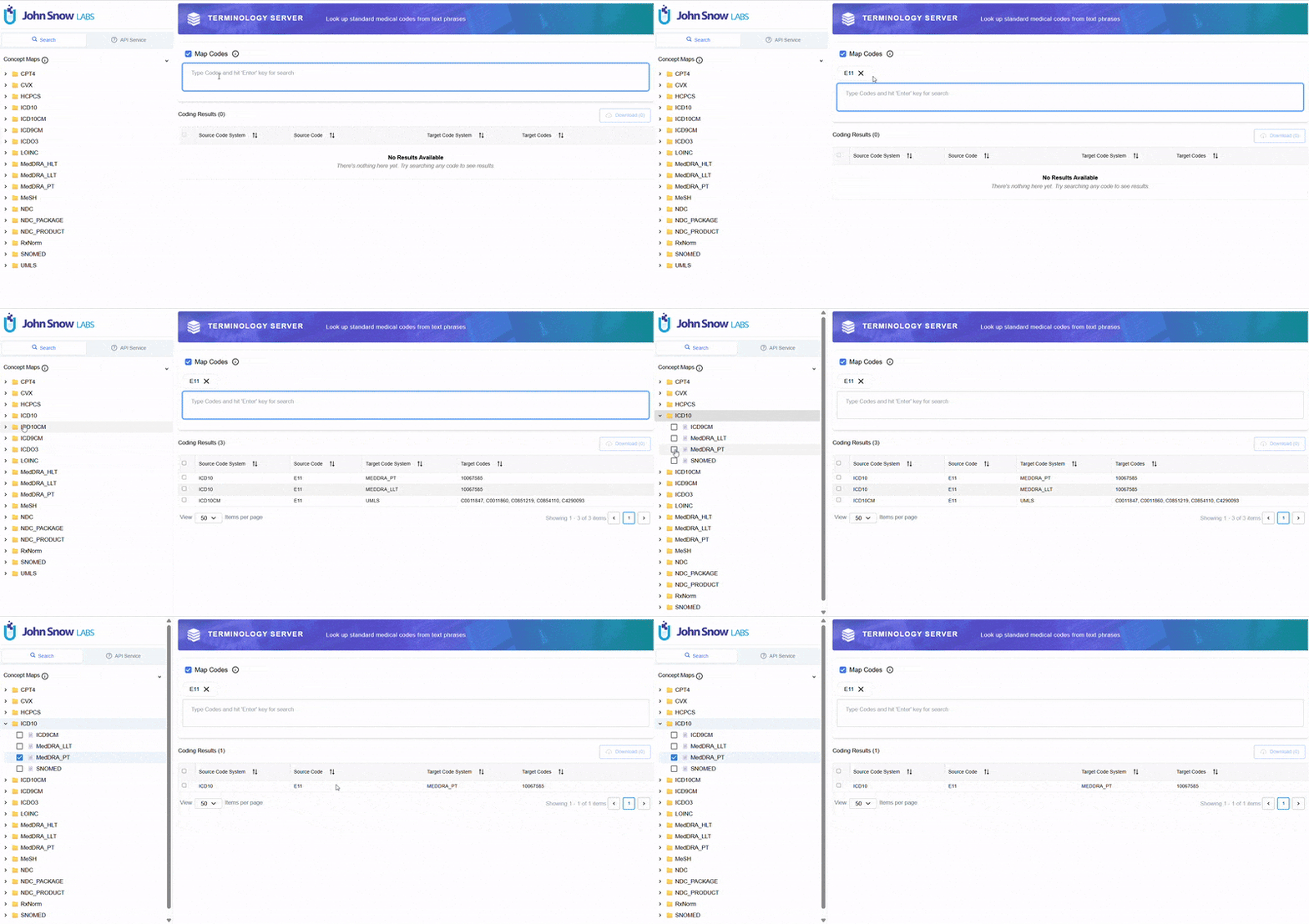
Concept Maps

Locate a specific medical code within the Terminology Server’s curated set of medical coding systems. View the equivalent medical code in a different vocabulary – such as SNOMED CT to ICD-10 crosswalks or LOINC to SNOMED mappings.

Advanced Filtering

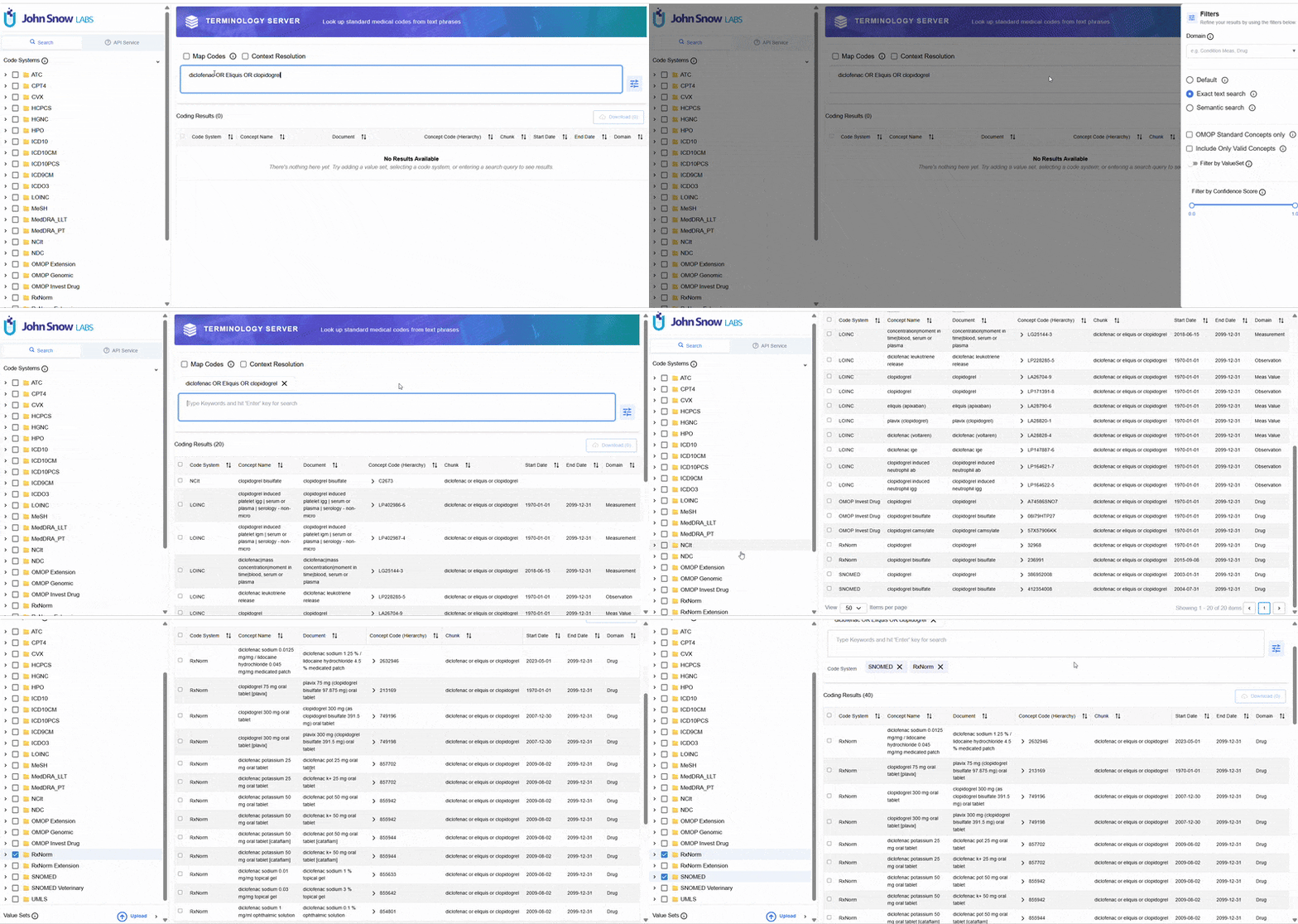
Filter by Domain (e.g. Condition/Device, Condition/Meas, Drug, Gender), OMOP Standards Concepts Only, Concept Validity, and Confidence Score for enhanced search precision.

Boolean Search Operations

Refine your results using boolean operators: use AND/OR logic for exact text matching to get precisely the codes you need.

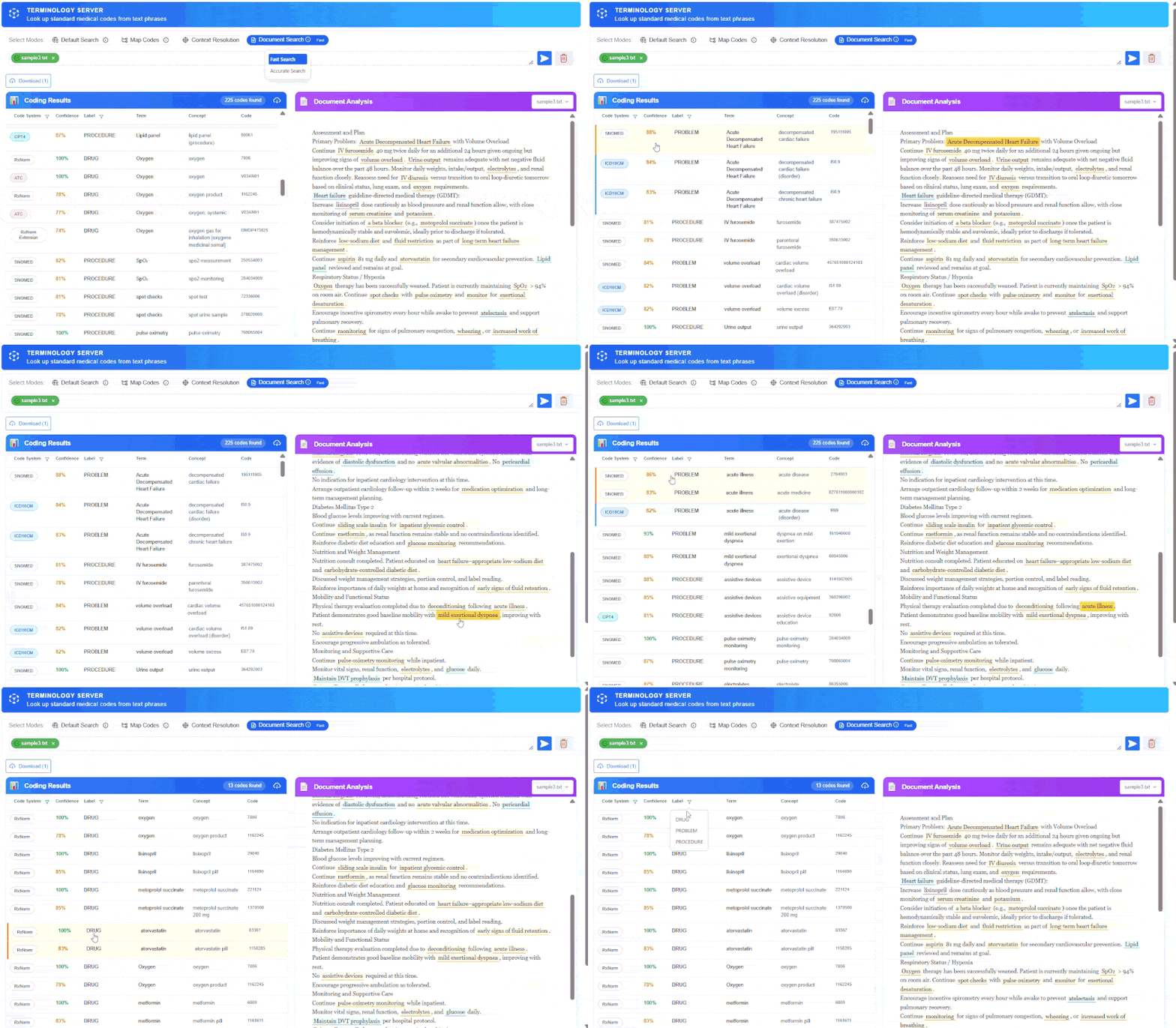
Schema-Based Clinical Document Coding

Extract and Normalize Clinical Entities from Any Document — Deterministic, Auditable, Scalable
  • Predefined entity schema: covers diagnoses, procedures, medications, and observations across all major code systems.
  • Direct mapping to standard terminologies: (ICD-10, SNOMED CT, CPT-4, RxNorm, LOINC, ATC, MedDRA, and more) – no post-processing required.
  • Deterministic output: identical inputs always produce identical coded results
  • High-throughput batch coding: process large volumes of clinical documents with sub-second per-document latency

Bridging the gap between narrative medicine and structured healthcare analytics with Document Search

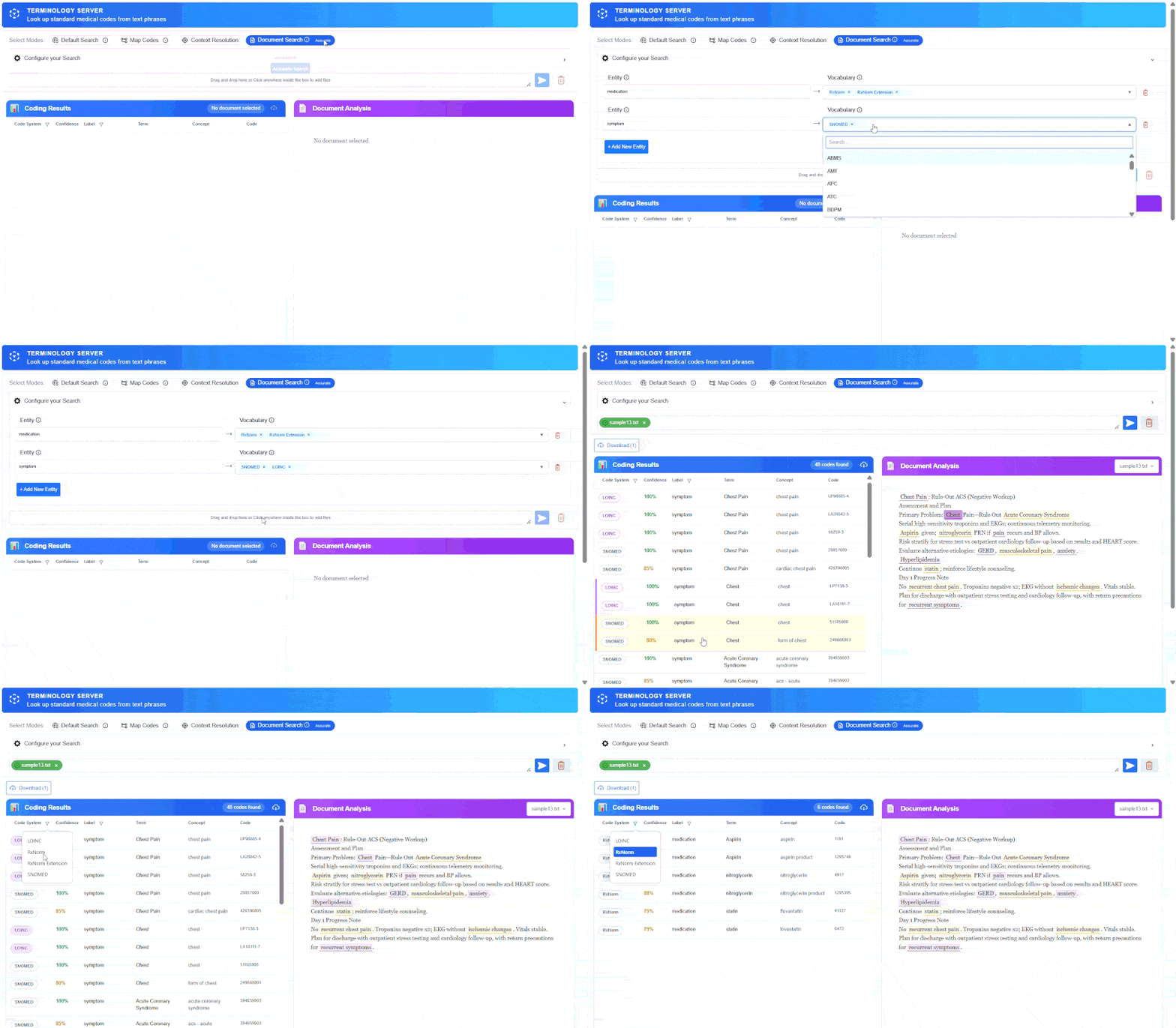
Accurate Search

Use Document Accurate Search, define or modify entity labels at runtime and use the built in pretrained clinical zero-shot entity recognition model.

Entities are mapped to different code systems based on user mappings.

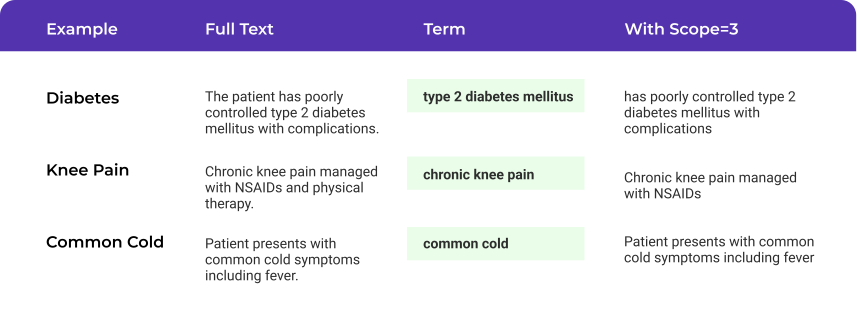
Narrow Search Results Using Term Weight and Scope

Optimize search precision based on context and confidence levels
  • Use higher term weights when you’re confident in your terminology
  • Use lower term weights when context is critical for disambiguation
  • Adjust scope based on how much surrounding context affects meaning
  • Combine with vocabulary filters for more precise results

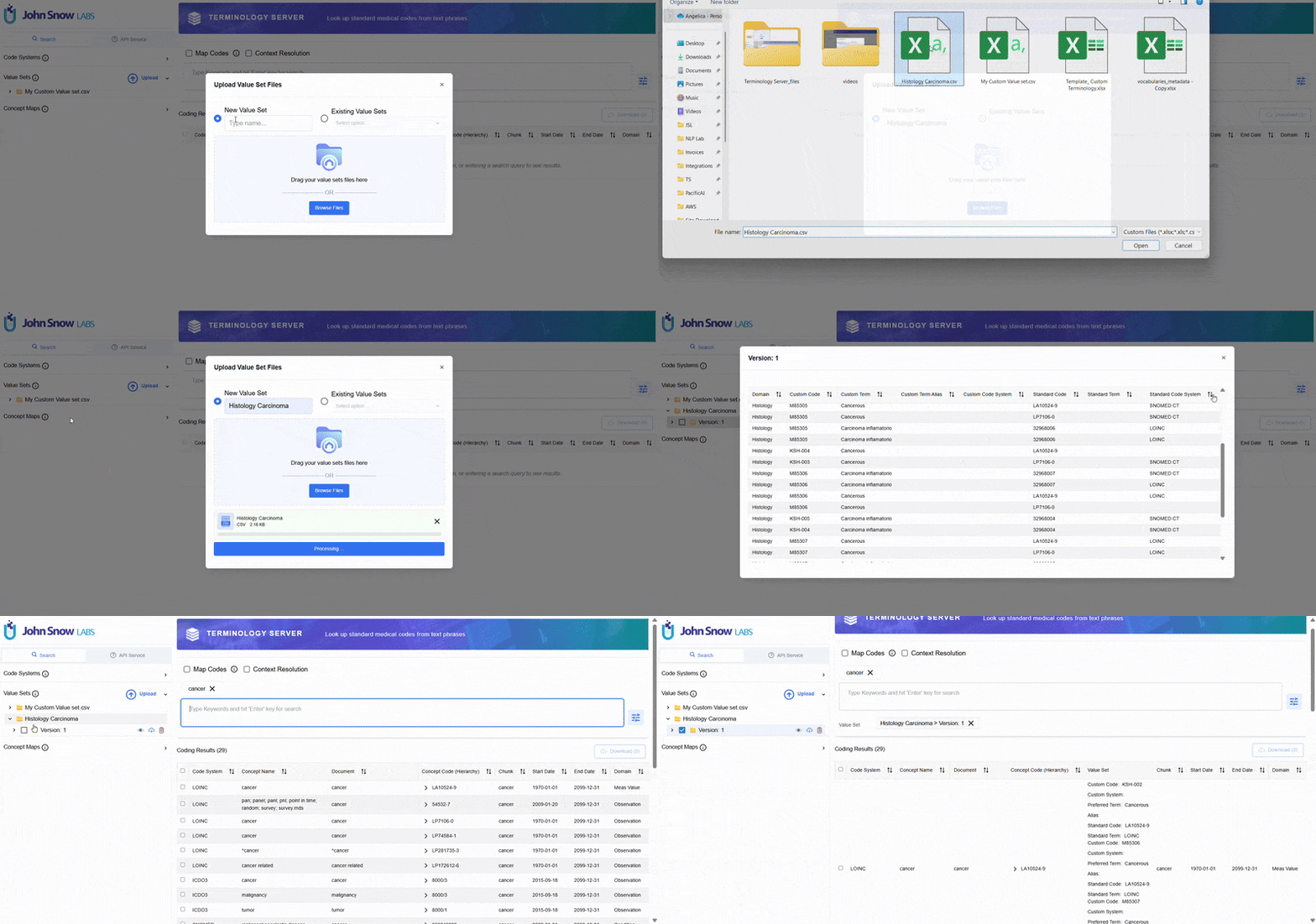
Upload and Use Your Custom Value Sets

Tailor your own medical code lists to fit your exact clinical or operational needs

CSV Upload Create your Value Sets a CSV file and upload directly into the Terminology Service

Version Control Support for Value Set versioning to track changes and maintain consistency

Filter Integration Filter search results by your custom Value Sets for targeted code discovery

Prebuilt Public Value Sets

Scope Every Terminology Search to Clinically Relevant, Standards-Aligned Code Subsets
  • Ready-to-use public library: CMS Chronic Conditions, Potentially Planned ICD-10-PCS Procedures, Acute Diagnosis ICD-10-CM, and more.
  • Versioned and traceable: Code lists remain reproducible across time points and audit cycles.
  • Filter at search time: Apply Value Set constraints directly within Default Search, Map Codes, or Document Search modes.

Enterprise Level Deployment and API Integration

Full programmatic access with enterprise-grade capabilities
API Access

Full access to all functionality available through the user interface. Implement custom workflows to fully leverage the platform's capabilities within your own systems.

Regular Updates

Regular updates of Terminology Server standard vocabularies. Always up to date with latest vocabularies to ensure accuracy and compliance.

Enterprise Security

Encryption in transit and at rest, role-based access control for administrative functions, and comprehensive audit logging.

MCP Server Integration – Terminology Tools
for Agentic AI Pipelines

Clinical AI agents are only as reliable as the terminology intelligence they can access at inference time. By registering Terminology Server search modules as MCP-compliant tools, autonomous AI agents can perform real-time concept normalization, cross-vocabulary mapping (SNOMED CT → ICD-10, RxNorm → NDC), Value Set validation, and code lookup, without human-in-the-loop intervention.

MCP-native tool registration

Expose any Terminology Server search module (Default, Map Codes, Document Search) as a named agent tool; no custom API wrappers needed.

Real-time reasoning

Agents resolve ambiguous clinical language to canonical codes at inference time, not post-hoc.

Cross-vocabulary interoperability

SNOMED CT → ICD-10, LOINC → SNOMED, RxNorm → NDC, and any configured concept map, on demand.

Notebook code sample included

Start in minutes with a fully documented Jupyter notebook demonstrating end-to-end agentic terminology workflows.

Built for Scalable Real-World Projects
with High Regulatory Requirements

Choose your deployment strategy based on security and compliance needs

Be in control of your data and process via on premise installation for maximum security and compliance.

Regular Updates

No hustle deployment on your virtual VPN on your favorite cloud provider through AWS or Azure Marketplace

Enterprise Security

Seamless integration with your Azure environment for enterprise healthcare solutions

Need additional customization and integration within your existing workflow?

Consult an Expert

Awarded for Pioneering Healthcare AI

With more than 40 awards and 10 years of innovation, John Snow Labs is recognized as a leader in no-code, privacy-first AI powered solutions for healthcare.
2025
Data Partner Award
2024
Data Partner Award
AI Breakthrough Award
2024
Corporate America Today
John Snow Labs
2024
Corporate America Today
Corporate America

Watch & Learn

Explore our Terminology Server videos, client case studies, and solutions.
Comparing OpenAI LLMs and John Snow Labs’ Medical Terminology Server (TS) for Medical Terminology Mapping

Frequently Asked Questions

Security, Compliance, and Scalability

When the Terminology Server is deployed on-prem or in a private cloud, all queries to it (e.g., a phrase to code search) stay within the organization’s secure network. Unlike some cloud-based terminology or NLP services, there is no need to send potentially sensitive text or codes over the public internet for processing.

From a compliance standpoint, the Terminology Server supports the full healthcare security stack: encryption in transit and at rest, role-based access control for administrative functions, audit logging of terminology updates and user access, and compatibility with single sign-on (SAML/OAuth) if integrated via the UI. The platform has been used in environments that require HIPAA compliance and has the necessary safeguards to qualify as a HIPAA-compliant component (e.g., no persistent PHI storage—only codes and metadata are stored; any transient query data can be purged or anonymized as needed). No patient identifiers or clinical notes are stored in the server – only the standard terminologies and user-defined mappings – which further simplifies compliance, as the server deals purely with reference data and mapping logic.

Yes, there is zero data sharing with John Snow Labs or third parties; there is no persistent PHI storage—only codes and metadata are stored.

John Snow Labs provides commercial support for the Terminology Server, including regular updates of content (e.g., new code releases) and software patches. Dedicated support ensures that as new versions of terminologies (ICD, SNOMED, etc.) are released, the server’s content library can be updated seamlessly without downtime.

John Snow Labs’ Terminology Server is engineered for high performance and scalability, capable of serving low-latency responses even under heavy workloads and with extremely large vocabulary. The server has been tested with millions of concept entries (the combined size of loaded terminologies) and is optimized for sub-second query times in typical deployments. Its architecture allows horizontal scaling to handle high concurrency.

For example, in an enterprise environment, the Terminology Server can handle real-time code lookups or validations for dozens of simultaneous EHR transactions without noticeable delay. Batch operations (like normalizing an entire dataset) are performed efficiently by leveraging distributed processing when available. Additionally, the embedding-based search is accelerated with vector indexing techniques, ensuring that semantic searches remain fast even as new terms and embeddings are added.

The platform provides documentation with step-by-step installation instructions as well as comprehensive API code samples.

Licensing

The license provides full access to all the features of the product, with no limitation to the number of users or the number of searches.

No, installation through the marketplaces will generate a cost, and using an on-premise deployment will require a license key. Contact us at support@johnsnowlabs.com for on-premise deployments.

Running the Software

We currently offer Terminology Server on AWS Marketplace and Azure Marketplace

Yes. See online documentation for detailed information.

See hardware requirements online documentation.

Payments

Charges are reflected on your AWs or Azure bill and billed through your cloud provider. For on-premise installation you need a valid license; to obtain a license please email us.

Yes. Please email us to discuss your situation and needs.

Privacy

No. The software is designed to be installed and operated entirely on your own infrastructure. It is built with privacy and data sovereignty in mind, ensuring that it does not transmit any data or results outside of your controlled environment. This architecture guarantees that your data remains within your jurisdiction, providing you with full control over its security and privacy.

Support

Email support@johnsnowlabs.com, call us at +1-302-786-5227, or start a chat on spark-nlp.slack.com. Paying customers get a private Slack channel, so that you can ask your questions privately.

Same business day 8x5 support is included with all subscriptions.

Get Support
Multiple ways to reach our expert team

preloader