

 Demos
Demos
































Testing a clinical NLP pipeline with an AI coding agent used to mean leaving the IDE to strip PHI from notes with a separate script. The Healthcare NLP de-identification MCP server removes that step: Cursor and VS Code Copilot call John Snow Labs’ de-identification pipeline as a tool, and a three-line note comes back masked or obfuscated in about 300 milliseconds. The server runs on infrastructure you control and was introduced as a preview in Healthcare NLP 6.3.0.
MCP lets an IDE agent call clinical de-identification
The Model Context Protocol (MCP) is an open standard, now maintained under the Linux Foundation, for connecting AI assistants to external tools. An MCP server publishes tools with typed inputs. The agent in your IDE decides when to call one and shows the result in the chat.
The John Snow Labs server publishes one tool, deidentify_text. It takes the clinical text and an output mode (masked, obfuscated, or both). Behind it runs the Healthcare NLP pretrained pipeline clinical_deidentification, the same Spark NLP for Healthcare pipeline you would call from a notebook or a batch job.
You could ask the IDE’s own model to redact the note instead. John Snow Labs’ 2026 de-identification benchmark measured that option on a public set of 1,479 expert-annotated PHI chunks from 48 clinical documents. Healthcare NLP reached 0.96 PHI F1, against 0.86 to 0.91 for the frontier models tested:
| System | PHI F1 |
|---|---|
| John Snow Labs Healthcare NLP | 0.96 |
| Claude Opus 4.8 | 0.91 |
| GPT-5.5 | 0.89 |
| Gemini 3.1 Pro | 0.86 |
The benchmark notebook loads clinical_deidentification_docwise_benchmark, a variant that its model card describes as prepared for benchmarking with cloud providers and that reports six coarse PHI classes; the methodology is in the accompanying paper. John Snow Labs de-identification also runs in production at Providence, where 2 billion patient notes were de-identified and adversarial testing on 790 patients produced zero re-identifications (de-identification).
Two deployment options expose the same tool
Version 2 is a small MCP server that forwards each request to a separate deid-service container, where the Spark NLP pipeline runs. Version 1 embeds the pipeline in the MCP server itself. Both publish the same deidentify_text tool.
| v2: MCP server plus deid-service (recommended) | v1: single container | |
|---|---|---|
| MCP endpoint | http://localhost:8001/mcp |
http://localhost:8000/mcp |
| Where the pipeline runs | deid-service container, po |
inside the MCP server container |
| Memory | under 100 MB for the MCP server; 8 GB+ for deid-service |
8 GB+ |
| MCP server startup | about 1 second | 2 to 5 minutes on first start |
| Best fit | several developers sharing one backend | one self-contained deployment |
Choose v2 when a team shares one pipeline backend or when you restart the MCP server often. Choose v1 when you want one container and have the memory to dedicate to it.
Four steps connect the server to your IDE
You need Docker with Compose, a Healthcare NLP license file (spark_jsl.json), 8 GB of free memory for the pipeline container, and Cursor or VS Code with GitHub Copilot.
1. Clone the code
git clone https://github.com/JohnSnowLabs/spark-nlp-workshop.git
cd spark-nlp-workshop/agents/mcp_servers/deidentification
2. Start deid-service
cp /path/to/spark_jsl.json deid-service/
cd deid-service
export JSL_SECRET=$(jq -r '.SECRET' spark_jsl.json)
docker compose up --build
Docker Compose mounts the license file as a secret at /run/secrets/spark_jsl.json. The first start downloads the 1.7 GB pipeline; wait for Application startup complete. Later starts read the pipeline from the local cache.
3. Run the server
cd ../jsl-deid-mcp-server-v2
pip install -e .
python -m src.server
The server listens on http://localhost:8001/mcp.
4. Register the server
For Cursor, add the server to ~/.cursor/mcp.json and restart Cursor:
  "mcpServers": {
    "jsl-deid": {
      "url": "http://localhost:8001/mcp"
    }
  }
}
For VS Code with GitHub Copilot, add it to .vscode/mcp.json in your project and reload the window:
{
  "servers": {
    "jsl-deid": {
      "type": "http",
      "url": "http://localhost:8001/mcp"
    }
  }
}
One prompt returns masked and obfuscated text
In Copilot Chat or the Cursor agent, ask for the tool by name and paste a note:
Use the Deid MCP to de-identify this clinical note with both masked and obfuscated output.
Dr. John Lee, from Royal Medical Clinic in Chicago, attended to the patient on 11/05/2024.
The patient's medical record number is 56467890.
The patient, Emma Wilson, is 50 years old, her Contact number: 444-456-7890.
The agent calls deidentify_text with mode: "both" and returns two versions. Masked output replaces each PHI span with its entity label:
Dr. <DOCTOR>, from <HOSPITAL> in <CITY>, attended to the patient on <DATE>.
The patient's medical record number is <MEDICALRECORD>.
The patient, <PATIENT>, is <AGE> years old, her Contact number: <PHONE>.
Obfuscated output replaces the same spans with realistic substitutes, so the note keeps its structure for demos and for parsers that expect natural text:
Dr. Vivia Ammon, from Baltimore Va Medical Center in Healdton, attended to the patient on 06/06/2024.
The patient's medical record number is 25958147.
The patient, Marla Sakai, is 40 years old, her Contact number: 999-925-8147.
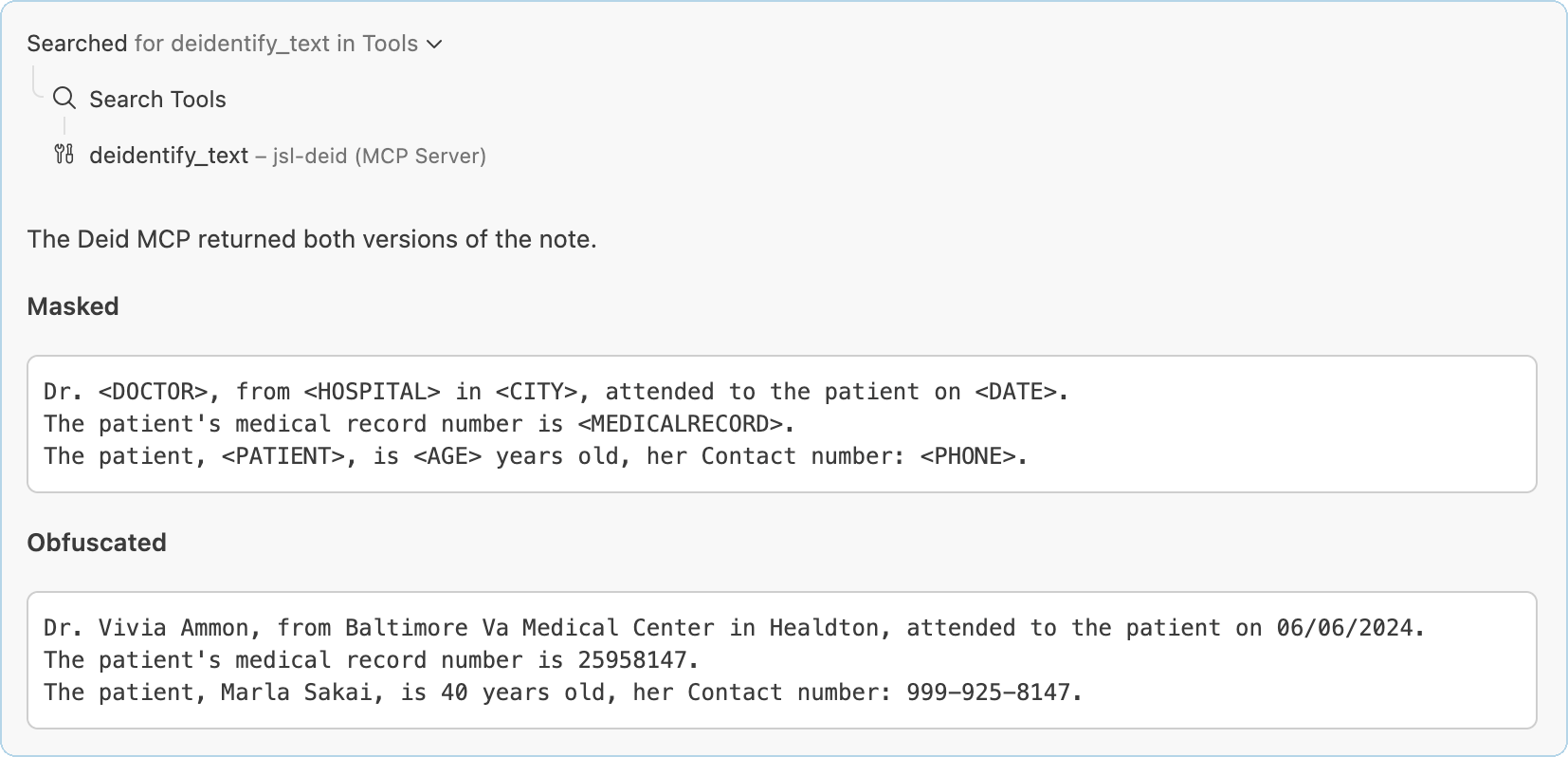
VS Code Copilot Chat calls deidentify_text on the jsl-deid MCP server and returns both versions of the note above. All patient data shown is synthetically generated for illustration.
The default pipeline masks 32 PHI entity types
The clinical_deidentification model card lists the labels below. The pipeline combines NER models, rule-based matchers, and contextual parsers.
| Category | Labels |
|---|---|
| Names and personal details | NAME, PATIENT, DOCTOR, USERNAME, AGE, DATE |
| Contact details | CONTACT, PHONE, FAX, EMAIL, URL |
| Locations | LOCATION, HOSPITAL, CITY, STATE, COUNTRY, ZIP, STREET |
| Medical, account, and government identifiers | ID, IDNUM, MEDICALRECORD, HEALTHPLAN, ACCOUNT, BIOID, SSN, DLN, LICENSE |
| Organizations and roles | ORGANIZATION, PROFESSION |
| Vehicles and devices | DEVICE, PLATE, VIN |
De-identification runs locally while the IDE model reads your prompt
The MCP server and deid-service run on your laptop or your servers and make no call to an external API. The MCP server logs the text length, the output mode, and the latency of each request, and never the text itself.
The IDE agent is a separate system. Cursor and VS Code Copilot send your chat prompt, including any note you paste into it, to the language model selected in the IDE. Keep IDE chat to synthetic or already de-identified notes, as this post does, unless your compliance team has approved the IDE’s model for PHI or the agent runs against a model you host.
For production PHI, call the service from your pipeline code with no IDE in the loop. deid-service exposes the same pipeline as a REST endpoint:
curl -X POST http://localhost:9000/deidentify \
  -H "Content-Type: application/json" \
  -d '{"text": "Dr. John Lee treated patient Emma Wilson", "mode": "both"}'
Warm requests take 150 to 830 milliseconds on a laptop
When the service starts, it runs a sample note through the pipeline to trigger JVM just-in-time compilation and lazy model loading. On our test machine that warmup took 10 seconds, which is the delay the first user request would otherwise absorb. Loading the cached pipeline took 87 seconds before that.
After warmup, request time grows with text length. We measured mode: "both" calls against the REST endpoint on an Apple M4 laptop, with Docker running the x86 image under emulation:
| Input | Calls | Median | Range |
|---|---|---|---|
| One sentence, 40 characters | 10 | 154 ms | 137 to 213 ms |
| Three-line note, 216 characters | 10 | 312 ms | 242 to 531 ms |
| Longer note, 1,736 characters | 5 | 829 ms | 798 to 878 ms |
The MCP layer adds little on top: a 55-character masked request through the v2 server took 192 ms end to end. The server uses the FastMCP streamable_http_app() served by uvicorn, which implements the Streamable HTTP transport that Cursor and VS Code Copilot connect to.
Try the server in your IDE
Clone the deidentification folder of spark-nlp-workshop, add your license file, and point Cursor or VS Code at http://localhost:8001/mcp. If you don’t have a Healthcare NLP license yet, start with a free trial. For the rest of the release, including a drug entity extractor you can run on de-identified text, see the Healthcare NLP 6.3 release post.
Frequently asked questions
What is a clinical de-identification MCP server? It is a Model Context Protocol server that exposes John Snow Labs’ Healthcare NLP de-identification pipeline as a tool an AI agent can call. In Cursor or VS Code Copilot, the agent sends clinical text to the deidentify_text tool and gets masked or obfuscated text back in the chat.
Does clinical text leave my environment when I use the MCP server? The de-identification step stays on your machine or servers: the MCP server and deid-service call no external API, and the MCP server logs only request size, mode, and latency. The IDE agent is different, because Cursor and Copilot send your chat prompt to the language model configured in the IDE. Use synthetic notes in IDE chat unless that model is approved for PHI, and call the REST endpoint from your own code for production data.
Why not ask the IDE’s own model to redact PHI? On John Snow Labs’ 2026 benchmark of 1,479 expert-annotated PHI chunks, Claude Opus 4.8, GPT-5.5, and Gemini 3.1 Pro scored 0.86 to 0.91 PHI F1, against 0.96 for Healthcare NLP. The tool is also repeatable: the example note in this post produced identical output in January and October 2026.
What is the difference between masked and obfuscated output? Masked output replaces each PHI span with its entity label, such as PATIENT or DATE. Obfuscated output replaces the same spans with realistic substitute values, so names, dates, and phone numbers still look like names, dates, and phone numbers. The both mode returns the two versions in one call.
Which IDEs and agents can connect to the server? We tested Cursor and VS Code with GitHub Copilot. Any MCP client that supports the Streamable HTTP transport can connect to http://localhost:8001/mcp for v2 or http://localhost:8000/mcp for v1.
What do I need to run the de-identification MCP server? You need a Healthcare NLP license file, Docker with Compose, and 8 GB of free memory for the container that runs the pipeline. The v2 MCP server itself is a Python package that uses under 100 MB of memory and starts in about a second.
How fast is de-identification through the MCP server? On an Apple M4 laptop running the x86 image under emulation, warm requests took a median of 154 ms for one sentence, 312 ms for a three-line note, and 829 ms for a 1,736-character note. The startup warmup took 10 seconds and spares the first request that delay.