

 Demos
Demos


















A radiology AI team has 5,000 chest X-rays ready to annotate. The images sit in the hospital’s imaging archive, stored the way every radiology department stores them: as DICOM files.
Before a single image reaches an annotator, the workflow stalls. The annotation platform does not accept DICOM. So, someone writes an export script, runs the files through a converter, produces PNG files, validates that nothing broke, and uploads the results. Only then can annotation begin.
The conversion is not hard. That is what makes it easy to overlook. But it sits between the data and the work, and it has to happen every time new images arrive. A workflow that should start with image review starts with file preparation instead.
As healthcare organizations expand multimodal AI initiatives, that detour becomes harder to justify.
Why DICOM is the standard format for medical imaging
DICOM is the standard through which medical images are stored, exchanged, and managed across healthcare. Radiologists review DICOM. PACS systems store DICOM. Imaging devices generate DICOM.
For healthcare teams, receiving a medical image in DICOM is the expected starting point.
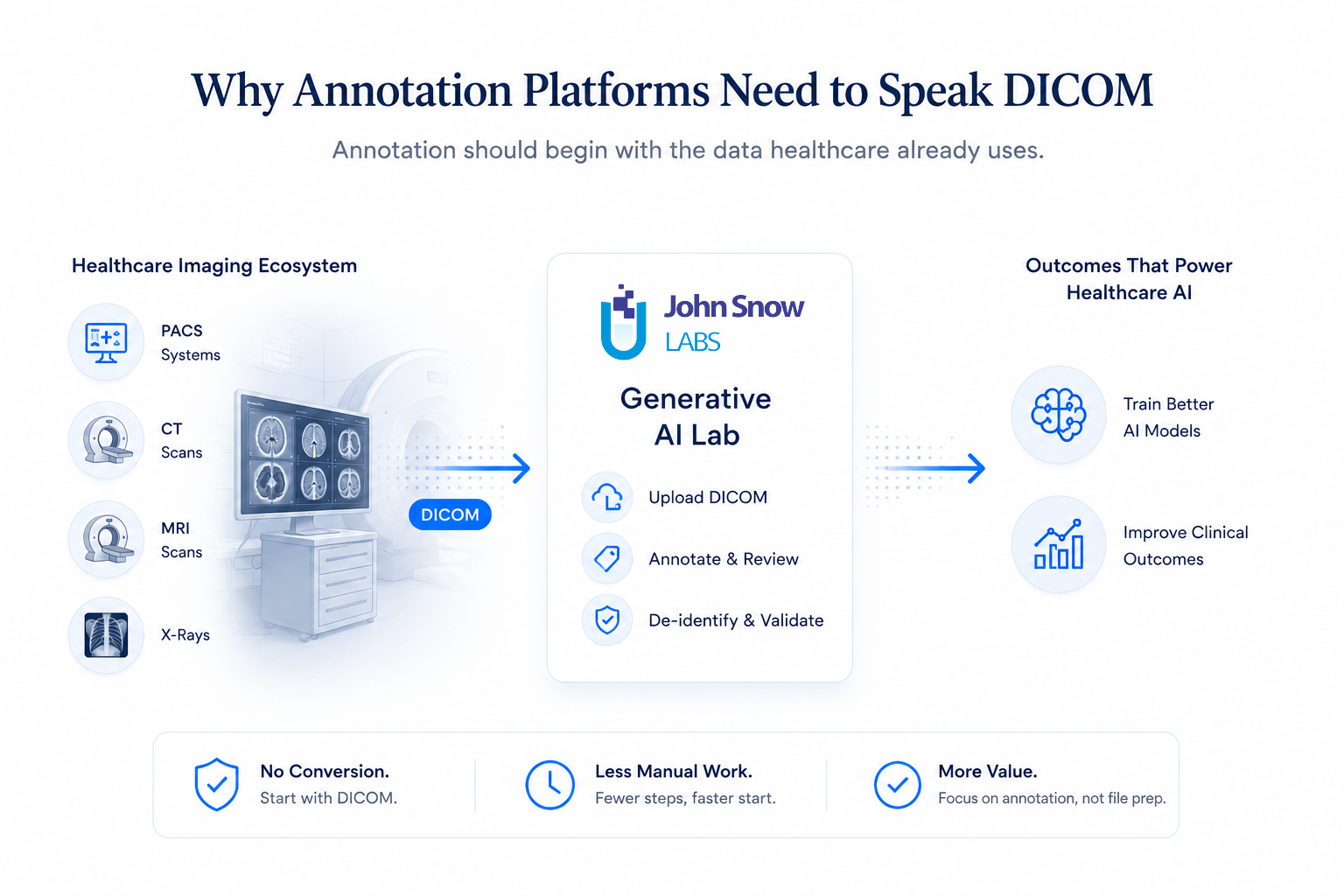
Clinical imaging workflows speak DICOM natively. Many annotation workflows historically have not. So annotation teams translate data out of the format healthcare uses and into the formats annotation tools prefer, before the annotation work has even started.
The operational cost of converting DICOM before annotation
A single conversion looks harmless. Export the files, run a script, upload the converted images, move on. At scale, those steps compound into standing operational work.
Projects acquire preprocessing pipelines that have to be maintained. New team members need documentation explaining how to prepare data before upload. Every time an external collaborator sends a fresh imaging dataset, the conversion runs again. None of this work improves a single annotation. It exists only to make annotation possible.
Your team already invests heavily in reviewing images, validating labels, and maintaining quality. The platform should not ask for additional setup work before any of that can begin.
The challenge becomes even more pronounced when imaging data contains multi-frame DICOM objects. Teams may need to split, organize, or otherwise prepare the data before annotation can begin, creating additional preprocessing steps that have little to do with the annotation task itself.
How Generative AI Lab annotates and de-identifies DICOM files
Healthcare annotation workflows have grown more sophisticated. Teams review clinical text, validate de-identification results, compare model outputs, and manage multi-stage approval processes within a single environment. Medical imaging workflows should not require a separate preparation pipeline before annotation can even begin.
Annotate DICOM files without conversion
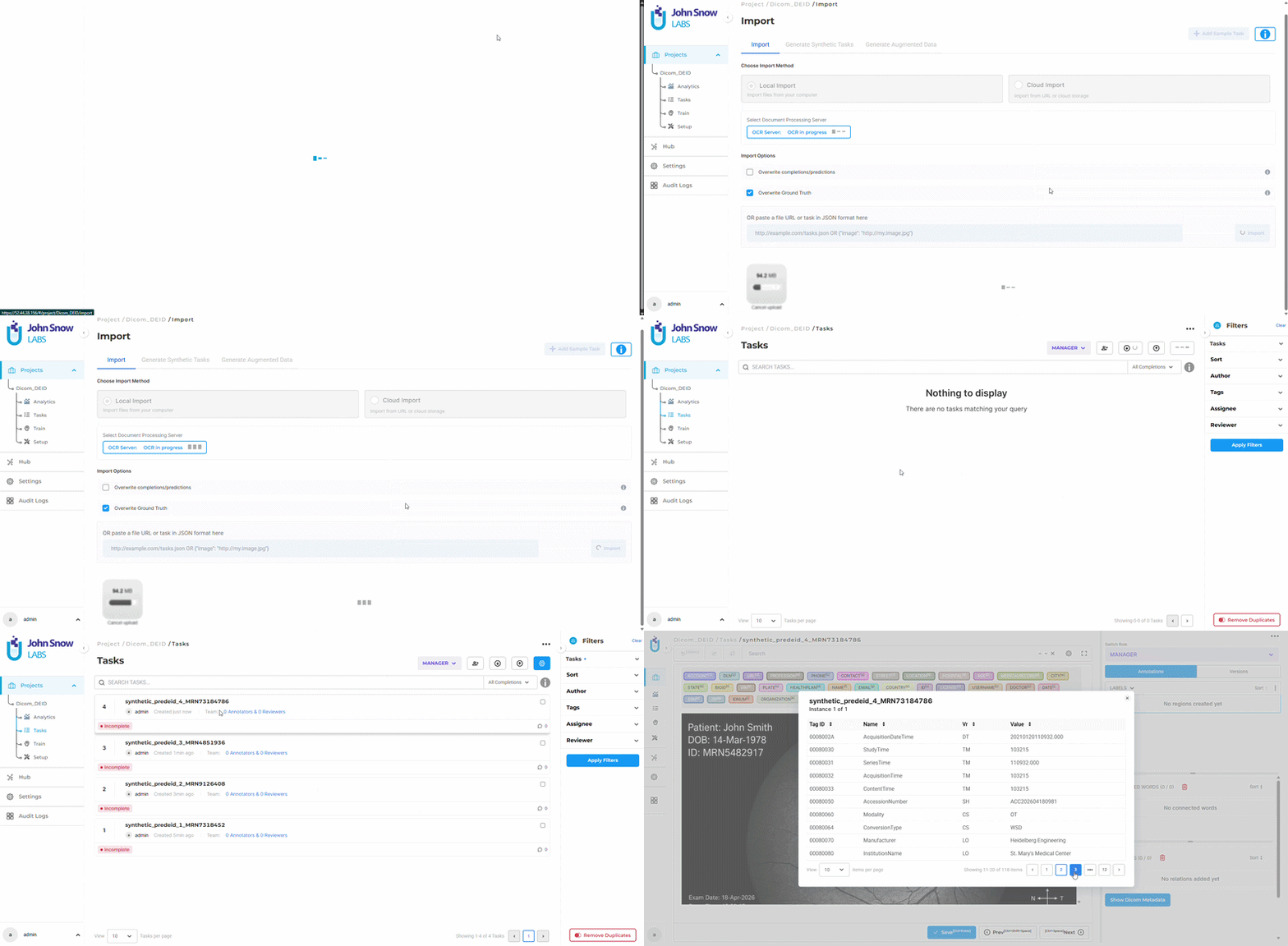
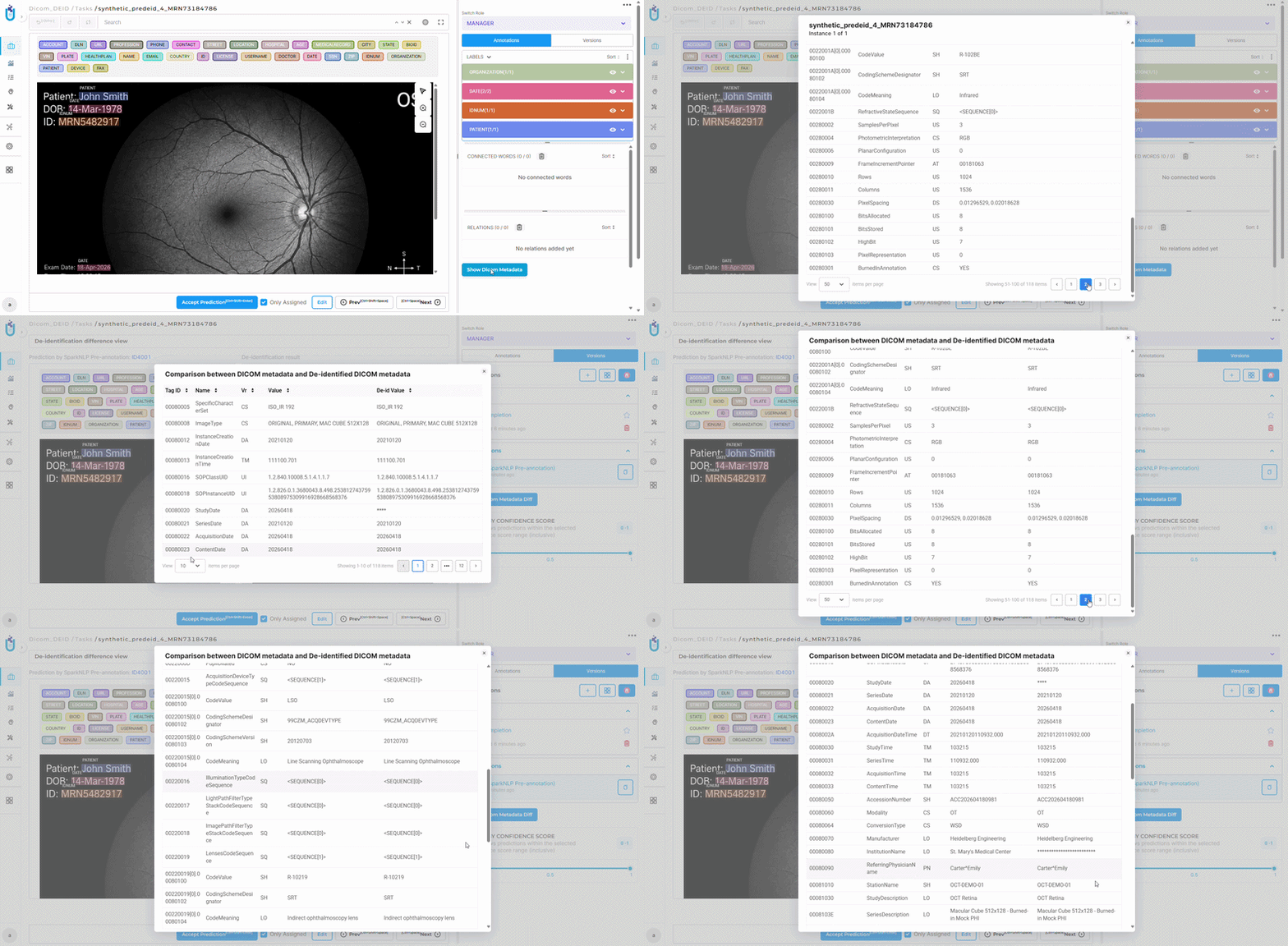
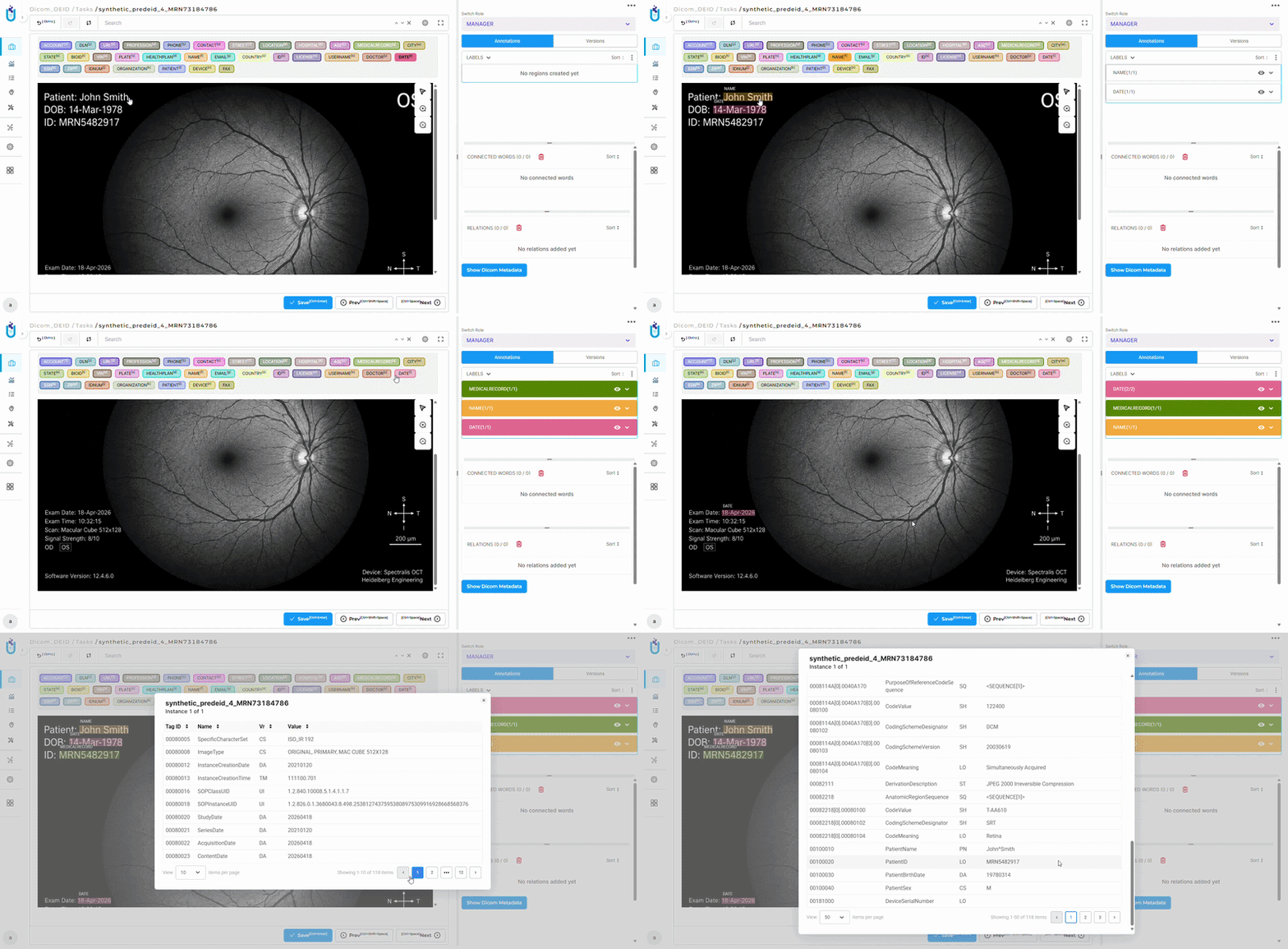
Rather than requiring external conversion, the Generative AI Lab platform accepts .dcm files directly, through the UI or supported APIs, and renders them automatically in the annotation interface while preserving the original image quality. From the user’s perspective, annotation begins immediately. Upload DICOM and start annotating/reviewing. The format handling happens internally, and the annotation experience matches the one teams already use for standard image formats.
Relevant DICOM metadata is retained throughout the workflow rather than requiring teams to manage image files and metadata separately.
 The result is a shorter workflow with fewer manual steps and fewer places for preprocessing errors to creep in.
De-identify images and metadata with configurable masking
The same native support extends to de-identification. DICOM De-Identification projects de-identify both the image content and the DICOM metadata. A dedicated De-identification Settings UI lets you configure a de-identification strategy for every label and metadata field independently, choosing between Masked with Characters, Masked with Fixed-Length Characters, Obfuscation, or None (which leaves the de-identified value empty).
Validation happens before export. The DICOM comparison view supports both Image Comparison and Metadata Comparison, showing the original and de-identified files side by side. Your team can upload MRI and CT scans into a DICOM De-Identification project, configure masking rules for each field, review exactly what changed, and export files ready for research with patient information removed and the required clinical data intact.
Why native DICOM support matters for multimodal healthcare AI
Healthcare AI is becoming increasingly multimodal. Organizations combine clinical notes, pathology reports, laboratory results, and medical images within the same initiatives, and annotation workflows are expanding well beyond text.
As that happens, the distance between source data and annotation matters more. Every preprocessing step adds operational complexity, and every format conversion adds a dependency to maintain. Manual handoffs add points where the workflow can slow down. The most scalable annotation workflows are the simplest ones: they let teams start with the data they already have and move directly into review, validation, and model development.
Healthcare organizations already work in DICOM. Requiring annotation teams to leave that ecosystem before meaningful work can begin adds friction to workflows that are complicated enough. Supporting DICOM eliminates a manual step that adds operational complexity without adding clinical value.
The best annotation workflows allow teams to start with the data they already have and move directly into creating training data. As multimodal healthcare AI expands, direct DICOM support will become the norm rather than the exception. To see it in action, watch the Generative AI Lab demo or start a free trial.
Frequently Asked Questions
If the platform converts DICOM internally, what format does it use for rendering?
The platform accepts DICOM files and renders them in the annotation interface using standard image formats for display. The conversion happens automatically and requires no user action.
Does this support CT and MRI scans?
Yes. Both single-frame and multi-frame DICOM files can be imported. When a DICOM file contains multiple frames, the platform creates a single annotation task and presents each frame as a separate page within that task. This allows annotators to review and annotate imaging data without first converting or splitting the DICOM file into separate image files.
Do annotation tools work differently with DICOM?
No. Annotators use the same interface, the same marking tools, and the same workflow they use with standard image formats. DICOM files upload the same way JPEG or PNG files do.
Does this replace PACS viewers?
No. DICOM support in annotation is a feature for creating training data and annotations. It is not a replacement for PACS viewers, which are built for clinical image review and clinical decision-making. The two serve different purposes.
Can Generative AI Lab de-identify DICOM files?
Yes. DICOM De-Identification projects de-identify both the image content and the DICOM metadata. Every label and metadata field can be configured with its own masking method, and a comparison view shows the original and de-identified images and metadata side by side before you export.