

 Demos
Demos

































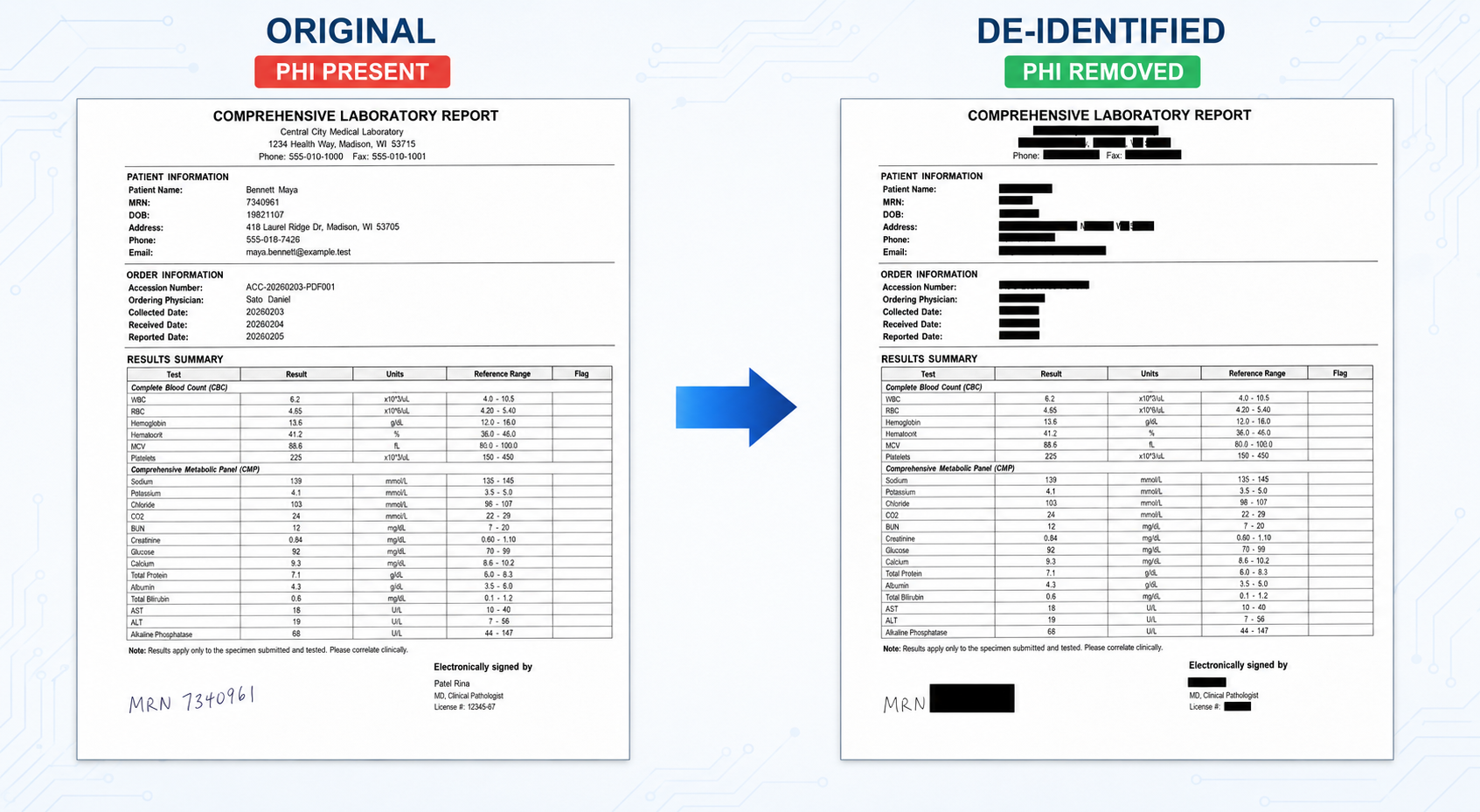
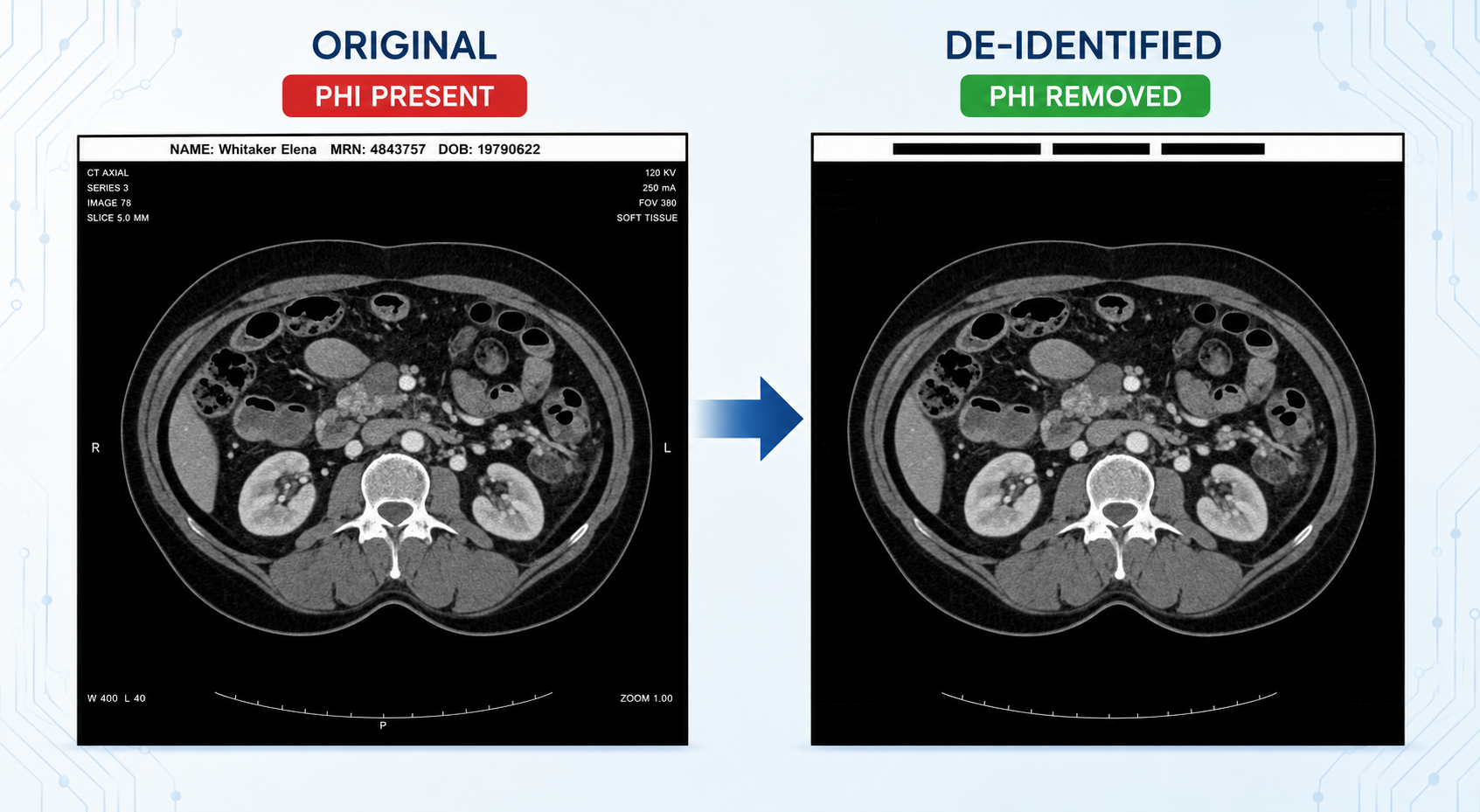
DICOM de-identification is workflow-specific because PHI can appear in metadata tags, free-text metadata fields, burned-in image pixels, and encapsulated PDF content. A production pipeline may need to inspect tags, apply metadata configurations via strategy files, run OCR and NER, map redaction regions, reconstruct DICOM output, and preserve required clinical context for downstream use.
A metadata-only workflow may inspect tags, apply a de-identification strategy file, and preserve the fields needed for routing or analysis. A pixel de-identification workflow needs image extraction, OCR, PHI detection, region mapping, and DICOM reconstruction. An encapsulated PDF workflow needs to extract and redact PDF bytes instead of medical image pixels.
The implementation details matter. A generic end-to-end pipeline prompt often falls short because the pipeline has to match the input format, PHI scope, output requirements, hardware constraints, and validation plan. The Visual NLP DICOM Skill gives an LLM a grounded way to generate John Snow Labs Visual NLP pipeline examples for specific DICOM de-identification tasks.
From manual discovery to grounded code generation
Visual NLP documentation, workshop repositories, webinars, and training material already cover DICOM de-identification. The hard part is turning those references into the right pipeline for a specific task. Teams usually start in one of three ways.
Manual discovery: searching the available references, then assembling the pipeline by hand. This gives experienced teams full control, but it requires knowing which example matches your specific use-case.
An LLM without the skill can produce a first draft and help explain the workflow, but the output is not grounded in the current Visual NLP DICOM patterns. It may generate plausible code with deprecated imports, outdated utilities, missing stage parameters, or hallucinated parameters. For example, a general-purpose LLM was asked to generate this pixel de-identification pipeline:
Generate a John Snow Labs Visual NLP DICOM de-identification pipeline for pixel de-identification.

The pipeline should detect and redact PHI burned into DICOM image pixels.

Target the following entities:
- Name
- Age
- Date
- Profession
- MedicalRecord

Use a pipeline suitable for DICOM pixel redaction and include the full code needed to:
- load DICOM files
- extract image/text from the DICOM
- detect the target entities
- redact the detected pixel regions
- display the de-identified DICOM output
In this sample response, the generated code looked plausible but did not follow the current Visual NLP DICOM workflow patterns.
- It referenced a stage called DicomToImage, which has been deprecated.
- It used ImageToText, although ImageToTextV3 is the recommended CPU-based option for DICOM pixel de-identification.
- It used MedicalNerModel, although newer zero-shot workflows can use PretrainedZeroShotNER or PretrainedZeroShotNERChunker for configurable PHI entity detection.
- It referenced a Name entity class that MedicalNerModel does not support in this context.
- It included unsupported parameters such as .setMatchingWindow(10) and .setPadding(5) on PositionFinder.
- It included .setPadding(5) on DicomDrawRegions, which is not exposed by that stage.
- It referenced columns that would not exist after DicomDrawRegions, because the stage aggregates the result and keeps only the final DICOM bytes; intermediate results are lost.
- It used a less suitable display utility instead of display_dicom() for viewing the DICOM output.
# ============================================================
# John Snow Labs Visual NLP
# DICOM burned-in PHI detection and pixel redaction
# ============================================================

from pyspark.ml import Pipeline

from sparknlp.base import DocumentAssembler
from sparknlp.annotator import (
    SentenceDetector,
    Tokenizer,
    WordEmbeddingsModel,
    MedicalNerModel,
    NerConverter,
)

from sparkocr.transformers import (
    DicomToImage,
    ImageToText,
    PositionFinder,
    DicomDrawRegions,
)

from sparkocr.utils import display_images


# ------------------------------------------------------------
# 1. Configuration
# ------------------------------------------------------------

# Can be a single DICOM file or a directory containing DICOM files.
DICOM_INPUT_PATH = "/path/to/input/dicom"

TARGET_ENTITIES = [
    "NAME",
    "AGE",
    "DATE",
    "PROFESSION",
    "MEDICALRECORD",
]

# ------------------------------------------------------------
# 2. Load DICOM files
# ------------------------------------------------------------

# Spark binaryFile provides:
# path, modificationTime, length, content
dicom_df = (
    spark.read
    .format("binaryFile")
    .option("pathGlobFilter", "*.dcm")
    .option("recursiveFileLookup", "true")
    .load(DICOM_INPUT_PATH)
)

dicom_df.select("path", "length").show(truncate=False)


# ------------------------------------------------------------
# 3. Extract image frames from the DICOM
# ------------------------------------------------------------

dicom_to_image = (
    DicomToImage()
    .setInputCol("content")
    .setOutputCol("image")
    .setKeepInput(True)
)


# ------------------------------------------------------------
# 4. OCR: detect text and preserve pixel coordinates
# ------------------------------------------------------------

# ImageToText returns:
#   text      - recognized text
#   positions - coordinates of recognized words/characters
ocr = (
    ImageToText()
    .setInputCol("image")
    .setOutputCol("text")
    .setPositionsCol("positions")
    .setConfidenceThreshold(40)
    .setIgnoreResolution(False)
    .setOcrParams([
        "preserve_interword_spaces=1",
    ])
)


# ------------------------------------------------------------
# 5. Prepare OCR text for clinical NER
# ------------------------------------------------------------

document_assembler = (
    DocumentAssembler()
    .setInputCol("text")
    .setOutputCol("document")
)

sentence_detector = (
    SentenceDetector()
    .setInputCols(["document"])
    .setOutputCol("sentence")
)

tokenizer = (
    Tokenizer()
    .setInputCols(["sentence"])
    .setOutputCol("token")
)


# ------------------------------------------------------------
# 6. Clinical word embeddings
# ------------------------------------------------------------

embeddings = (
    WordEmbeddingsModel
    .pretrained(
        "embeddings_clinical",
        "en",
        "clinical/models",
    )
    .setInputCols(["sentence", "token"])
    .setOutputCol("embeddings")
)


# ------------------------------------------------------------
# 7. Detect PHI entities
# ------------------------------------------------------------

# ner_deid_subentity_augmented detects granular PHI categories,
# including the entities requested here.
phi_ner = (
    MedicalNerModel
    .pretrained(
        "ner_deid_subentity_augmented",
        "en",
        "clinical/models",
    )
    .setInputCols(["sentence", "token", "embeddings"])
    .setOutputCol("ner")
)

# Convert IOB NER annotations into complete entity chunks and retain
# only the requested entity categories.
ner_converter = (
    NerConverter()
    .setInputCols(["sentence", "token", "ner"])
    .setOutputCol("phi_chunks")
    .setWhiteList(TARGET_ENTITIES)
)


# ------------------------------------------------------------
# 8. Map detected text entities back to pixel coordinates
# ------------------------------------------------------------

position_finder = (
    PositionFinder()
    .setInputCols(["phi_chunks"])
    .setPageMatrixCol("positions")
    .setOutputCol("phi_coordinates")
    .setMatchingWindow(10)
    .setPadding(5)
)


# ------------------------------------------------------------
# 9. Redact the detected regions in the original DICOM
# ------------------------------------------------------------

dicom_redactor = (
    DicomDrawRegions()
    .setInputCol("content")
    .setInputRegionsCol("phi_coordinates")
    .setOutputCol("deidentified_dicom")
    .setKeepInput(True)
    .setPadding(5)
    .setAggCols(["path", "content"])
)


# ------------------------------------------------------------
# 10. Build and run the pipeline
# ------------------------------------------------------------

pipeline = Pipeline(
    stages=[
        dicom_to_image,
        ocr,
        document_assembler,
        sentence_detector,
        tokenizer,
        embeddings,
        phi_ner,
        ner_converter,
        position_finder,
        dicom_redactor,
    ]
)

pipeline_model = pipeline.fit(dicom_df)

result = pipeline_model.transform(dicom_df).cache()


# ------------------------------------------------------------
# 11. Inspect the OCR and detected PHI
# ------------------------------------------------------------

result.select(
    "path",
    "text",
    "phi_chunks.result",
    "phi_chunks.metadata",
).show(truncate=False)


# Optional: flattened entity inspection
detected_phi = result.selectExpr(
    "path",
    """
    inline(
        transform(
            phi_chunks,
            x -> struct(
                x.result AS text,
                x.metadata['entity'] AS entity,
                x.begin AS begin,
                x.end AS end
            )
        )
    )
    """
)

detected_phi.show(truncate=False)


# ------------------------------------------------------------
# 12. Extract the redacted DICOM image for display
# ------------------------------------------------------------

deidentified_dicom_to_image = (
    DicomToImage()
    .setInputCol("deidentified_dicom")
    .setOutputCol("deidentified_image")
    .setKeepInput(True)
)

display_df = deidentified_dicom_to_image.transform(result)


# Display every de-identified DICOM image/frame.
display_images(
    display_df.select("deidentified_image"),
    limit=20,
)
These are the issues the skill is designed to reduce by grounding the model in supported Visual NLP DICOM workflows.
An LLM with the Visual NLP DICOM Skill starts from controlled references with supported workflows, stage patterns, and prompt commands. That gives your team a more direct path to a reviewable Visual NLP starting pipeline. For DICOM de-identification, grounding matters because the generated pipeline needs to preserve the necessary columns, redact the intended PHI, produce the right DICOM output, and remain easy to validate on your own data.
How to start with the skill
Upload the skill folder or ZIP to your preferred LLM tool and start with a simple prompt.
I uploaded the Visual NLP DICOM Skill.
Use it as the source of truth and show me the supported workflows.
To view the workflow menu during the chat, use: /dicom_tasks
Which DICOM workflows are supported
Metadata inspection
Use this workflow before changing DICOM files. It generates a tag inspection workflow that shows which fields are present in the input files.
Metadata Strategy file generation
Use this workflow when you need custom handling for specific DICOM tags. The skill can generate a ready-to-edit strategy file from tag, VR, and name values.
For metadata strategy file generation, you can provide rows such as:
"(0010,0010)",PN,Patient Name
"(0010,0020)",LO,Patient ID
"(0008,0020)",DA,Study Date
Metadata de-identification
Use this workflow when you want to remove or transform structured DICOM metadata. It creates a metadata de-identification pipeline using default or custom strategy settings.
Free-text metadata de-identification
Use this workflow when PHI appears inside natural-language metadata fields. The skill adds NER stages for text-bearing fields, not only structured tag values.
Pixel de-identification pipeline builder
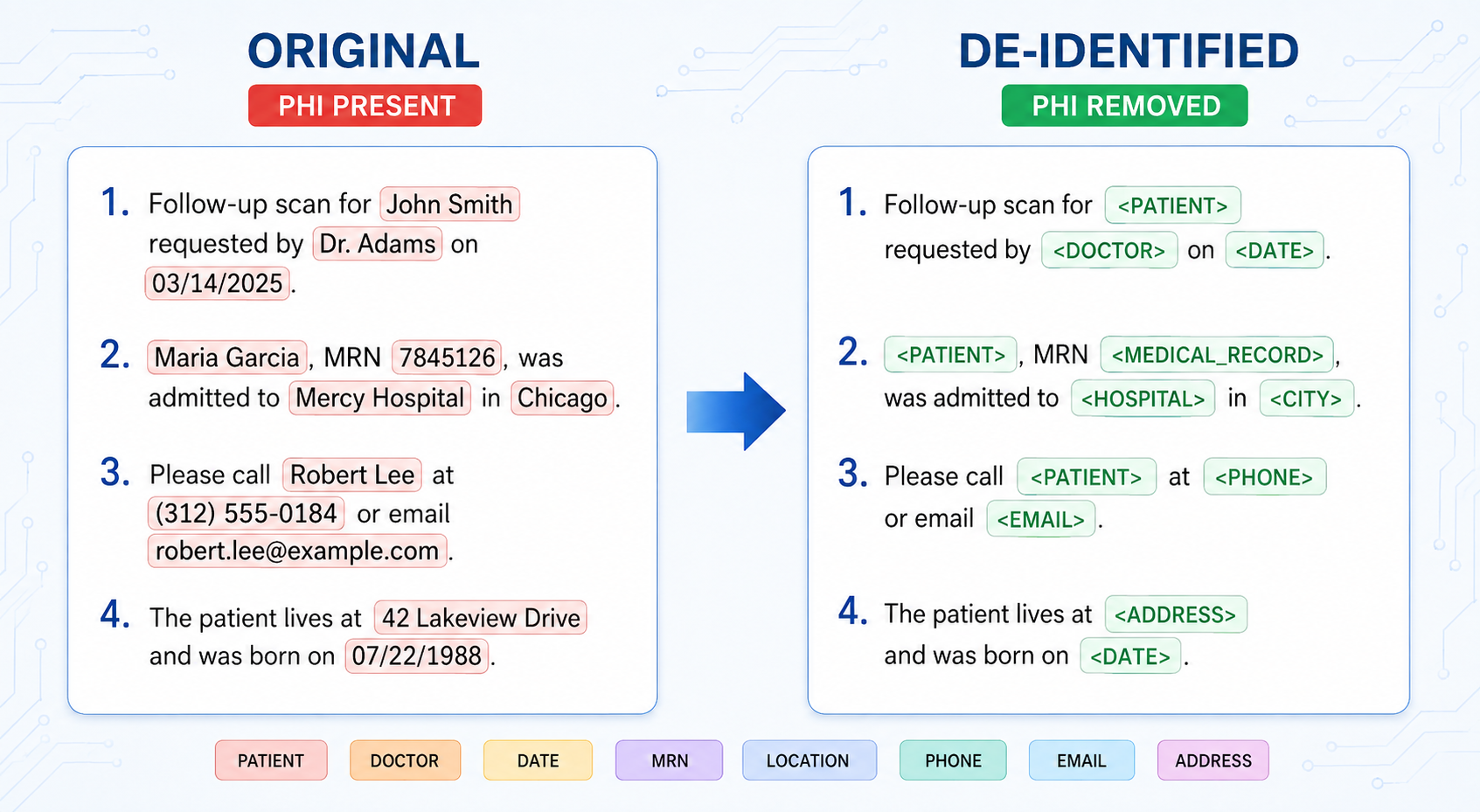
Pipeline builder logic to wrap Visual NLP DICOM stages around state-of-the-art healthcare NER pipelines. It helps detect PHI that is burned into image pixels and redact the corresponding regions in the DICOM output.
For more information about the stages, configuration options, and supported pipelines, you can ask the model directly.
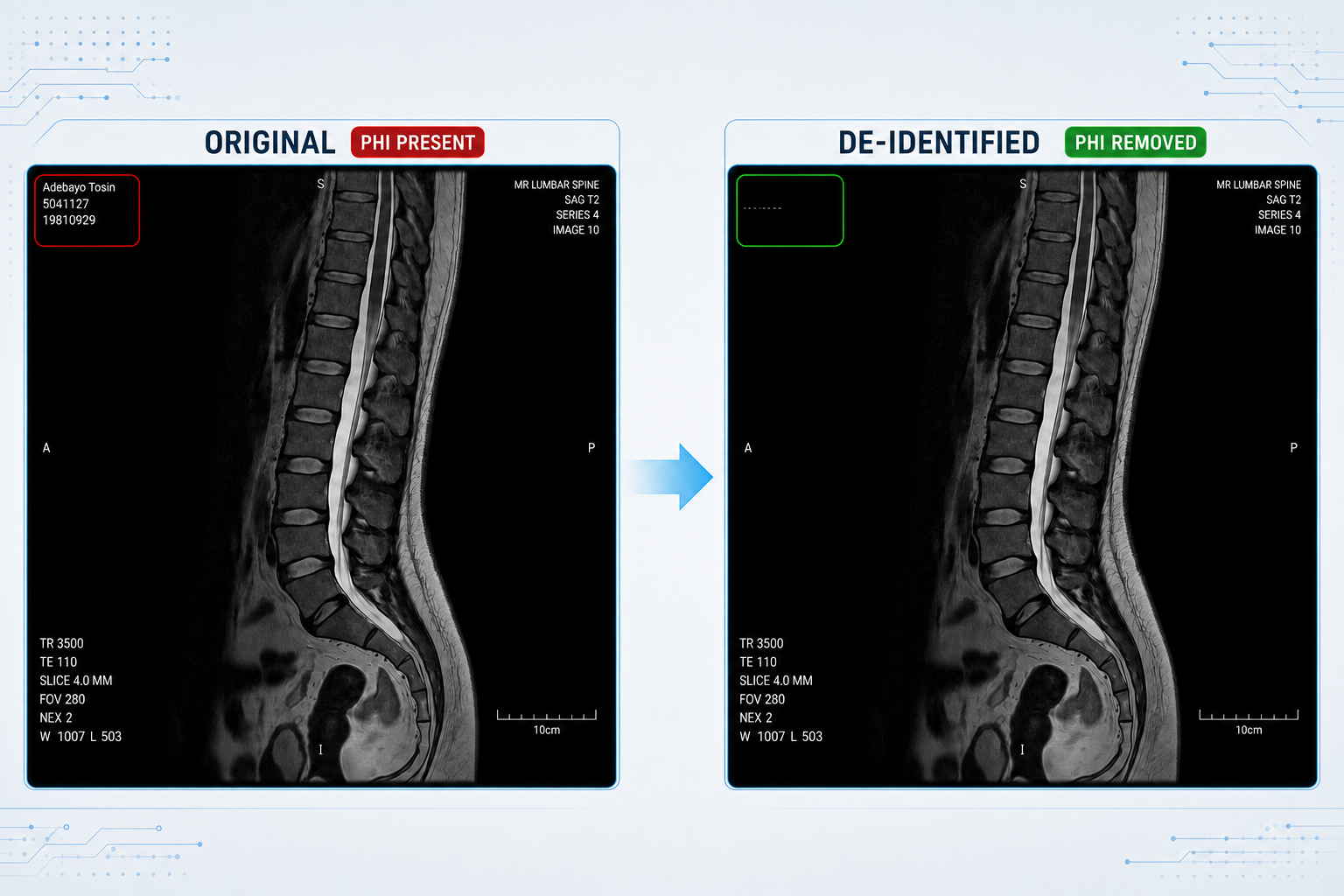
Pixel zero-shot de-identification
This is commonly used for free-text metadata and pixel de-identification. If pretrained pipelines get you most of the way there, but you need more control, you can stack zero-shot NER models and build a pipeline for your specific use case.
Encapsulated PDF de-identification
Both the pipeline-builder and zero-shot workflows follow their corresponding pixel de-identification patterns, with additional stages to extract the encapsulated PDF, de-identify its content, and write the updated PDF bytes back to the DICOM file.
Blanket pixel de-identification
Use this workflow when you need to remove all visible text from image pixels. It creates a text-region detection and redaction pipeline.
Visual NLP pretrained pipelines
- Full DICOM de-identification Pipeline
- Minimal DICOM de-identification Pipeline
- Pseudonym DICOM de-identification Pipeline
Example: Blanket Pixel de-identification
Blanket pixel de-identification removes visible text regions from DICOM pixels. This pattern is useful when you need to redact all detected text from the image rather than classify specific PHI entities.
The example below shows a Visual NLP pipeline that converts DICOM files to images, detects text regions, draws redaction regions back into the DICOM, and displays the de-identified output.
from pyspark.ml import Pipeline, PipelineModel
from pyspark.sql.functions import lit

from sparknlp.annotator import *
from sparknlp.base import *

import sparknlp_jsl
from sparknlp_jsl.annotator import *

import sparkocr
from sparkocr.transformers import *
from sparkocr.utils import *
from sparkocr.enums import *
from sparkocr.schemas import *

config = {

    # ImageTextDetector: Scala-based default
    # ImageTextDetectorV2: Python-based alternative

    "text_detector": "ImageTextDetector",

    "use_gpu": True,
    "score_threshold": 0.5,
    "text_threshold": 0.2,
    "size_threshold": 10,
    "with_refiner": True,
    "link_threshold": 0.5,

    "scale": 1.0,
    "frame_sampling": 5,
    "frame_sampling_strategy": FrameSamplingStrategy.CONSECUTIVE,

    "compression_mode": "disabled",
    "compression_quality": 80,
    "memory_optimized": False,

    "text_regions_col": "text_regions",
    "final_dicom_col": "dicom_pixel_cleaned",
}

# Define DICOM Stages [ DicomToImageV3, Text Detection, DicomDrawRegions ]

dicom_to_image = DicomToImageV3() \
    .setInputCols(["content"]) \
    .setOutputCol("image") \
    .setKeepInput(False) \
    .setScale(config["scale"]) \
    .setFrameLimit(config["frame_sampling"]) \
    .setFrameSamplingStrategy(config["frame_sampling_strategy"]) \
    .setCompressImage(False) \
    .setCompressionMode(config["compression_mode"]) \
    .setCompressionQuality(config["compression_quality"]) \
    .setMemoryOptimized(config["memory_optimized"])

if config["text_detector"] == "ImageTextDetector":
    text_detector = ImageTextDetector.pretrained("image_text_detector_mem_opt", "en", "clinical/ocr") \
        .setInputCol("image") \
        .setOutputCol(config["text_regions_col"]) \
        .setScoreThreshold(config["score_threshold"]) \
        .setLinkThreshold(config["link_threshold"]) \
        .setTextThreshold(config["text_threshold"]) \
        .setSizeThreshold(config["size_threshold"]) \
        .setWithRefiner(config["with_refiner"]) \
        .setUseGPU(config["use_gpu"])

elif config["text_detector"] == "ImageTextDetectorV2":
    text_detector = ImageTextDetectorV2.pretrained("image_text_detector_v2", "en", "clinical/ocr") \
        .setInputCol("image") \
        .setOutputCol(config["text_regions_col"]) \
        .setScoreThreshold(config["score_threshold"]) \
        .setTextThreshold(config["text_threshold"]) \
        .setSizeThreshold(config["size_threshold"]) \
        .setWithRefiner(config["with_refiner"]) \
        .setUseGPU(config["use_gpu"])

else:
    raise ValueError(
        f"Unsupported text_detector: {config['text_detector']!r}. "
        "Use 'ImageTextDetector' or 'ImageTextDetectorV2'."
    )

draw_regions = DicomDrawRegions() \
    .setInputCol("path") \
    .setInputRegionsCol(config["text_regions_col"]) \
    .setOutputCol(config["final_dicom_col"]) \
    .setAggCols(["path"]) \
    .setKeepInput(True) \
    .setScaleFactor(1 / config["scale"])

# Define the pipeline with stages
pipeline = PipelineModel(stages=[
  dicom_to_image,
  text_detector,
  draw_regions
])

# Load DICOM from disk
dicom_path = "/path/to/dicom/*.dcm"
dicom_df = spark.read.format("binaryFile").load(dicom_path)

# Transform
result = pipeline.transform(dicom_df)

# View Result
display_dicom(
    df=result,
    fields=config["final_dicom_col"],
    limit=1,
    width=300,
)
Example Prompts
Ask for pipeline generation:
- Generate a DICOM metadata de-identification pipeline.
- Generate a pixel PHI redaction pipeline for burned-in text.
- Generate a zero-shot de-identification pipeline with configurable entities.
Ask for customizations:
- How do I customize the metadata strategy file?
- How do I choose which PHI entities to redact?
- How do I change the OCR or NER model used in the pipeline?
- Can you generate a CPU-friendly version of this pipeline?
- Can you generate a GPU or visual language model (VLM)-based version to improve OCR accuracy?
Ask for explanations:
- Explain what each stage in this pipeline does.
- Can you explain all the configurations for DicomToImageV3?
- Does ImageTextDetector support GPU acceleration?
- Explain how to build a custom strategy file.
- What different configurations are available for metadata de-identification?
- What configuration options are available for this workflow?
- How do I validate and save the de-identified DICOM output?
Conclusion
The Visual NLP DICOM Skill is designed to reduce hallucinated code by grounding the model in known examples, templates, and workflow patterns. Generated code still needs review.
Before production use, validate the pipeline against your own DICOM data, target PHI categories, output requirements, hardware, and compliance process. For regulated workflows, include domain review and compliance review, and keep enough provenance to reproduce how each file was processed.
Download the Visual NLP DICOM Skill from the workshop repository, use it to generate a starting pipeline, and validate the output against your own DICOM data and compliance requirements.
Resources
Visual NLP Workshop Repo
Visual NLP Workshop DICOM Repo
Visual NLP DICOM Walkthrough blog post
DICOM Paper