

 Demos
Demos

































Digital pathology is generating data faster than most healthcare organizations can safely share it. A single whole-slide image (WSI) can weigh in at several gigabytes, and every one of them is a potential HIPAA or GDPR incident waiting to happen — not because of the tissue in the image, but because of the metadata, barcodes, and handwritten labels riding along with it.
In this post we’ll walk through a production-grade, serverless de-identification pipeline for SVS pathology slides, built on AWS Batch and John Snow Labs’ Visual NLP. We’ll cover the compliance problem it solves, the anatomy of an SVS file, the architecture we deploy, and a full hands-on walkthrough — from `docker build` to a redacted slide landing back in S3 — using the actual infrastructure code from this repository.
The de-identification problem in healthcare
What is PHI?
Protected Health Information (PHI) is any data that can tie a medical record back to an identifiable person: name, date of birth, medical record number, accession number, physician name, facility name, a photographed ID sticker — even a barcode. In imaging workflows specifically, PHI has a nasty habit of hiding in places engineers don’t expect: embedded file metadata, a scanner’s auto-generated label image, or text burned directly into pixels.
HIPAA
In the US, the HIPAA Privacy Rule defines 18 categories of identifiers (the “Safe Harbor” list) that must be removed for data to be considered de-identified — names, geographic subdivisions smaller than a state, dates tied to an individual, medical record numbers, biometric identifiers, and full-face photographic images among them. Digital pathology slides can trip several of these at once: a label image is effectively a photograph, and it often contains a patient sticker. Also, the header of the file can contain tags like patient identifiers, technician’s name, institution, or even dates.
GDPR
In the EU, health data is a “special category” of personal data under Article 9 of GDPR, subject to stricter processing conditions than ordinary PII. Pseudonymization and anonymization are explicitly called out as risk-mitigation techniques, but GDPR’s bar for “anonymous” data (i.e., data that falls outside the regulation entirely) is high: re-identification must be reasonably impossible, not just inconvenient.
Why you need to care
Two things make this an engineering problem, not just a legal one:
- Scale. A single pathology lab can generate thousands of slides a week. Manual review doesn’t scale, and neither does a one-off script running on someone’s laptop.
- PHI hides in unstructured places. Unlike a database column you can just drop, PHI in imaging data can be a photograph of a sticker, a watermark on a scanned label, or a free-text field a technician typed six years ago. Finding it requires actual computer vision and NLP.
That’s the gap we will close with our pipeline: OCR + NER to find PHI in image content, and tags, applied automatically, at the moment data lands in S3.
DICOM and SVS: where PHI actually lives
This repository ships two parallel pipelines — `dicom/` and `svs/` — because DICOM and SVS files hide PHI in structurally different ways.
DICOM
In an extreme simplification, a DICOM file is a header of tagged attributes, followed by pixel data. The header is structured: `PatientName` is tag `(0010,0010)`, `PatientID` is `(0010,0020)`, `PatientBirthDate` is `(0010,0030)`, and so on. Many of these tags can be removed using rules, but some require NLP.
What is even harder is burned-in PHI: text baked directly into the pixel data by the imaging modality itself — ultrasound annotations, ID overlays on radiology exports, ruler and timestamp burn-ins. That text isn’t in a tag you can clear; it has to be found visually and then redacted. All that without corrupting the file’s encoding, and without destroying valuable information present in the file.
SVS (Aperio whole-slide images)
An SVS file is a pyramidal, multi-resolution tiled TIFF. It contains several encoded layers: the full-resolution tissue image, one or more downsampled levels for fast viewing, and — critically — a couple of small auxiliary images the scanner adds automatically:
- Label image — a photo of the physical glass slide’s label, which is frequently a printed or handwritten patient/accession sticker.
- Macro image — a low-res overview of the entire slide including its edges, sometimes capturing handwriting on the slide itself.
- Header/metadata fields (e.g. `ImageDescription`) — free-text fields the scanner populates, which can carry accession numbers, operator names, or facility identifiers.
In other words: SVS PHI is almost never in the tissue region itself — it’s in the small label/macro auxiliary images and the header text. That distinction is exactly what shapes the pipeline design in section 4: we clean the header, the auxiliary images, and only run the (expensive) OCR+NER stage on tiles that actually contain detected text.
Introducing AWS Batch, and our architecture
Why AWS Batch
Pathology de-identification is a bursty, resource-heavy batch workload, not a request/response service: files arrive in batches (a scanner’s daily export, a bulk migration), each job needs meaningful CPU and memory for a few minutes, and there are long idle stretches in between. That profile is a poor fit for an always-on server and a good fit for AWS Batch, which handles provisioning, queuing, and scaling of compute for you — you submit jobs, it finds capacity.
The proposed architecture
Let’s take a quick look at our architecture
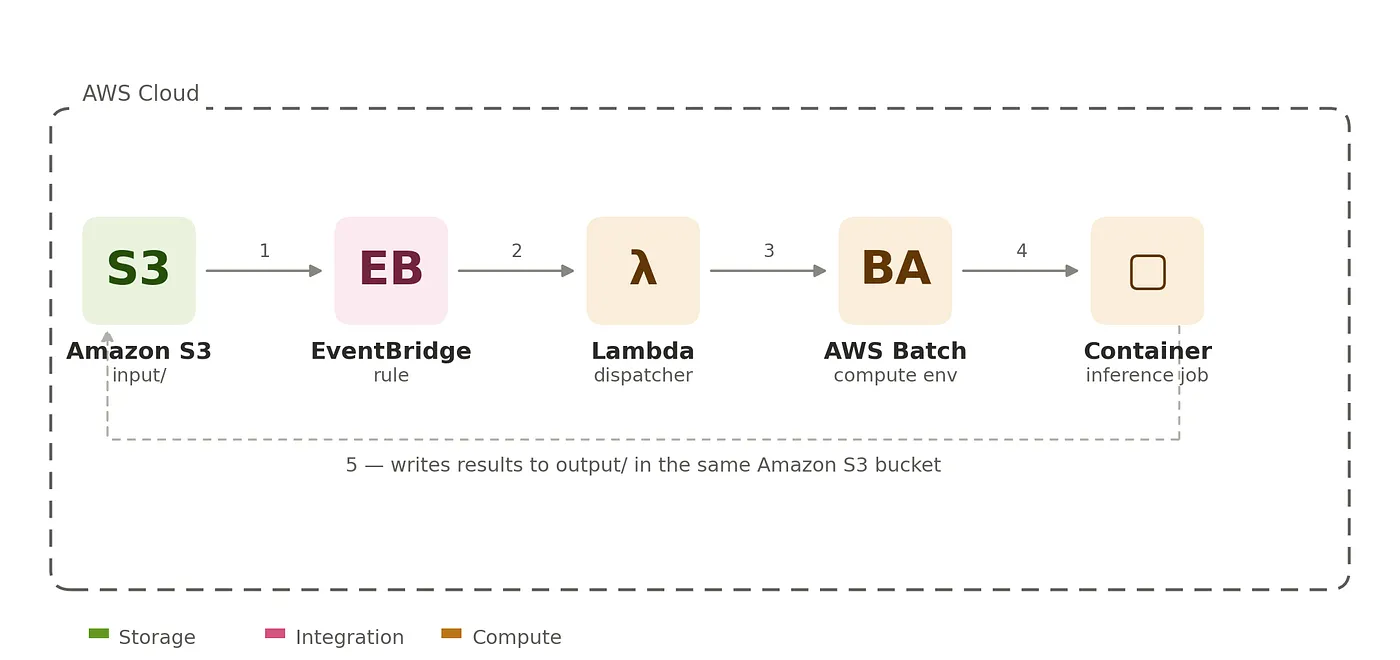
- Amazon S3— the source of truth. Slides land under
s3://<bucket>/<folder>/. - EventBridge — watches the bucket via S3 → EventBridge notifications, filtered specifically on object keys ending in `_READY`. Nothing runs until that dummy file marker appears — this lets you upload a whole batch of files first and trigger processing exactly once, on your own schedule.
- Lambda (check trigger_batch_job.py) — the dispatcher. It targets the folder where the dummy
`_READY`marker was dropped, and submits the job to AWS Batch. - AWS Batch — a managed EC2 compute environment allocates capacity on demand (0 to 64 vCPUs, `c7a.4xlarge` instances, `BEST_FIT_PROGRESSIVE` allocation) and runs the container as a job. Nobody pays for idle EC2 capacity between batches.
- The container — downloads each input file from S3, runs the Visual NLP de-identification pipeline, and uploads the result to
`<folder>_output/`. On a per-file failure, it writes `_FAILURE_{filename}` (containing the traceback) to the output prefix instead of silently dropping the file.
Everything after the initial `_READY` marker write is event-driven — there’s no polling, no cron, and no idle compute cost.
Practical walkthrough: deploying the SVS pipeline
This section follows the actual runbook in `svs/README.md`, ordered for a fresh deploy into an account that’s never run this before.
Note: if you’re interested in Dicom, the steps are almost the same, follow dicom/README.md on the repository.
The SVS de-identification pipeline itself
Worth understanding before you deploy anything, because it explains why the container is built the way it is. For each input `.svs` file (`svs/docker/app.py`):
- remove_phi— strips PHI-bearing header/metadata fields from the file.
- svs_to_tiles — breaks the pyramidal image apart, extracting the label/macro auxiliary images (and a thumbnail) at an automatically-selected level.
- A small Spark pipeline runs Text Detection over the tiles, and only tiles where text was actually detected are kept — this is the optimization that keeps cost down, since most of a whole-slide image is tissue with no text at all.
- The surviving tiles go through the full clinical NER pipeline, which returns bounding-box coordinates for identified PHI text.
- redact_phi_in_tiles draws over those coordinates. By default it redacts the tiles in place; set
`CREATE_NEW_SVS_FILE=true`to instead assemble a brand-new de-identified `.svs` file, leaving the original untouched (slower, but non-destructive).
Prerequisites
Let’s make sure we have all these things working before we get started.
- AWS CLI configured for the target account — confirm with
`aws sts get-caller-identity`. - Docker, to build the image.
- Node.js (for `npx aws-cdk`) and Python 3.10+.
- A Visual NLP license/keys JSON file.
- IAM permissions on your user for AmazonEC2ContainerRegistryFullAccess, plus the CDK bootstrap policy set documented in cdk/README.md.
Create the ECR repository (by hand, first)
We create the repo *before* deploying the stack, and point the stack at it via context (rather than letting CDK own it), so that `cdk destroy` never touches the image and pushing a new build never forces a redeploy:
aws ecr create-repository --repository-name deid-pipeline
Note the `repositoryUri` from the output, e.g. `123456789012.dkr.ecr.us-east-1.amazonaws.com/deid-pipeline`.
Build and push the container image
Building the container is simple:
REGION=<like 'us-east-1'>
REPO_URI=
aws ecr get-login-password --region ${REGION} | docker login --username AWS --password-stdin "${REPO_URI%%/*}"

docker build --secret id=license,src=path/to/your-license.json -t deid-container docker
docker tag deid-container:latest "${REPO_URI}:latest"
docker push "${REPO_URI}:latest"
Bootstrap and deploy the CDK stack
An AWS CDK(Cloud Development Kit) stack represents a collection of AWS resources that you define using CDK constructs.
The CDK app (`cdk/deid_pipeline/deid_stack.py`) provisions everything: a VPC (public subnets only, no NAT gateway — instances get a public IP for ECR/S3 access, keeping cost down), the Batch compute environment/queue/job definition, the Lambda trigger, the EventBridge rule, and a Secrets Manager secret holding `SPARK_OCR_LICENSE`.
cd cdk
python3 -m venv .venv && source .venv/bin/activate
pip install -r requirements.txt

npx aws-cdk bootstrap aws://123456789012/us-east-1   # once per account/region

npx aws-cdk deploy \
  -c ecr_repository_name=deid-pipeline \
  -c existing_bucket_name=pathology-images-123456789012-us-east-1 \
  -c license_file=./existing_license.json
A couple of context values worth understanding:
- bucket_name vs. existing_bucket_name — pass `bucket_name` to have the stack create a fresh, stack-owned bucket (destroyed on `cdk destroy`); pass `existing_bucket_name` to import a bucket you already have (e.g. one shared with another workload). Pass at most one.
- license_file is read locally at CDK synth time, and its `SPARK_OCR_LICENSE` field is written straight into the Secrets Manager secret the stack creates — there’s no separate “upload the secret” step. The stack file itself is generic and safe to commit; the JSON license is never committed.
Under the hood, two separate IAM roles matter for the running job:
- The job (task) role is what the container itself assumes — granted `read/write` on the data bucket, nothing else.
- The execution role is what ECS/Batch uses before your code even starts — to pull the image from ECR and resolve the `SPARK_OCR_LICENSE` secret from Secrets Manager, injecting it as an environment variable the container picks up at `nlp.start()`.
Note the stack outputs — you’ll need `BucketName` and `JobQueueArn` for the next step.
Test end-to-end
Let’s put this thing to work!
BUCKET=
aws s3 cp slide1.svs s3://$BUCKET/testfolder/
aws s3 cp slide2.svs s3://$BUCKET/testfolder/
# Nothing runs yet — this is the trigger:
aws s3api put-object --bucket $BUCKET --key testfolder/_READY --body /dev/null
# Watch it work:
aws batch list-jobs --job-queue
aws s3 ls s3://$BUCKET/testfolder_output/
To tail the Lambda dispatcher’s logs live:
FN=$(aws cloudformation describe-stacks --stack-name DeidPipelineStack \
  --query "Stacks[0].Outputs[?OutputKey=='TriggerFunctionName'].OutputValue" --output text)
aws logs tail /aws/lambda/$FN --follow
If a file fails to process, you won’t get silence — you’ll get `testfolder_output/_FAILURE_slide1.svs` containing the full traceback, while the rest of the batch continues.
Teardown
Once we’re done, destroying the stack is easy:
cd cdk
npx aws-cdk destroy
Because the ECR repository was created outside the stack, `cdk destroy` never touches it or the image inside it — redeploying later doesn’t require rebuilding. Delete it explicitly if you’re done with it entirely:
aws ecr delete-repository --repository-name deid-pipeline --force
Summary
PHI in pathology imaging can be pretty intricate — it lives in scanner-generated label photos, macro overviews, and free-text metadata fields, which means finding it requires real OCR and NER. The pipeline in this post handles that automatically: data on S3 connects to a fully event-driven chain — EventBridge → Lambda → AWS Batch — spins up exactly the compute it needs, runs John Snow Labs’ Visual NLP de-identification pipeline, and writes a redacted slide back out, scaling to zero the moment the queue is empty.
The same architectural pattern (`S3 → EventBridge → Lambda → AWS Batch → container → S3`) also powers the companion DICOM pipeline in this repo, adapted for DICOM’s structured-tag-plus-burned-in-pixel PHI model instead of SVS’s tiled-image-plus-label model.
As an additional reminder, all the code referenced in this post — the CDK stack, the Lambda trigger, the Dockerfile, and the pipeline entrypoint — lives in this repository.
`svs/README.md`— the ordered deploy runbook this walkthrough follows`svs/cdk/` — the CDK app (`deid_pipeline/deid_stack.py`, `lambda/trigger_batch_job.py`)`svs/docker/`— the container source (`app.py`, `installer.py`, `Dockerfile`)`dicom/`— the parallel DICOM pipeline, same architecture